
Hybrid cloud management services place workloads, align security and simplify operations. Learn how assessment, automation and governance improve decisions.
I’ve seen a hybrid cloud give a business more options, but without clear oversight those options can create more work, not less. Hybrid cloud management services coordinate workloads across on-premises infrastructure, private cloud and public cloud, placing each workload where it best fits business needs for cost, security and performance. The aim is consistent governance, not another layer of complexity.
In my experience, managing separate environments makes it harder to align access, security policies and operations. The practical question is not only where your systems run, but whether your team can manage them as one well-governed environment.
I’ll explain what hybrid cloud management services involve and how assessment and consultancy can shape a workable approach. I’ll also cover automation, governance and provider evaluation, with practical considerations for running cloud operations and choosing a professional partner.
Key Takeaways
- I place each workload according to its performance, cost, security and compliance needs, rather than using one setting for everything.
- I assess existing platforms and operating models before planning cloud changes, including how business continuity and available resources affect migration.
- I use orchestration to coordinate routine cloud tasks, such as provisioning resources and responding to changing demand.
- I find unified governance brings access controls, security policies and operational processes into a consistent framework across environments.
- I compare providers by how their services fit my systems, governance needs and operational responsibilities.
What is hybrid cloud management?
I see hybrid cloud management as coordinating workloads across on-premises infrastructure, private cloud and public cloud. I think of it as one operating approach across several environments, not a single place where every system must live.
Workload placement across clouds
When I assess workload placement, I start with cost, performance and compliance needs. A customer-facing application may need fast response times, while archival records may suit lower-cost storage. Sensitive information may need tighter access controls and a clearly defined location. I map these requirements against existing infrastructure, dependencies and operating costs before recommending where to deploy. For example, I review an application’s users, connected systems and data sensitivity before weighing a move to public cloud.
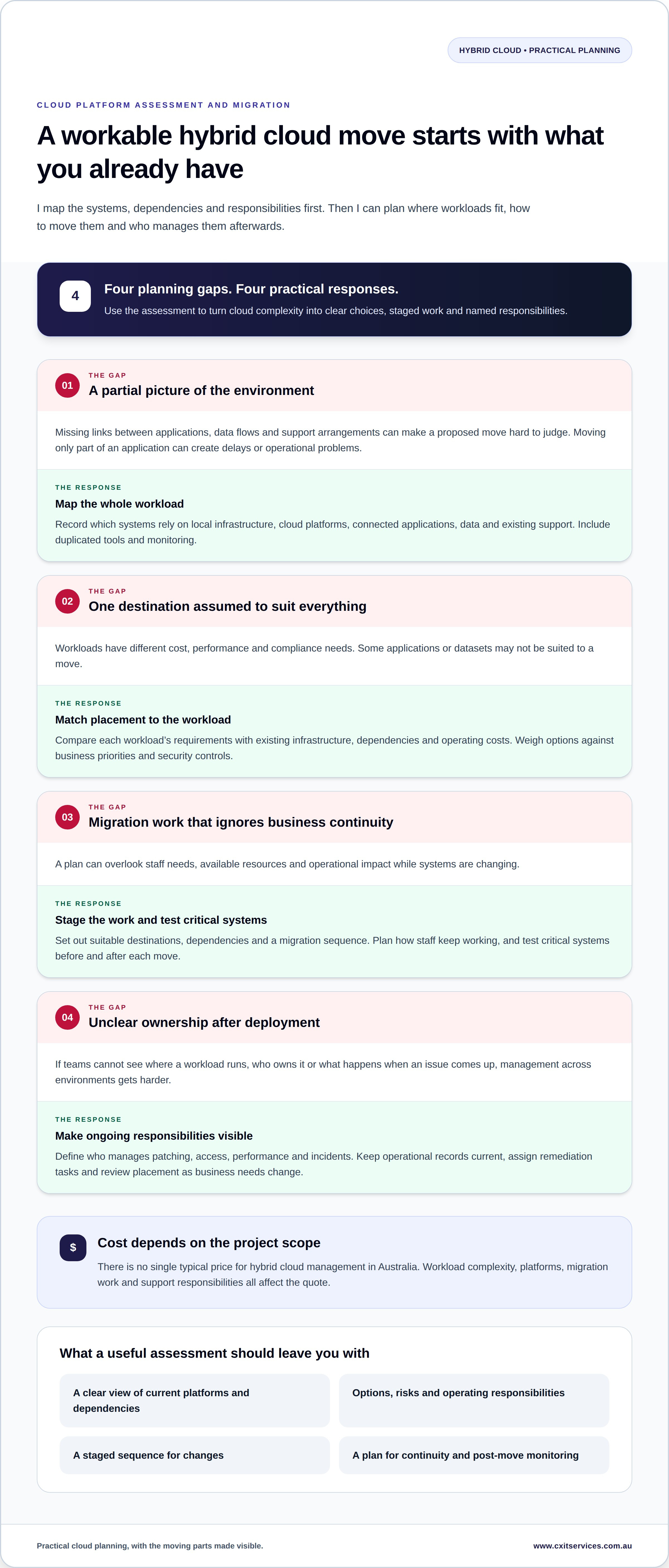
I haven’t seen a single typical price for hybrid cloud management in Australia. Costs depend on workload complexity, platforms, migration work and support responsibilities, so I base a quote on the project’s scope.
Governance and compliance management
I look for clear governance around who can approve changes, access systems and respond to incidents. A business can apply consistent security policies across private and public cloud, then monitor access, configuration changes and alerts centrally. For example, a policy can require approval before sensitive data moves to another environment. I make sure the approval process and its records are clear, rather than relying on a verbal handover between teams.
I’ve seen Australian managed service providers coordinate monitoring, security controls, change management and incident response across environments. For healthcare workloads, I consider the sensitivity of patient information, restrict access by role and track relevant system activity. Compliance monitoring can flag policy exceptions for investigation, but I don’t treat it as a replacement for clear responsibility for deciding what action follows an alert.
Migration and workload management
Before I plan a migration, I map workloads, dependencies, data and business continuity needs. I identify suitable destinations, sequence the work and test critical systems before and after each move. Some applications or data may not be suitable for migration, so I factor resource availability and operational impact into the plan. I also confirm how staff will continue working while systems change.
After deployment, I manage patching, access, performance and incidents across private and public clouds. I also review workload placement as business needs change. A provider can coordinate approved moves, update operational records and assign remediation tasks. For teams needing dedicated operational assistance and troubleshooting, IT service providers such as ITS Canada Inc show how structured help desk support can maintain productivity while infrastructure evolves. I make sure staff can see where each workload runs, who owns its operation and what happens when an issue needs attention.
Cloud platform assessment and consultancy
When I assess cloud infrastructure, applications and operating responsibilities, I want decision-makers to get a clear view of what they have. In my experience, the useful outcome is a practical architecture, not a platform diagram that gathers dust.
Assessing platforms and workloads
I map existing environments, application dependencies, data flows and support arrangements. I want the map to show which systems rely on local infrastructure, which use cloud platforms, and where teams duplicate tools or monitoring. For example, I’ve seen how a practice management application may depend on a local database. Moving only its front end could create delays or operational problems.
I also consider business continuity, resource availability and the skills needed to manage each environment. I make sure migration planning accounts for these factors because, in my experience, not every application or dataset is suited to a move. I find a useful report sets out options, risks, dependencies and a staged sequence, so managers can decide what to change first.
Hybrid, multi-cloud and management platforms
I describe hybrid cloud as combining on-premises infrastructure with private and public cloud environments. I use multi-cloud to mean services from more than one cloud provider, whether or not local infrastructure is involved. I think the distinction matters: a business using two public clouds has a multi-cloud setup, but not necessarily a hybrid one.
I note that more than 97% of enterprises operate on more than one cloud. In my view, a cloud management platform can bring resource visibility, provisioning, monitoring and policy controls into a shared operating view. I’d look at whether existing tools cover the environments in use, or whether separate consoles leave gaps in cost tracking, access oversight or incident response.
Turning assessment into a workable plan
I turn assessment findings into decisions. I can compare platform capabilities with application requirements, operational skills, security controls and business priorities. For instance, I’d expect a system with strict latency needs to require a different design from an intermittently used development environment. I want recommendations to explain trade-offs, dependencies and ongoing responsibilities.
I use a consistent baseline for cost comparisons. When I compare hybrid cloud providers, I examine how savings are calculated and which factors shape the comparison. That includes evaluating physical infrastructure costs alongside cloud spend; resources from data centre operators like 3EX Hosting show how elements like metered power influence ongoing facility efficiency. I want a sound plan to identify assumptions, migration sequencing and post-deployment monitoring. I note that a full hybrid multicloud platform technology and operating model at scale delivers 2.5 times the value of a single-platform, single-cloud-vendor approach.
Cloud orchestration and automation
I find it useful to separate the two: automation handles a repeatable action, while orchestration connects actions into a workflow. For example, a workflow can provision a virtual server, assign access permissions and apply approved configuration policies. In a hybrid environment, I’d use it to link private infrastructure with public cloud services while keeping task ownership clear.
I’d start a practical workflow with a defined trigger and an approved action. When a staff member joins, automation could create an account, assign a role and record the change. I’d keep a manager’s approval in the process for sensitive access. Automation handles routine work, while policies identify decisions that need human oversight. In my experience, approval records and change logs also help teams investigate unexpected access or configuration changes.
I’ve seen orchestration used to coordinate capacity changes too. Cloud bursting temporarily extends private-cloud resources into the public cloud. A business could use public cloud capacity when its private environment cannot meet a short-term demand peak. I’d make sure the workflow defines thresholds, access rules and monitoring for those added resources. Without clear follow-through, temporary capacity may keep running after demand drops, adding unnecessary usage.
I’d choose tools based on the work they need to handle. Teams can use native tools built into a cloud platform or a management layer that coordinates tasks across platforms. Native capabilities may suit work contained within one provider’s environment. Cross-platform orchestration can help when a workflow spans private infrastructure and multiple public cloud services. I’d compare which systems the tools support, how policies apply and whether monitoring shows operators task status and failures clearly.
I wouldn’t treat automation as set-and-forget. A provider can define a change workflow, test it in a controlled environment, then monitor results before wider deployment. For example, a patching process can identify eligible servers, apply an approved update and report systems needing attention. I’d make sure policies name who approves exceptions and handles remediation. Clear logs, alerts and rollback steps give operations teams a practical response when a workflow fails or produces an unexpected result.
I’ve found hybrid cloud software can automate compliance updates and alerts, helping businesses keep up with changing rules and regulations. I’d connect those signals to a review process that identifies affected systems, assigns an owner and records the response. That way, a compliance notification doesn’t sit on its own while decisions about sensitive changes stay with the appropriate reviewer.
I’d test how updates are handled before relying on them in routine operations. A clear escalation path helps staff distinguish an automated notice from a change that needs approval, then track any follow-up through completion.
Hybrid cloud management definition and unified governance
I’ve seen hybrid cloud management work best when teams coordinate infrastructure, workloads and operations across on-premises systems, private cloud and public cloud. Defined processes connect these environments instead of treating each platform as a separate island. That gives organisations flexibility over where applications run while keeping access, configuration and performance in view.
In my experience, unified governance means applying consistent rules across different technologies. An organisation can use one approval process for changes, whether a server runs in a private data centre or public cloud. Platforms may use different tools, but roles, responsibilities and records should still align. Otherwise, a change approved in one environment may bypass controls used elsewhere.
I’ve found identity is a practical place to put governance into action. A staff member with an approved finance role should receive access based on that role, rather than a separate set of informal permissions for every platform. Shared identity policies help manage access across environments. A zero-trust approach also checks access in context instead of assuming a user or device is safe simply because it is already connected.
From what I’ve seen, unified governance covers more than sign-in rules. It can define who approves deployments, how configuration changes are recorded, which alerts need action and who leads incident response. For example, a monitoring alert from public cloud infrastructure should reach the team responsible for investigating it, even if another team manages the private environment. Clear ownership prevents alerts and remediation tasks from falling between groups.
I’ve seen compliance management follow the same logic. Organisations remain responsible for consistent data security, compliance and regulatory strategies across on-premises, private cloud and public cloud settings. A central process can track controls, policy exceptions and monitoring alerts across those locations. For a medical practice, that might mean documenting who can access patient information and reviewing access changes across its systems.
I reckon governance should also hold when workloads move. A business can set provisioning rules, approvals and access policies above any single platform, so core controls travel with the workload. For example, moving an application between environments should not silently remove its established access restrictions or monitoring requirements. Teams should be able to explain who owns each control, how exceptions are handled and where evidence is recorded.
Which hybrid cloud management providers operate in Australia?
I usually see Australian organisations consider three provider types: cloud platforms, technology integrators and managed service providers. Microsoft Azure, Amazon Web Services (AWS) and Google Cloud are examples of cloud platform providers. Their platforms can form part of a hybrid or multi-cloud environment alongside an organisation’s own infrastructure. From what I’ve seen, management may sit with the business, a specialist partner or a combination of both.
I see technology integrators such as Accenture, Fujitsu and Kyndryl working across complex technology environments. Their role can include designing architecture, coordinating migration and aligning operations across platforms. The scope depends on the engagement. A large organisation consolidating multiple systems, for example, may need an integrator to coordinate teams, applications and transition planning. In my experience, the provider’s name alone doesn’t show who handles day-to-day monitoring after the project.
I’ve also seen managed service providers offer another operating model. They may take responsibility for agreed tasks, work alongside an internal IT team or manage particular parts of cloud operations. The key, in my view, is clear responsibility. A business needs ownership for access changes, patching, incident escalation and recovery. If an internal team approves changes but a provider deploys them, the process should show how approvals and records connect.
In my experience, these categories can overlap. An organisation might run workloads on Microsoft Azure and AWS, use a technology integrator for migration, then assign ongoing monitoring to a managed provider. I reckon this arrangement works best when roles, policies and reporting are defined across all parties. Otherwise, teams may end up with separate dashboards and unclear responsibility for alerts.
When I compare providers, I look at their role alongside the work required. A cloud platform provider supplies the underlying environment. An integrator may design or coordinate a transition. A managed provider may handle ongoing operations. These are different responsibilities, even when one organisation can perform more than one. I find a useful comparison describes deliverables, exclusions, escalation paths and how operational performance is reported.
I also look for a consistent baseline in cost comparisons. When comparing hybrid cloud providers, examine how savings are calculated and which factors shape the comparison. For example, a proposal should distinguish platform charges from migration work and ongoing management. In my view, the right fit depends on existing infrastructure, application needs, internal capability and the level of operational responsibility the business wants to retain.
CX IT Services: Cloud Services
I find cloud planning works best when it starts with the systems a business already uses and the work staff need to get done. It’s useful to know where applications and data sit, across local infrastructure and cloud environments, and who’ll manage that mix. Start by identifying what the business runs, what it relies on and where operational support is needed.
Personally, I reckon a practical cloud plan starts with business requirements, not a platform for its own sake. I’d assess how Cloud Services fit existing infrastructure, applications and workloads. That means looking at access, performance, continuity and how teams will manage changes. In a professional services firm, business-critical files and staff applications need to support everyday work without creating disconnected processes or unclear responsibilities.
Cloud operations also need sound security and support. I offer Cyber Security and Managed IT Services & Support to help manage technology and protect business systems. The right combination depends on the organisation’s current setup and who’s responsible for each task. Clear ownership helps staff understand where support sits, how issues are handled and how changes are managed.
Automation may help when teams repeat the same administrative tasks across business systems. I offer AI & Automation to support suitable automation needs alongside cloud planning. For instance, a business can assess a recurring process and see whether automation could reduce manual handling. Match the technology to a defined business requirement, rather than automating a process that needs fixing first.
I’d consider Cloud Services when your current setup is difficult to oversee, business requirements have changed, or you need help planning cloud operations. A useful discussion covers the systems you rely on, the work your team handles internally and where support would make a practical difference. That gives us a clear starting point without assuming every workload belongs in the same environment.
If you’re ready to discuss your cloud requirements, contact CX IT Services.
Frequently Asked Questions
What are the challenges?
I’ve seen fragmented oversight, hidden dependencies and unclear responsibility cause the most trouble. An identity service outage, for example, can stop staff accessing applications across several environments, even when the applications themselves are available. Different monitoring tools can leave teams with an incomplete view, too. I recommend mapping critical dependencies, naming the team responsible for each system, and documenting escalation and recovery procedures.
What are hybrid cloud management services and what do they include?
I think of hybrid cloud management services as the work involved in coordinating and operating systems across private infrastructure and public cloud environments. They can include platform assessment, migration planning, workload oversight, access controls, monitoring, automation and incident coordination. In my experience, the practical detail is who owns each task. A service agreement should spell out responsibilities for change approvals, patching, reporting and recovery, so internal staff know what the provider manages and what remains theirs.
What Australian data residency and privacy requirements apply to hybrid cloud environments?
I’d start by checking the organisation’s data, sector, contracts and applicable privacy obligations, as requirements depend on all four. Map where personal and sensitive information is stored, backed up and accessed, including by overseas support teams or subcontractors. I’d also document retention, deletion, access permissions and incident responsibilities. For a medical practice, trace patient records through applications, backups and support workflows, not just the main server’s location.
How do businesses assess and choose a hybrid cloud management provider?
I’d begin with an inventory of platforms, critical applications, dependencies and internal skills. The provider’s proposed scope should identify deliverables, operational responsibilities, reporting and escalation paths. I’ve found that a business keeping its internal IT team may need shared change approvals and clear handovers, rather than outsourced control of every system. Compare proposals against the same workload inventory and cost baseline, including migration work and ongoing management.
What tools do hybrid cloud management providers use for monitoring, automation, security and cost management?
In my experience, providers use cloud management platforms and native tools to track system health, logs, access events and configuration changes. Automation tools can handle approved tasks such as provisioning accounts or applying patches. Security capabilities may include identity controls, policy enforcement and alerting. Cost dashboards group usage by service or workload, helping teams spot unexpected consumption. I’d check whether the tools give operators a consistent view across environments and a clear route to act on alerts.
What are the risks and challenges of hybrid cloud management, including outages and vendor lock-in?
I’ve seen outages spread when services depend on shared networks, identity systems or databases. Vendor lock-in can make changes harder if applications rely on provider-specific services or data formats. I recommend documenting dependencies, testing recovery procedures and keeping an exit plan covering data export, access removal and replacement services. For a finance application, teams should also identify which connected systems need restoring first to resume essential work.





 Microsoft Partner