
Unchecked backups and fuzzy IT roles hurt businesses. Understand the real risks of not having professional IT support and how to spot dangerous support gaps.
What if the biggest IT risk isn’t a dramatic cyberattack, but nobody being sure who’s responsible when something goes wrong? Personally, I reckon the risks of not having professional IT support often begin with small gaps: updates no one owns, backups no one checks, or staff unsure who to call when systems stop working.
It’s fair to ask whether an internal employee or ad hoc help is enough. It can be, if responsibilities are clear and the right skills are available. But relying on the person who’s “good with computers” can leave important security, maintenance and recovery tasks without a proper owner. And when an issue interrupts work, that uncertainty doesn’t help.
I’ll explain where unmanaged IT can expose an Australian business, how to check your current responsibilities and support gaps, and what to consider when comparing internal, co-managed and managed IT support. The aim isn’t to make every technical issue sound like a crisis. It’s to help you see what’s covered, what isn’t, and what level of support makes sense for your business.
Key Takeaways
- The risks of not having professional IT support grow when maintenance, access, backups and updates have no clear owner.
- Check how your business handles security tasks, incident escalation and recovery before a disruption puts those processes to the test.
- Compare internal, co-managed and managed support by who handles prevention, documentation and recovery, not just who answers help requests.
- Start your IT risk review by listing critical systems, key accounts, data locations and the services your work depends on.
- Use the review to identify support gaps and decide what responsibilities should stay in-house or be shared with a support provider.
What are the risks of not having professional IT support?
The risks of not having professional IT support increase when essential technology tasks have no clear owner. That doesn’t mean an incident is inevitable. It means small gaps can sit unnoticed, then compound: an overdue update, an old account that still has access, or a backup nobody has checked.
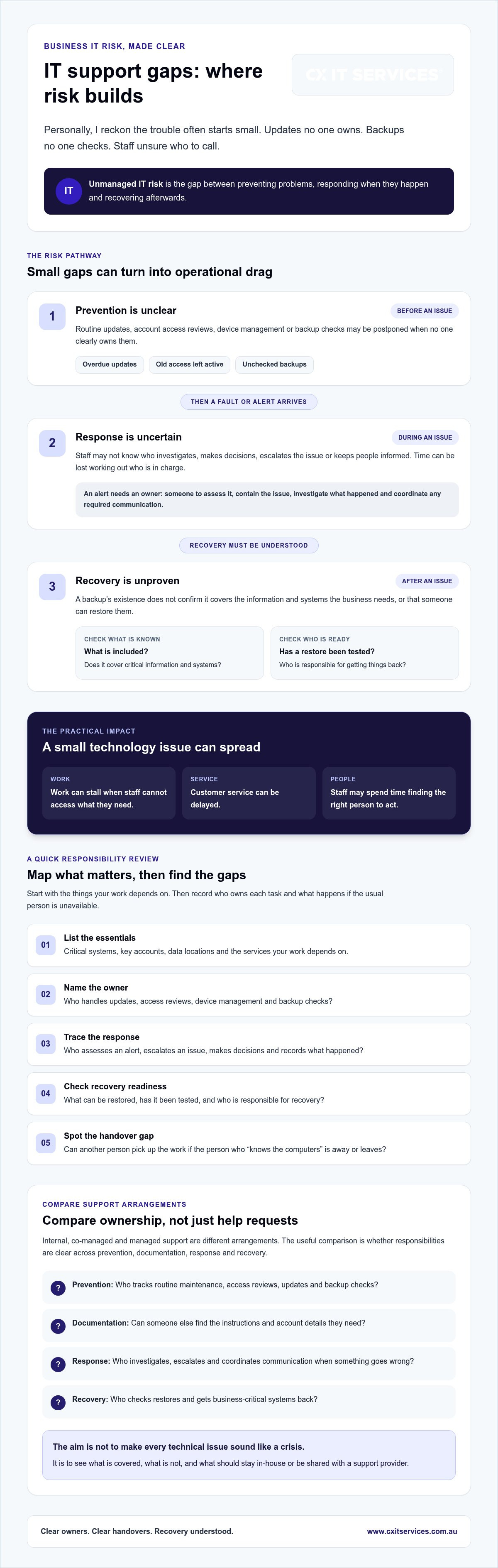
Unmanaged IT risk is the gap between preventing problems, responding when they happen and recovering afterwards. If a system fails or staff can’t access the information they need, work can stall and customer service can be delayed. The technology issue may be small. The distraction spreads when nobody knows who should investigate, make a decision or keep people informed.
Professional support isn’t just someone to call when a computer misbehaves. Technical support can be organised across different levels, but a business still needs to understand what its support arrangement covers and who owns ongoing tasks. For an overview of the client’s managed IT support, consider how defined responsibilities could fit alongside your existing team.
Which IT responsibilities are easiest to leave unattended?
Routine updates, account access reviews, device management and backup checks are easy to postpone when daily work gets busy. Someone may assume another person is handling them. Staff then aren’t sure who should act or where to raise a concern.
For example, a departing employee’s access might not be reviewed promptly. A colleague notices later, raises it with a manager, and several people spend time working out who can remove access. It’s a modest issue, but now it’s an operational distraction as well as an access-control gap.
Why reactive, ad hoc IT help can leave gaps
Ad hoc help can fix a fault once someone reports it. That’s different from having an agreed process for tracking system health, noticing recurring problems and deciding who escalates an issue. Fix the symptom, move on, and the same fault may return.
Informal responsibility can work until the person who “knows the computers” is flat out, away or leaves. If instructions and account details live only in their head, someone else may struggle to pick up the work. I don’t reckon every business needs the same support model or scope. The useful question is whether your current arrangement clearly covers prevention, response and recovery, including who steps in when the usual person can’t.
How do IT support gaps create security and recovery risks?
Security and recovery depend on routine work being done, checked and followed up. If nobody owns access reviews, patching or security alerts, gaps can build quietly. A former staff member’s account may stay active. A software update may be delayed. An alert may arrive without anyone knowing who should investigate it.
Tools help, but they don’t manage themselves. Security software can’t replace regular maintenance, oversight or an agreed response plan. The risks of not having professional IT support often show up in the handover: who checks the alert, who makes decisions, and who records what happened? If that’s unclear, investigation and containment can lose time while people work out who’s in charge.
Security exposure when nobody owns routine controls
Outdated systems, excessive access and missed alerts are possible exposures when routine controls fall between people. The Australian Cyber Security Centre’s Essential Eight can give Australian businesses a useful reference point for considering security measures. It isn’t a blanket legal requirement for private businesses. If you’re reviewing who manages these controls, explore business cyber security services as one way to understand the support available.
A response plan should make practical steps clear: who assesses an alert, who contains the issue, who investigates what happened and who coordinates any required communication. Agreeing these responsibilities in advance helps staff act without losing time deciding who’s in charge.
Backups do not help unless recovery is understood
A backup’s existence doesn’t tell you whether it covers the systems and information the business needs, or whether someone can restore them. Check what’s included, whether restores are tested, and who is responsible for recovery. A file copy might be useful, but it won’t answer how staff will access the business-critical systems they rely on.
A backup status is only reassuring when you know the right data can be restored and someone knows how to do it. That’s why restore readiness matters more than a green tick in a report. For a deeper look at recovery responsibilities, review backup and disaster recovery planning.
Personally, I’d start by asking who owns each step, from routine security checks to restoring priority systems. If that’s hard to answer, you can outline your IT support needs and clarify what should be covered.
Professional IT support versus internal or ad hoc help: what changes?
The key difference is ownership. Internal and ad hoc support can work well, but your business needs to know who handles routine care as well as faults. Managed or co-managed support can make those responsibilities clearer, though neither is automatically the right fit for every organisation. The risks of not having professional IT support depend less on the label and more on what’s actually covered.
| Area | Internal or ad hoc help | Managed or co-managed support |
|---|---|---|
| Responsibility | May sit with an employee or be agreed job by job. | Can define who owns agreed IT tasks and how they’re shared. |
| Prevention | Routine work may compete with projects and daily requests. | Can include planned ongoing work, depending on the documented scope. |
| Escalation | Often relies on knowing whom to contact when an issue grows. | Can set out escalation contacts and steps in advance. |
| Documentation | May depend on individual habits or informal notes. | Can clarify what changes and support activity are recorded. |
| Recovery planning | May be handled internally or arranged when needed. | Can assign recovery responsibilities, subject to the agreed scope. |
What internal and ad hoc support can leave unresolved
Internal IT staff know the business and its systems. That’s valuable. The pressure point is capacity: planned project work and routine maintenance can compete for the same hours, while one person may hold key system knowledge. Ad hoc help can fix a specific fault without taking ownership of what happens between calls. If your internal team needs extra capacity, co-managed IT support is one option to consider, with responsibilities agreed between the parties.
What professional support should make clearer
Before comparing providers, write down what you need covered. Ask who monitors systems, owns escalations, records changes and coordinates recovery. Confirm what remains with your staff, what the provider handles and how the arrangement changes if business needs shift. A service name alone won’t answer those questions. The scope and hand-offs matter.
That clarity also helps you judge whether internal support is enough, needs specialist backup, or would benefit from an external team taking on agreed responsibilities. No model guarantees security or uninterrupted service. A good comparison shows where accountability sits and what happens when the usual contact is unavailable. If you’re weighing up those gaps, you can outline your IT support requirements as a next step.
How can you assess your business IT support risks?
I’d do a support review with the people who make decisions and the people who actually handle IT. Keep it practical. You’re looking for unclear ownership and gaps that could affect work, not trying to prove an incident has happened.
A practical five-step support gap review
- List what the business relies on. Note critical systems, key accounts, staff and devices, where important data is stored, and external services those systems depend on.
- Assign an owner to each task. Record who handles routine maintenance, updates, security alerts, incidents, backups and staff requests. If the answer is “someone in the office”, find out who specifically.
- Check access and upkeep. Confirm how access is reviewed, how updates are managed, and whether the devices and systems in use are accounted for. Write down anything you can’t confidently verify.
- Check recovery and escalation. Confirm what data backups cover, whether restores have been tested, who coordinates recovery, and where staff should report an issue. Note who takes over if the usual contact is unavailable.
- Rank gaps and choose an action. Consider the impact on essential work and how urgent the gap is. For each high-priority item, record one next action, a person responsible and a review date.
This gives you a working record, not a pass-or-fail score. A missing answer is useful information. It tells you what to check next, without assuming the business has been breached or that every gap needs the same fix.
When should you seek specialist help?
Unclear accountability, repeated outages, unsupported systems and recovery that hasn’t been tested are good reasons to review your current arrangement. If your team can’t confidently assess or address a material gap, bring in someone with the right expertise. That doesn’t mean handing over every IT decision. It means getting a clear view of the issue and the options for dealing with it.
The risks of not having professional IT support are easier to manage once you know which responsibilities are covered and which are sitting in limbo. I’d start with the gaps that could interrupt essential work, then agree who will deal with each one and by when.
To review your current IT support needs, outline the systems your business relies on and the questions your review hasn’t answered.
What changes when professional IT support owns prevention and response?
The practical change is clearer ownership. Instead of waiting for someone to report a fault, an agreed support arrangement can assign responsibility for routine IT care, escalation and recovery. That doesn’t remove every risk. It does make it easier to see who handles each task, what’s included and where your staff still need to act.
Managed support is an ongoing service relationship, not simply a number to call when something breaks. The scope should fit your business systems, internal capability and support requirements. Confirm the details before committing, including what’s covered, what isn’t, how incidents are escalated and who coordinates recovery. That clarity helps address the risks of not having professional IT support without assuming every business needs the same setup.
Choose support around your actual gaps
Start with the gaps you’ve identified. Helpdesk support may matter if staff lack a clear place to raise IT issues. Cybersecurity, cloud, Microsoft 365 or backup support may be relevant if those systems and responsibilities are part of your environment. Co-managed support can suit a business that wants to retain internal IT capability while sharing selected responsibilities with an external provider.
I’d ask providers to spell out inclusions, exclusions, escalation steps and the division of work with your staff. Don’t compare service names alone. Compare what someone will actually be responsible for, and what remains on your team’s list.
Make the next conversation useful
Bring a short inventory: the systems your business relies on, recurring IT issues, current providers and unresolved risks. Add the names or roles of people who currently handle IT tasks. You don’t need a perfect technical document. A few honest notes can show where ownership is clear and where it isn’t.
CX IT Services is Australian-owned, serves businesses nationally and has more than 26 years of industry experience. It offers managed and co-managed IT support for business environments, with managed services available to businesses with ten or more employees. CX IT Services also offers 24/7 support and on-site technicians across Australia. Check the current service scope and terms to understand what that means for your requirements, without assuming a particular response time.
Personally, I reckon the useful first conversation is about fit, not a promise that every risk will disappear. Apply to discuss your business IT support and bring the gaps you want to clarify.
Make IT ownership clear before a gap becomes a problem
Personally, I reckon the useful question isn’t whether your business has an IT provider. It’s whether someone clearly owns prevention, incident response and recovery. The risks of not having professional IT support can be reduced by checking who handles essential tasks, where internal or ad hoc help leaves gaps, and what your business needs from a support arrangement.
There’s no single model that suits every organisation. Internal, co-managed or managed support can each make sense, provided responsibilities and service scope are clear. Start with the systems your team relies on, note what’s unresolved, then decide who should take the next step.
CX IT Services is Australian-owned and operated, with more than 26 years’ industry experience. It provides 24/7 support and on-site technicians across Australia. Check the current scope and terms to see whether the support fits your requirements.
Apply to discuss your business IT support needs. A clear conversation about your gaps is a practical place to start, and you can build from there with more confidence.
Frequently Asked Questions
Can a small business manage IT without professional support?
Yes, a small business can manage IT internally if it has the skills, time and clear processes to handle its systems. The important thing is to name who owns updates, access, backups, staff requests and incident escalation. If IT tasks are added to someone’s already busy role, they may slip behind other work. Review the arrangement as your systems, staff and business needs change.
Is antivirus software enough to protect a business?
No. Antivirus software can be one part of a security approach, but it doesn’t manage access, update systems, review alerts or decide what to do during an incident. For example, a tool won’t necessarily ensure an old account is removed when someone leaves. Check who maintains your security tools, follows up alerts and coordinates a response. The right controls depend on your business systems and risks.
What happens if a business has no tested backups?
If backups haven’t been tested, you may not know whether essential data can be restored or how long recovery could take. A backup may not include every system or file your team relies on. Confirm what’s covered, who is responsible for restoration and whether recovery has been tested. The aim is to know that the right information can be brought back, not just to see a backup status marked as complete.
What is the difference between managed and co-managed IT support?
Managed IT support is an ongoing service where a provider takes responsibility for agreed IT tasks. Co-managed support shares responsibilities between the provider and your internal IT team. For example, your staff might retain day-to-day oversight while an external team adds capacity or expertise in agreed areas. Neither model covers everything by default. Confirm the scope, handovers, escalation process and responsibilities before choosing.
When should a business get professional IT support?
Consider professional support when nobody can clearly explain who owns key IT tasks, recurring faults keep disrupting work, systems are unsupported, or recovery arrangements haven’t been tested. Specialist advice is also useful when your team can’t confidently assess or address a gap that could affect essential operations. Start by listing critical systems, current support responsibilities and unresolved issues. That gives you a grounded basis for deciding what help is needed.





 Microsoft Partner