
Stop wasting time on ticket queues. Find outsourced IT support for medium business that takes real ownership of your tech, security, and day-to-day work.
Outsourced IT should give your business clear ownership, not just somewhere to send a ticket. I reckon that’s the difference between outsourced IT support for medium business that helps people get on with their work and a helpdesk that simply clears its queue.
If staff are waiting for help, recurring issues keep coming back, or nobody’s sure who owns security and backups, you’re right to look closely at the support model. The answer isn’t automatically to outsource everything. Your business might suit a fully managed service, a co-managed arrangement with internal IT, or a different model altogether.
This article explains what outsourced IT support should cover, including day-to-day assistance, security, backups and technology planning. I’ll compare the main IT models and outline what to check before choosing a provider, from service scope and escalation pathways to how responsibilities are documented.
The aim is straightforward: help you work out whether a provider can offer reliable support, make responsibilities easier to understand and keep technology decisions connected to how your business operates and plans to grow.
Key Takeaways
- Use outsourced IT support for medium business only when the agreed scope makes it clear who handles each responsibility.
- Check whether support, security, cloud services, backups, devices and technology planning are covered, or need separate arrangements.
- Compare outsourced, in-house and co-managed IT by looking at ownership, internal knowledge and the management effort each model requires.
- Before choosing a provider, document your needs, test how issues are escalated, review reporting and clarify fees.
- Prepare for a change by recording your current systems, recurring issues, critical workflows and existing support responsibilities.
What outsourced IT support means for a medium business
I’d define outsourced IT support as an external provider taking agreed responsibility for some or all of your business’s ongoing technology support and management. The key word is agreed. The label alone doesn’t tell you whether the provider handles staff requests, security, backups or technology planning. The written scope should.
This sits within the broader managed services model, where an external provider delivers and manages services under an agreed arrangement. For a medium business, outsourced IT support can give staff a clear place to seek help and give leaders a defined point of responsibility. But the work covered, and what remains with your team, depends on the agreement and your systems.
Businesses usually consider outsourcing as staff numbers grow, systems multiply and more daily work depends on technology. Support needs can outgrow what one internal person can reasonably manage alongside their other duties. That doesn’t mean every medium business needs to outsource. CX IT Services works with businesses with ten or more employees, but the right model depends on your needs, existing capability and the support you want covered.
What does an outsourced IT provider actually take responsibility for?
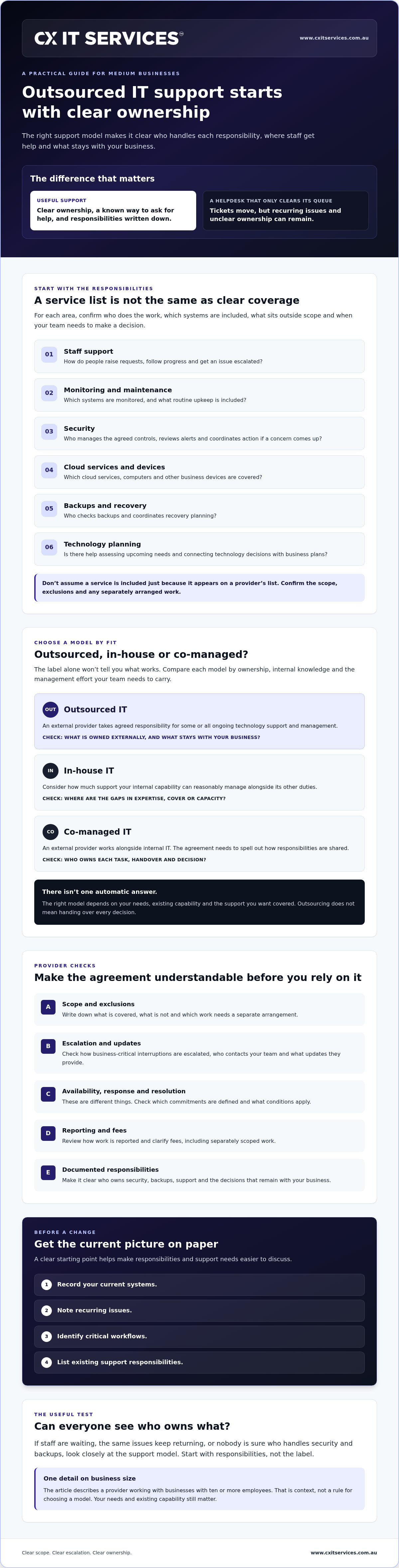
Separate the work into clear responsibilities. Day-to-day helpdesk support means staff can report problems and get assistance. Monitoring and maintenance involve oversight of agreed systems. Security, backup and recovery, cloud services and technology planning may also be part of the arrangement, but don’t assume they’re included just because a provider lists them. Ask who owns each task, what falls outside scope and how it fits your operating environment.
Staff also need a straightforward way to raise an issue and follow its progress. A defined reporting channel, named escalation path and clear update process help prevent requests from disappearing into a general inbox. If you’re comparing managed IT support, check how the provider handles both routine requests and issues that need a decision from your business.
Why medium businesses consider outsourcing
More people and more systems usually mean more support requests, account changes and technology decisions. If one busy employee is the default person for every issue, work can stall when they’re unavailable, or when a problem needs expertise they don’t have. An external team can take on agreed responsibilities, while your business retains decisions that belong with its leaders. The point isn’t to hand over everything. It’s to make ownership clear and support manageable.
What a useful outsourced IT support arrangement should cover
A service list can look impressive and still leave gaps. I’d check the responsibilities behind each item: who does the work, what systems are covered, how staff get help and what happens when an issue needs your decision. That’s what turns outsourced IT support for medium business into an accountable arrangement rather than a bundle of broad promises.
Depending on your agreement and operating environment, coverage may include:
- Support access: how staff raise requests, see progress and get an issue escalated.
- Monitoring and maintenance: which systems are monitored and what routine upkeep is included.
- Security: who manages agreed security controls, reviews alerts and coordinates action when a concern arises.
- Cloud and devices: which cloud services, computers and other business devices the provider supports.
- Backups and recovery: who checks backups and coordinates recovery planning.
- Technology planning: whether the provider helps assess upcoming needs and align technology decisions with business plans.
Use the managed IT support services overview as a starting point, then confirm what applies to your business. A listed service doesn’t prove it’s included in your arrangement. Ask for responsibilities, exclusions and separately scoped work to be set out clearly.
Support, monitoring and clear escalation
Staff need to know where to report a problem and how to check its status. Ask how business-critical interruptions are escalated, who contacts your team and what information they’ll provide. Don’t treat an availability claim as a response or resolution commitment. Those are different things. Check whether the agreement defines them, and what conditions apply, before relying on them.
Security, cloud and recovery responsibilities
Agree who manages security controls, cloud environments, backups and recovery planning. If a provider monitors a system but your business must approve changes or act on alerts, make that division explicit. The same goes for backup checks and recovery decisions. Review the business cyber security services overview, then confirm the specific security responsibilities proposed for your setup.
Visibility matters after the agreement is signed, too. Ask what reporting you’ll receive, how often the service will be reviewed and whether recurring issues or unresolved risks will be raised with you. Regular reviews give both sides a chance to check whether the scope still fits, especially as staff, systems or workflows change.
If you’re assessing whether the arrangement fits your business, you can share your support requirements for review. Start with the systems and responsibilities you need covered, not just the service names on a list.
Outsourced, in-house or co-managed IT: which model fits?
There isn’t one right IT model for every medium business. The choice comes down to who needs to own the work, what knowledge you want to keep inside the business and how much time your team can give to managing support.
| Model | Ownership | Internal knowledge | Coverage and management effort |
|---|---|---|---|
| In-house | An internal employee or team owns the work. | Knowledge stays close to the business. | Direct presence, but the business manages priorities, capacity and any gaps in expertise. |
| Outsourced | An external provider owns the responsibilities set out in the agreement. | Business knowledge needs to be shared and documented. | An external service team handles agreed work. Your business still needs to manage the relationship and make decisions assigned to it. |
| Co-managed | Internal staff and an external provider share defined responsibilities. | Internal knowledge stays in place and can be supported by external capability. | Can add support or expertise, but duties and escalation ownership need to be clear. |
For a fuller cost discussion, see this managed IT versus in-house comparison. Cost is only one part of the decision. Compare what each model actually covers and the management time your business must contribute.
When fully outsourced IT may be a fit
Fully outsourced support may suit a business that wants an external team to manage agreed ongoing responsibilities, rather than rely on one internal person to carry them all. Check whether the provider can adapt its support as your staff, systems and requirements change. Outsourcing doesn’t automatically cost less than an internal hire. Compare the scope, capabilities and effort involved in managing each option.
When co-managed IT is the better question
If you already have an internal IT person or team, outsourcing doesn’t have to mean replacing them. A co-managed arrangement can add external support while keeping internal knowledge and capability in your business. Before agreeing to one, mark out which duties your team retains, which are shared and who owns escalation when an issue crosses those lines. CX IT Services outlines its co-managed IT support offering for businesses considering that approach.
Personally, I’d start by listing the work your current team handles, the work that gets missed and the decisions that need to stay internal. That gives you a more useful basis for assessing outsourced IT support for medium business than choosing a model by name alone. If you want to discuss what support might fit, you can send through your business requirements.
How to assess an outsourced IT support provider
I’d assess a provider by checking whether the proposed arrangement fits your actual operations, not by choosing the longest service list or the neatest-looking contract. Work through the same questions with each provider. You’ll get a clearer comparison.
- Document your needs. List your systems, users, business-critical workflows, recurring problems and current support responsibilities.
- Check the scope. Confirm what’s included, excluded or separately scoped, and how responsibilities will be reviewed as your business changes.
- Test escalation. Ask how staff raise requests, how urgent issues are escalated and how your team receives updates.
- Review visibility. Request examples of the reporting and service reviews the provider uses, so you can judge whether they’ll give you useful oversight.
- Clarify fees. Ask what the proposed fees cover, what may incur separate charges and how work outside routine support is identified and approved.
There’s no single provider or contract structure that suits every business. Compare each proposal against your needs, and check the detail before you commit.
Questions to ask before signing
Start with the practicalities. Who handles staff requests? How do issues move up the escalation path, and who keeps your business informed? Confirm which users, systems and business locations are covered. If your staff work across multiple sites or need in-person support, check the provider’s national support coverage and on-site availability against those needs. Don’t assume a broad coverage claim tells you what’s available for your circumstances.
Ask how projects, upgrades and other work outside routine support are identified, estimated and approved. That distinction can prevent surprises and makes it easier to see who is responsible for the next step. For example, if physical device breakdowns or hardware damage fall outside routine remote support, you can visit SIMSIM Repairs for prompt computer and mobile phone servicing.
Check visibility, security and continuity
Ask for examples of regular reporting and service reviews, then check whether the format would help your decision-makers understand open issues and responsibilities. You don’t need a thick report for its own sake. You need enough visibility to see what’s being managed and what needs your attention.
For security, backups and recovery, confirm who owns each responsibility and how the provider coordinates with your staff if action is needed. Broad reassurance isn’t evidence. Clear ownership, agreed processes and reporting you can review are more useful measures of fit.
If you’re weighing up outsourced IT support for medium business, bring your requirements to the discussion. You can share your IT support requirements with CX IT Services for consideration.
How to move forward with outsourced IT support
Changing IT support takes preparation. It’s not automatically simple or risk-free, particularly if important systems, records or responsibilities are poorly documented. Before you compare providers, get a clear picture of what your business relies on and what you need support to do.
Prepare a clear picture of your current IT
Write down the essentials. You don’t need a perfect inventory, but a useful starting point will help make the first conversation specific.
- Systems and devices: note the main software, cloud services and business devices your team depends on.
- Recurring issues: record what keeps disrupting work, who reports it and what workarounds staff use.
- Critical workflows: identify the tasks that must keep running, such as accessing business records or communicating with clients.
- Current responsibilities: list existing providers, internal IT duties and work that has no clear owner.
- Support needs: note the hours and type of coverage your operations require, including whether on-site support is relevant.
Keep this summary at a business level. Don’t send passwords, sensitive credentials or confidential records through an initial enquiry. A provider can discuss the scope you need without receiving access details upfront.
What to expect from the first conversation
I’d expect a useful first discussion to cover your business context, current support arrangements, service scope and expectations. Be ready to explain what you want handled, what should stay with your team and what needs further assessment. Ask what’s included in the proposed fixed monthly fee, what would be scoped separately and how responsibilities will be reviewed as your needs change.
CX IT Services is Australian-owned and supports businesses with ten or more employees. Its stated service attributes include 24/7 support and on-site technicians across Australia. Check the current scope and conditions of that support against your own requirements, including how coverage applies to your business. The company also uses a fixed monthly fee model for managed IT services, so confirm which services that fee includes rather than assuming every requirement is covered.
Good outsourced IT support for medium business starts with agreed responsibilities, not a rushed handover. Use the conversation to test whether the proposed arrangement fits your systems, workflows and expectations. The next step should be clear, even if more assessment is needed before any change is made.
If you’re ready to outline what your business needs, apply to discuss your IT needs with CX IT Services.
Choose support with clear ownership
I’d choose the IT support model that fits your business, not the one with the longest service list. Before making a change, I’d write down what your team relies on, who owns each responsibility and how urgent issues should be escalated.
Whether you choose in-house, outsourced or co-managed support, I’d want the arrangement to spell out what’s included, what sits outside scope and how security, backups and technology planning are handled. That’s what makes outsourced IT support for medium business accountable, rather than just another place to log a ticket.
CX IT Services is an Australian-owned provider with more than 26 years of industry experience, offering managed IT services for businesses with ten or more employees. The provider states it offers 24/7 support and on-site technicians across Australia. I’d confirm the support scope and conditions, and what’s included in the proposed service, before deciding whether it suits your business.
If you’re ready to discuss your requirements, I’d start by applying to discuss outsourced IT support for your business. A clear picture of your needs is a solid place to start.
Frequently Asked Questions
What is outsourced IT support for a medium business?
I define outsourced IT support for a medium business as an arrangement where an external provider takes responsibility for agreed IT support and management tasks. The scope may include helpdesk support, monitoring, security, cloud services or technology planning, but I wouldn’t assume every provider covers the same work. Before choosing one, I’d check what’s included, who owns each task and how staff can escalate issues that disrupt business operations.
Is outsourced IT support suitable for a business with ten employees?
It can be, but I wouldn’t use headcount alone to decide. I’d consider how much the business relies on technology, what help staff need and whether current IT responsibilities are being handled. CX IT Services states its managed IT services are for businesses with ten or more employees. I’d compare the proposed scope with your actual systems, support needs and internal capability before deciding whether it fits.
What does an outsourced IT support provider usually do?
A provider may handle staff support, system management, security, cloud services, backups or technology advice. I’d treat these as possibilities, not a standard package, because the agreement sets the actual scope. Ask for a written description of the systems and users covered, exclusions, escalation steps and project work that may be scoped separately. That gives you a fairer basis for comparing providers than counting service labels.
Is outsourced IT support better than hiring an internal IT person?
Neither option is automatically better. I’d weigh the direct business context an internal employee can offer against the external team and agreed service capabilities a provider can bring. The right choice depends on the skills and coverage you need, as well as the time available to manage support. If you want to retain internal capability while adding external support, I’d also consider a co-managed arrangement.
How much does outsourced IT support cost for a medium business?
The cost depends on your users, systems, support requirements and included services. CX IT Services describes its managed IT services as operating under a fixed monthly fee, but I’d confirm the specific fee and inclusions directly. Ask what the fee covers, what may be charged separately and how changes to your business could affect the scope or cost. That’s a more useful comparison than looking at a fee without its details.
Can an outsourced IT provider support staff across Australia?
Coverage varies by provider and agreement. I’d check how remote assistance and any on-site work apply to your business. CX IT Services states that it provides 24/7 support and on-site technicians across Australia. Before relying on those service attributes, ask how they apply to your users, operating hours and support needs. I’d also confirm response arrangements and coverage conditions, since availability doesn’t by itself define response or resolution times.
What should I check before changing to outsourced IT support?
I’d start by documenting your current systems, recurring issues, business-critical workflows and existing support responsibilities. Then check the provider’s scope, escalation process, reporting and ownership of security, backups and recovery. Ask how project work is identified and approved, and how changes are communicated. A clear view of the current setup helps both sides identify gaps and plan any transition, without assuming the change will be effortless.





 Microsoft Partner