
Thinking about a microsoft teams phone system australia? This blunt guide cuts the crap and shows you how to switch from your old PBX without the downtime.
Why is your business still paying for a plastic handset that sits on an empty desk? For many Australian firms, the traditional PBX has become a costly relic that fails the moment a staff member works from home. Transitioning to a microsoft teams phone system australia allows you to bin redundant hardware and stop the constant juggle of multiple tech vendors. It's a move toward efficiency that many local businesses hesitate to make because they fear the technical fallout.
We understand that the thought of migrating your entire voice network feels like a recipe for downtime and lost data. It's a genuine concern for any professional organisation. However, moving your telephony to the cloud doesn't have to be a headache. This blunt guide shows you how to integrate calls, chat, and meetings into a single app while maintaining crystal-clear reliability across the country. We'll explore how to achieve predictable monthly billing and a system that works as well in a home office as it does in a CBD boardroom.
Key Takeaways
- Stop wasting budget on redundant hardware by transitioning from legacy desk phones to a unified digital communication solution.
- Learn how a microsoft teams phone system australia turns your laptop and mobile into a fully functional business phone without the technical complexity.
- Ditch the disconnected silos of traditional VoIP for a system that integrates seamlessly with your existing Microsoft 365 apps and files.
- Secure a proven migration roadmap to avoid the common pitfalls of a rushed setup and ensure a smooth transition for your staff.
- Discover the value of a managed service model to handle constant platform updates and provide national support when you need it most.
Microsoft Teams Phone System in Australia: Why your legacy setup is probably rubbish
Personally, we reckon the era of the plastic desk phone is dead and buried. Walk into almost any modern office and you will see rows of expensive handsets gathering dust while staff use headsets or their mobiles. It's a redundant expense that many firms continue to pay simply because that is how they have always done it. If your team already spends their entire day within the Microsoft Teams platform for chat and meetings, maintaining a separate, clunky system for external calls makes zero sense. It creates unnecessary friction, complicates your tech stack, and drains budget that could be better spent elsewhere.
Transitioning to a microsoft teams phone system australia allows you to consolidate your communications into one interface. You stop paying for hardware that nobody wants to use and start leveraging the software your team already understands. It's about efficiency and removing the barriers that stop your people from doing their best work.
The true cost of legacy hardware
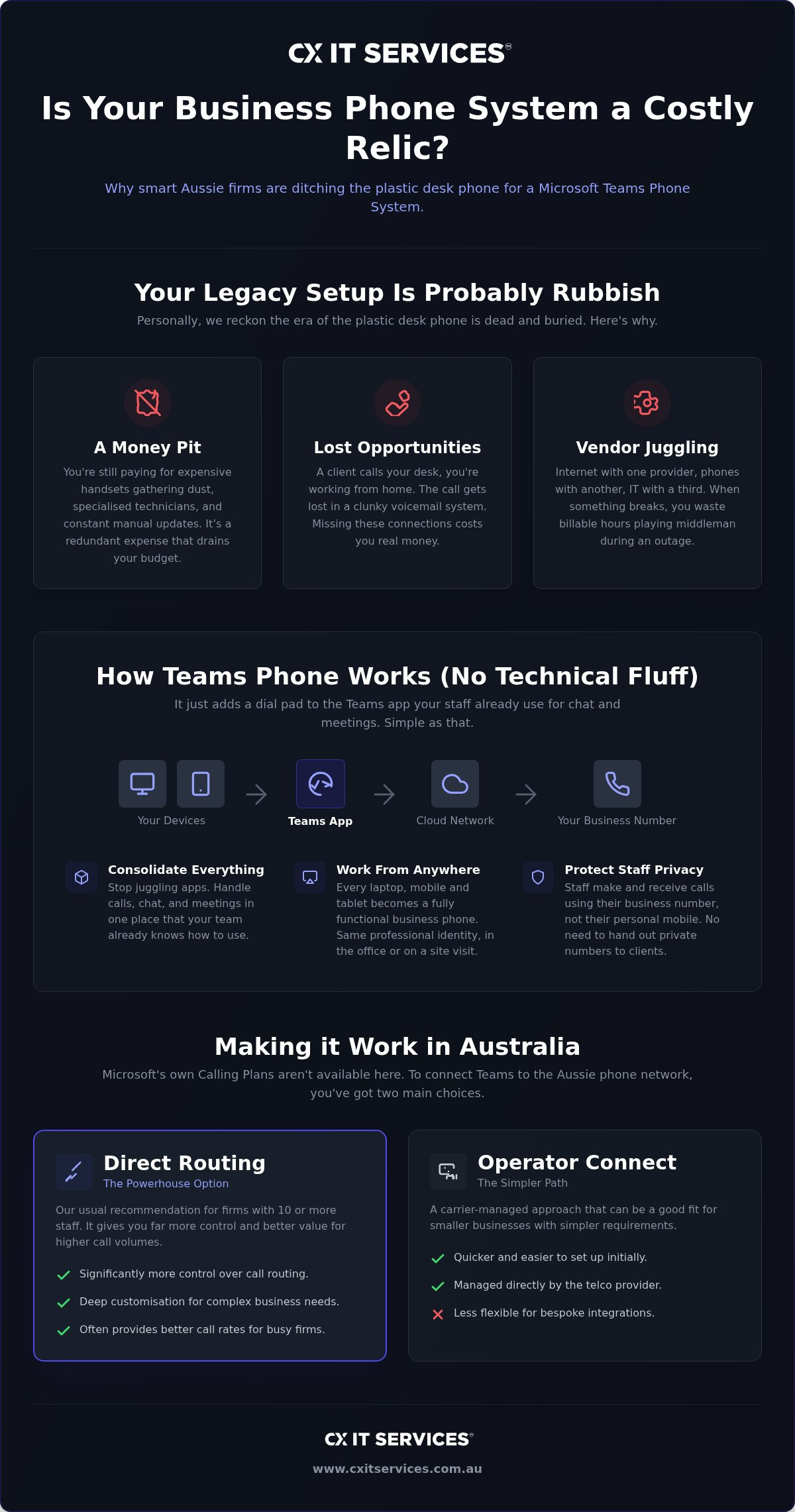
Maintaining an old on-premise PBX is a money pit for growing firms. These systems require specialised technicians, expensive replacement parts, and constant manual updates. Beyond the direct costs, there's the hidden drain on your billable hours. If a client calls your desk and you're at a site visit or working from home, that call often goes unanswered or gets lost in a clunky voicemail system. Missing these connections costs you real money.
Managing multiple vendors is another silent productivity killer. When your internet is with one provider, your phones with another, and your IT support with a third, you spend hours playing middleman during an outage. A unified business phone system removes this complexity by putting your entire communication infrastructure under one roof.
Why the NBN changed the game for Aussie Comms
The old copper network that once powered Australian business is gone. When the NBN rolled out, it effectively set an expiry date on traditional analogue phone lines. This shift forced a move toward Voice over IP (VoIP), but many firms simply swapped an old physical box for a slightly newer one without embracing the full potential of the cloud. They kept the limitations of the past while paying for the technology of the future.
Cloud-based systems are now the standard for reliability across the country. A microsoft teams phone system australia is built to handle the realities of local internet speeds, using intelligent codecs to maintain call quality even when bandwidth fluctuates. It ensures that whether your staff are in a metropolitan centre or a remote home office, they have the same professional dialling capabilities as if they were sitting in the head office.
How Teams Phone actually works without the technical fluff
Understanding the microsoft teams phone system australia doesn't require a degree in telecommunications. Think of it as simply adding a dial pad to the Teams app your staff already use for internal chat. It turns every laptop, mobile, and tablet in your organisation into a fully functional business phone. This creates a single digital identity for each employee. Whether a staff member is at their desk in the office or using their mobile on a site visit, they make and receive calls using their professional business number. There is no need for staff to give out personal mobile numbers or manage separate devices.
To make this work in a local context, you need three specific components: the Teams application, a Microsoft Phone Standard license, and a connection to the Australian public telephone network. It is important to note that Microsoft Calling Plans are not available for purchase in Australia as of September 2026. This means local firms must use either Direct Routing or Operator Connect to link their Teams environment to the outside world. If you are curious about how this integration looks for your specific setup, you can request a technical review to see the path forward.
Direct Routing vs Operator Connect in Australia
Direct Routing is the powerhouse option that we usually recommend for firms with 10 or more staff. It gives you significantly more control over your call routing and often results in better rates for higher call volumes. It allows for deep customisation of how calls flow through your business. Operator Connect is a simpler, carrier-managed approach that is easier to set up but can be less flexible for firms with complex needs or bespoke integrations. For most Australian businesses that value stability and cost-efficiency, Direct Routing backed by reputable telecommunications specialists like Nexgen Australia remains the superior choice.Number porting: Moving your digits
You do not have to lose the phone numbers your clients have used for the last 20 years. Under Australian regulations, you have the right to keep your existing numbers when migrating to a new provider. Porting those numbers into the Microsoft ecosystem is a methodical process that requires a steady hand to avoid downtime. We manage the entire transition from start to finish. This means you do not have to spend your afternoon on hold with a legacy telco trying to explain a technical handover. We ensure your numbers move across cleanly while also configuring the mandatory emergency calling (000) requirements for every user.
Teams Phone vs Traditional VoIP: Finding the right fit for 10+ staff
Most cheap VoIP providers operate on a "set and forget" model. They sell you a proprietary system, ship the handsets, and then effectively disappear until you have a problem. When that problem inevitably arises, you are often left dealing with a call centre that doesn't understand your business context. Choosing a microsoft teams phone system australia represents a shift from using a standalone tool to adopting a unified platform. It is the difference between having a phone that just makes calls and having a communication hub that understands your workflow.
For any firm with 10 or more staff, managing disconnected silos is a recipe for operational chaos. If your phone system doesn't talk to your email, calendar, and file storage, your team spends half their day manually syncing data or switching between apps. Teams Phone eliminates this friction. When you receive a call, you can see the client's history, check your calendar for their next appointment, and access their files without leaving the interface. It's about maintaining your sanity through consolidation. Organisations seeking to achieve this level of seamless integration often rely on the expertise of Microsoft specialists like Kagool to ensure their technology stack is fully unified and efficient.
Fewer logins for your staff directly translate to fewer helpdesk tickets. Every time you add a new standalone software, you increase the security risk and the administrative burden on your internal team. By folding your telephony into the Microsoft ecosystem, you provide a single point of entry for your employees. This simplicity is mirrored in your administrative overhead. Receiving one predictable bill from one provider makes your accounts team very happy and simplifies your annual budgeting. You can see how this integration forms part of a broader strategy through our managed IT services, which focus on reducing complexity across your entire business.
The hidden costs of "budget" providers
Budget providers often lure Australian firms with low per-user rates, but these savings frequently come at the expense of infrastructure quality. Cheap systems often suffer from rubbish call quality, jitter, and dropped connections because the provider hasn't invested in local data centres or high-quality peering. If your phones go down for even an hour, what does that actually cost your firm in lost billable time and client frustration? Reliability is worth significantly more than saving ten bucks a month on a license. A microsoft teams phone system australia backed by a professional partner ensures that you have a "safe pair of hands" managing your uptime, rather than a faceless budget carrier.
The migration roadmap: Avoiding the Monday morning disaster
A successful move to a microsoft teams phone system australia requires a methodical plan, not just a wing and a prayer. We have seen too many firms rush this transition and end up with broken call flows that frustrate both staff and clients. The objective is a seamless switch where calls continue to flow without interruption. No missing voicemail, no confused receptionists, and absolutely no drama. It is about maintaining professional standards from the moment the old system is switched off.
To achieve this, we follow a structured process that respects the complexity of your business operations. We focus on the technical details so you can focus on your clients. If you are ready to move away from legacy hardware without the risk, you can book a migration consultation to start your roadmap.
Phase 1: Auditing your call flows
We begin by mapping exactly how calls move through your office. Every hunt group, auto-attendant, and after-hours rule must be documented and replicated. It's also the time to ensure your business internet is robust enough to handle the increased voice traffic. Without this foundational audit, you risk losing the nuance of how your business actually communicates with its clients. We look for potential bottlenecks before they become active problems.
Phase 2: The test and cut-over
We never recommend a "big bang" approach for larger firms. Instead, we run a pilot group to iron out any technical kinks before the entire team moves. The actual cut-over happens during off-peak hours to ensure your billable time is protected. Having expert support available on day one is a non-negotiable part of our process. Whether it is on-site or remote, our team is there to ensure that the Monday morning experience is one of calm efficiency rather than technical panic.
Phase 3: Training and adoption
Migrating the technology is only half the battle; the other half is human adoption. Teaching your team how to transfer calls, set status, and manage their voicemail is vital for a professional image. When your staff understand how to use the microsoft teams phone system australia for more than just internal chat, it transforms your collective productivity. We deliver short, sharp training sessions that respect your staff’s time while giving them the confidence to use the new system effectively from day one.
Why a managed approach is the only way to sleep at night
Setting up a microsoft teams phone system australia is a significant milestone, but maintaining peak performance requires ongoing vigilance. Microsoft updates their platform constantly, often rolling out changes that can affect call routing or user permissions without warning. A managed approach ensures that you have a safe pair of hands watching your back, handling the backend technicalities while you focus on your core business. It is about ensuring that your dial tone is always there when you need it, regardless of the latest software release.
Stability in a professional environment is never a matter of luck. It is the result of methodical oversight and a proactive approach to system health. By partnering with an expert, you move away from a reactive "break-fix" cycle and into a model where your communications are managed as a strategic asset. You focus on your clients; we focus on the infrastructure that connects you to them.
Fixed-fee predictability
Budget anxiety often stems from the unpredictable nature of hourly IT support. Our business phone systems are designed for growing firms that require total financial transparency. We operate on a fixed monthly fee model that covers both support and management, ensuring there are no nasty surprises on your invoice. This predictability allows your management team to plan with confidence, knowing that your communication costs are locked in even as your organisation scales.
24/7 National support
For organisations with a national footprint, the standard work day is a moving target. If a team member has a critical call issue in a different time zone late in the afternoon, they cannot afford to wait for a regional helpdesk to open the following morning. We provide 24/7 national support to ensure that your people are covered across every Australian state and territory. This round-the-clock availability is a cornerstone of our service, providing the reliability that professional firms demand. If you are ready to secure your communications with a managed partner, apply for a strategic consultation to discuss your requirements.
Securing the future of your business communications
Moving to a microsoft teams phone system australia is more than just a technical upgrade; it is a strategic decision to simplify your operations and reclaim your team's time. By consolidating your calling, chat, and meetings into a single interface, you effectively eliminate the friction of legacy hardware and the high costs of redundant vendors. A successful transition relies on a methodical roadmap that protects your call flows and ensures your staff are confident using the new platform from day one.
With 26 years of Australian IT expertise, we provide the stability and oversight needed for a seamless migration. You gain the security of 24/7 national support and the clarity of fixed monthly fees for predictable budgeting. This managed approach removes the stress of technical complexity, allowing you to focus entirely on your clients. Apply for your fixed-fee Microsoft Teams Phone migration quote today. It's time to trade your clunky desk phones for a system that actually works wherever your business goes. We are here to ensure your move is handled with quiet competence and professional care.
Frequently Asked Questions
How long does it take to migrate 20 staff to Teams Phone in Australia?
A typical migration for 20 staff takes between two and four weeks to complete. The primary variable is the number porting process, which is governed by Australian telecommunications regulations. While the technical setup of the microsoft teams phone system australia can happen quickly, we allow sufficient time for carrier handovers to ensure no calls are dropped. We manage the entire timeline so your internal team isn't caught in the middle of provider disputes.
Can we keep our existing 1300 or 1800 numbers?
Yes, you can keep all your existing 1300, 1800, and local landline numbers. Number portability is a legal right for Australian businesses, and we handle the complex porting process on your behalf. We coordinate with your current carrier to move your numbers into the Microsoft ecosystem without service interruptions. This ensures your clients can continue reaching you on the same contact details they have used for years.
Do we need to buy new headsets or can we use our existing ones?
Most modern USB or Bluetooth headsets will work with the system, though we recommend using Teams-certified hardware for the best experience. Certified devices offer better noise suppression and integrated call controls, which are vital for professional environments. If your current headsets are business-grade, they are likely compatible. We can audit your existing hardware during the planning phase to determine if any replacements are actually necessary for your staff.
What happens if our office internet goes down?
If your office internet goes down, the system automatically fails over to the Teams app on your staff's mobile devices. Because the system is cloud-based, calls don't rely on your physical office infrastructure. Your team can continue making and receiving calls using their professional business numbers via 4G or 5G connections. This built-in redundancy provides a level of business continuity that traditional on-premise PBX systems simply cannot match.
Is Microsoft Teams Phone secure enough for sensitive legal data?
Microsoft Teams Phone is built on enterprise-grade security protocols that meet the stringent requirements of Australian professional firms. All voice traffic is encrypted, and the system integrates with your existing Microsoft 365 identity management and multi-factor authentication. This provides a secure environment for discussing sensitive data. We help you configure these settings to ensure your firm remains compliant with local privacy regulations and industry standards.
Can we still have a physical phone on the reception desk?
You can certainly keep a physical handset on your reception desk or in common areas. While most staff prefer using headsets with their computers, Teams-certified IP phones from manufacturers like Yealink or Poly provide a familiar desk phone experience. These devices connect directly to your network and offer the same features as the digital app. This is often the best solution for high-traffic areas where a dedicated physical device is more practical.
How much does a Microsoft Teams Phone migration cost for an Aussie firm?
The cost of migrating to a microsoft teams phone system australia varies based on the complexity of your current call flows and the number of users. We provide a fixed-fee migration model to ensure your firm has total budget predictability from the start. This approach removes the risk of hidden charges or hourly overruns. We focus on delivering a safe pair of hands migration that balances technical excellence with a clear, upfront investment.
Do we need a specific Microsoft 365 license for the phone system?
To use the phone system, each user requires a Microsoft Teams Phone Standard license. This is included in the Microsoft 365 E5 tier or can be added as a standalone license to Business or Enterprise plans. You also need a connection to the public phone network via Direct Routing or Operator Connect. We help you navigate these licensing requirements to ensure you are only paying for the specific features your organisation needs to operate.





 Microsoft Partner