
Stop wasting cash on piecemeal tech. Here is what business IT services actually cover in Australia, from managed support to cyber security and cloud setups.
Useful IT services keep staff working, protect business information and help your business recover when something goes wrong. The challenge is often not a lack of support, but a collection of services that don’t work together.
I reckon IT support feels reactive when nobody has a clear view of the whole setup. A helpdesk can sort staff issues, but businesses also need the right mix of cyber security, cloud services, backups, phones and planning. What matters most depends on your team, your risks and the IT capability you already have in-house.
This guide explains what business IT services cover and how the pieces fit together, without burying you in technical detail. You’ll see how managed IT works when an external team takes responsibility for ongoing support, and how co-managed IT works alongside internal staff. We’ll also look at cyber security, backup and disaster recovery, and virtual CIO support, so you can decide what needs attention first.
Key Takeaways
- Business IT services can cover staff, devices, networks, cloud systems, security and continuity, not just fixing faults.
- Helpdesk support, cyber security and cloud management do different jobs. Knowing where they overlap can help you spot gaps.
- Compare managed, co-managed and project-based support by who owns the work and how much responsibility stays with your team.
- Map critical systems, staff needs and recurring disruptions before deciding what to address first.
- CX IT Services supports businesses with ten or more employees through managed IT on a fixed monthly fee, alongside co-managed support options.
What do IT services include for an Australian business?
By business IT services, I mean the support and systems that keep workplace technology usable, secure and recoverable. That’s different from fixing someone’s personal phone or home computer. For a business, IT services can cover staff, devices, networks, cloud systems, cyber security and continuity when something goes wrong.
It pays to look past the first symptom. A staff member can’t log in before a client meeting. The cause could be their device, account permissions, network or the cloud system holding the work files. Those areas can sit under different services, so the useful question is not just how to get the person back in. It’s what caused the failure, and whether the same issue could affect other staff.
Not every business needs every service at the same depth. A team that relies on cloud software may need close attention to accounts and connectivity; if you are reviewing your workplace software, you can learn more about Mooov to see how an all-in-one platform works for Australian businesses. Another business may have more on-site equipment to maintain. Start by identifying what keeps staff working and what would cause real disruption if it failed.
What counts as an IT service at work?
Support resolves staff issues and keeps essential systems usable. Managed services go further than the helpdesk. A Managed Service Provider generally delivers ongoing technology support and management. That can include monitoring, maintenance and planned work, not just emergency fixes after something breaks.
It’s also useful to separate ongoing operational work from a one-off project. Managing staff access or maintaining devices is recurring work. Setting up new hardware or building a website is a defined task with a particular outcome. Both can be worthwhile, but completing a project doesn’t replace the support needed to keep systems working afterwards.
Which business problems do IT services solve?
Helpdesk and device support can address the time staff lose to repeated login problems, slow devices or unreliable connections. Support can investigate the cause, while tracking repeat issues can show whether a fault is limited to one device or points to a wider system problem. That’s more useful than applying the same quick fix every time.
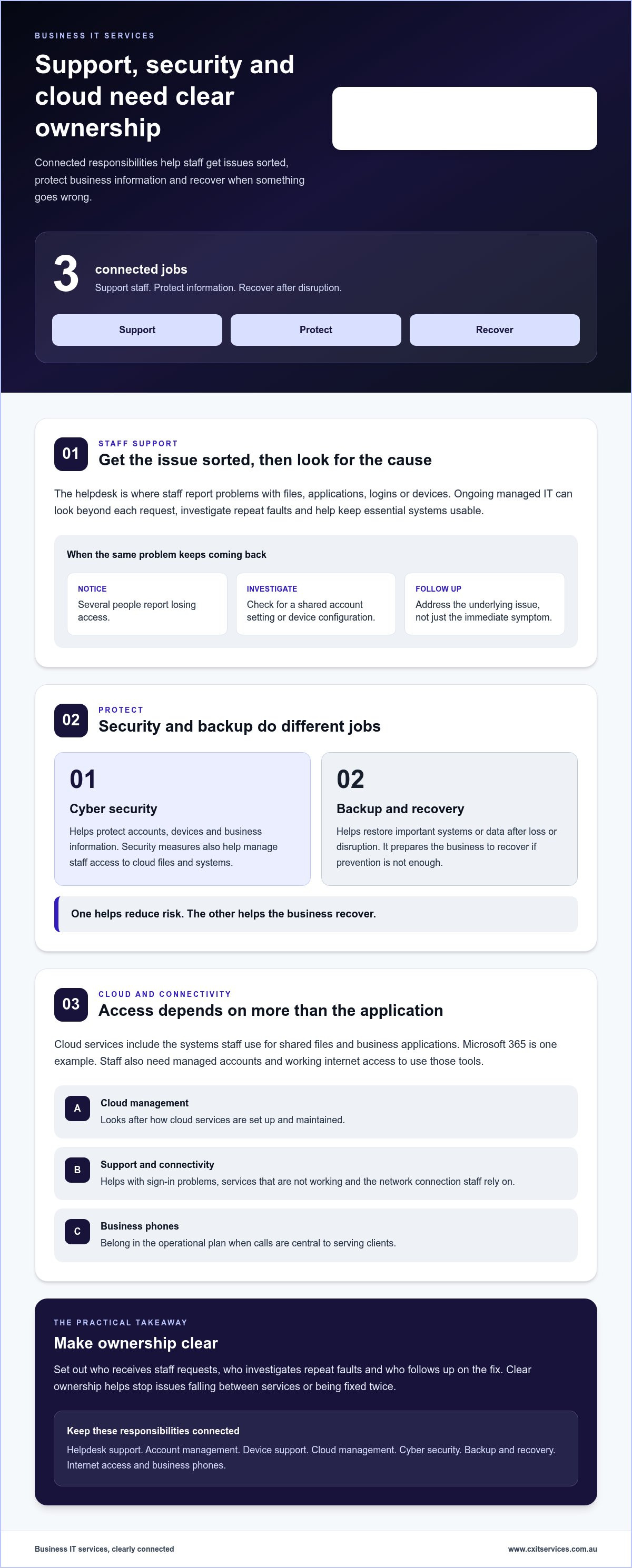
Cyber security and backup are related, but they solve different problems. Security helps protect accounts, devices and business information. Backups and disaster recovery help restore important systems or data after loss or disruption. One helps reduce risk. The other prepares the business to recover if prevention isn’t enough.
Staff also need reliable access to everyday tools. Cloud services and connectivity support access to files, email and business applications. If those tools are cloud-based, people still need working connections and managed accounts. Cloud services should be considered alongside network support, with the scope shaped around how the team works.
How IT services work together across support, security and cloud
I look at IT services as connected responsibilities, not separate fixes. Helpdesk support gives staff a place to raise issues. Account management controls who can access business systems. Device support keeps work equipment configured and usable. Managed IT provides wider oversight, helping identify recurring faults and investigate their cause instead of patching the same symptom again.
How do helpdesk and managed IT support fit together?
The helpdesk is the front door for staff who can’t access a file, use an application or get a device working. Managed IT support looks beyond each individual request. If several people keep losing access, I’d look for a shared cause, such as an account setting or device configuration, rather than treating every report as unrelated. Reviewing support patterns can reveal the underlying issue.
That’s why I’d connect helpdesk support with ongoing oversight. Otherwise, staff can report the same problem, get the immediate symptom fixed, then run into it all over again. When you define the service scope, make clear who receives requests, who investigates repeat faults and who follows up on the fix.
Where do cloud and cyber security fit?
Cloud services are the systems and environments staff use to access work, such as shared files and business applications. Microsoft 365 is one example of a cloud-based work environment; for teams looking to optimise software spending, read more about sourcing legitimate Microsoft licences at discounted rates. Cloud management concerns how those services are set up and maintained. Cyber security is a separate layer that helps protect users, systems and business information. The services overlap, but one doesn’t replace the other.
For example, staff need suitable access to cloud files to do their jobs. Security measures help manage that access, while support deals with problems such as sign-in issues or a service that isn’t working. Cloud services for business and business cyber security services need distinct responsibilities, even when they’re planned together. Clear access rules and ownership connect those protections to the way staff work.
Include internet access and business phones in the same operational picture. A cloud application may be available, but staff can’t use it properly if the connection is down. Calls may also be central to serving clients, so communications belong in the support plan.
Clear ownership stops IT problems falling between services or being fixed twice. Joined-up support means staff know where to report an issue, and someone follows it through to the right part of the system. If you’re ready to map those responsibilities across your business, start a conversation about your IT support needs.
Managed, co-managed or project-based IT services: what changes?
The main difference is who owns the ongoing work. With managed IT, an external team takes responsibility for an agreed scope of support and maintenance. Co-managed IT shares that work with your internal team. Project-based work covers a defined task, then ends. The right fit depends on what your team can manage and where it needs extra capacity.
| Support model | Ownership | Ongoing responsibilities | Internal workload | Typical use |
|---|---|---|---|---|
| Managed IT | External IT team owns the agreed service scope. | Ongoing support, monitoring and maintenance. | Lower day-to-day IT workload, with business staff still involved in decisions and requests. | For a business needing continuing support without running every IT function internally. |
| Co-managed IT | Internal staff and external support share responsibility. | Tasks are divided according to the team’s needs and capabilities. | Internal staff retain selected responsibilities and work with extra support. | For a business with internal IT capability that needs specialist help or operational backup. |
| Project-based IT | Responsibility is tied to a specific task or outcome. | Work ends when the agreed project is complete. | Internal staff coordinate the project and manage what happens afterwards. | For a defined job, such as setting up hardware or completing a technology change. |
When does fully managed IT make sense?
Managed IT can suit a business that needs regular support but doesn’t want to run every IT function in-house. The service scope is agreed in advance, with ongoing responsibilities and a fixed monthly fee for CX IT Services’ managed IT support for businesses with ten or more employees. That gives the business a clearer operating arrangement than calling for help only after something breaks. For a broader explanation of what managed IT services are, Forbes Advisor outlines the managed service provider model.
When can co-managed IT support an internal team?
Co-managed support can add capacity when internal IT staff are stretched, need specialist input or want backup for operational work. Your internal team might retain responsibility for staff priorities and business systems, while external support takes on agreed technical tasks. Make the split clear: who handles requests, who manages access, and who follows up recurring issues? CX IT Services provides co-managed IT support for businesses that want to share IT responsibilities with an external team.
A project can solve a specific problem, but it doesn’t provide ongoing oversight once the task is finished. If staff still need support or systems need regular attention, project work alone leaves a gap. The practical test is simple: identify who owns the routine work after the project team packs up.
How to map your business needs before setting an IT services scope
Start with what the business needs to keep operating, not a catalogue of technology. Map the work that must continue, the people who rely on it and the problems that keep getting in the way. That gives you a practical basis for deciding what needs ongoing support and what can be planned as a separate improvement.
The right scope follows business impact, not a generic checklist.
Which IT issues should a business prioritise first?
Work through these areas in order. Keep the notes plain. You’re identifying what matters and where responsibility is unclear, not writing a technical specification.
- 1. Business-critical systems: List the systems staff need for essential work and customer service. Note what stops if each one becomes unavailable.
- 2. Staff needs and onboarding: Record common support requests, who needs access to which systems, and what must happen when an employee starts or changes roles.
- 3. Recurring disruptions: Look for repeat faults, unresolved issues and workarounds staff rely on. A problem that keeps returning deserves more attention than a one-off nuisance.
- 4. Security: Identify concerns around staff access, devices and business information. Note who owns the follow-up when a concern is raised.
- 5. Recovery: Establish which important information and systems are backed up, who is responsible for them, and what the business needs to restore after disruption.
- 6. Connectivity: Consider how staff access everyday tools, including people working remotely. Note whether internet or phone issues interrupt client service or internal work.
Separate immediate operational gaps from planned improvements. A system that’s stopping essential work needs attention before a future cloud change or automation project. Both may matter, but lumping them together makes it harder to agree what comes first.
How should internal capacity shape the support model?
List the IT tasks your staff can own reliably, then mark where they need specialist capacity or backup. Consider your workforce size, operating hours, remote work patterns and how support requests are handled. If one staff member is carrying several IT responsibilities alongside their main role, include that capacity pinch in the scope.
Clear responsibilities matter. Write down who handles staff requests, account changes, security follow-up, recovery planning and longer-term decisions. IT strategy and planning can connect operational needs to future priorities, so improvements are sequenced rather than added to an already crowded workload.
Once you’ve mapped business impact and internal capacity, you can set a more useful scope for IT services. Discuss your business IT requirements and the support model that fits them.
How CX IT Services brings business IT services together
Joined-up IT support gives staff a clearer path when something needs attention, rather than leaving them to chase fixes across different parts of the business. CX IT Services is Australian-owned and brings more than 26 years of industry experience to supporting businesses.
For businesses with ten or more employees, CX IT Services provides managed IT support under a fixed monthly fee. That ongoing arrangement can make responsibilities clearer than sorting out support only after something breaks. Businesses with their own IT staff can use co-managed support to share the work. Support includes 24/7 assistance and on-site technicians across Australia.
What can a joined-up IT services arrangement cover?
The scope depends on what your team needs. These services can support daily work and business continuity:
- Managed or co-managed IT support and helpdesk assistance.
- Cyber security, cloud services and connectivity.
- Business phone systems for staff and client communications.
- Backup and disaster recovery planning to help restore operations after disruption.
- AI automation for suitable processes where it addresses a practical business need.
These aren’t interchangeable services. Cloud systems rely on access and connectivity, while staff need support when something stops working. Security and recovery planning address different risks. AI automation may suit a particular process, but it isn’t a requirement for every business. Shape the arrangement around how your team works, not a checklist.
What happens when a business is ready to apply?
Start with what’s happening in your business now: which systems staff rely on, where time is being lost, and what your internal team already manages. Applying begins that conversation. You don’t need a technical plan ready. A clear outline of your team’s needs and current IT arrangements is a useful place to start.
From there, the support model can match the work that needs doing, whether that’s managed IT, co-managed support or a combination of services. If you’re ready to discuss your requirements, apply to work with CX IT Services.
Put a clearer IT support plan in place
Good IT services aren’t a grab-bag of fixes. They connect staff support, security, cloud systems and recovery, with clear ownership of the work. The right mix depends on which systems your business relies on, where disruptions keep happening and what your internal team can manage.
Personally, I reckon the practical starting point is to separate urgent gaps from longer-term improvements, then choose a support model that fits your team. Managed IT support is available to businesses with ten or more employees under a fixed monthly fee. Co-managed support can share the load with an internal IT team.
CX IT Services is Australian-owned and operated, with more than 26 years of industry experience. Its support includes 24/7 assistance and on-site technicians across Australia.
If your current setup feels fragmented or too reactive, apply to work with CX IT Services. A clearer plan can help your team get on with the work that matters.
Frequently Asked Questions
What do IT services include for a small or growing business?
IT services can cover staff support, devices, networks, cloud systems, cyber security and backup planning. The right mix depends on the work your business relies on and the problems that disrupt it. A growing team might need help managing staff access and devices as people join, alongside support for everyday systems. You don’t need every service at the same depth. Start with what keeps your team working.
What is the difference between IT support and managed IT services?
IT support usually means resolving staff issues and keeping systems usable. Managed IT services add ongoing responsibility for an agreed scope of support, monitoring and maintenance, rather than focusing only on problems after they occur. The distinction is whether support is called on as needed or forms part of continuing oversight. The scope should make clear which tasks are handled and who owns them.
Can a business use managed IT services alongside an internal IT team?
Yes. Co-managed IT lets an external support team work alongside your internal IT staff. Your team might retain responsibility for business priorities and selected systems, while external support provides specialist capacity or backup for agreed tasks. The important part is defining who handles staff requests, account changes, security concerns and follow-up. Clear ownership helps prevent work being missed or duplicated.
How do I know which IT services my business needs?
Start by listing the systems your staff need for essential work and customer service. Note recurring IT problems, security concerns, backup responsibilities and connectivity issues that interrupt work. Then separate urgent operational gaps from planned improvements, such as a future cloud change or automation project. The right scope follows business impact and your team’s capacity, not a generic checklist.
Do IT services include cyber security and data backup?
They can. Cyber security helps protect users, systems and business information, while backups support recovery if information is lost or systems are disrupted. They address different needs, so one doesn’t replace the other. A practical assessment should identify what needs protection, what is backed up and who is responsible for recovery planning. That gives the business a clearer view of its security and continuity gaps.
Can IT services support businesses with staff across Australia?
Yes. CX IT Services supports businesses nationally, with 24/7 support and on-site technicians across Australia. A support arrangement can account for how staff access systems, where they work and what help they need to keep essential tasks moving. For teams spread across locations or working remotely, define how staff raise issues and who owns follow-up across the business.
What happens when a business applies for managed IT support?
Applying starts a conversation about your business needs and current IT arrangements. It’s useful to outline your team size, the systems staff rely on, recurring disruptions and what your internal team currently manages. CX IT Services provides managed IT support to businesses with ten or more employees under a fixed monthly fee. The discussion helps establish what support and responsibilities need to be covered.





 Microsoft Partner