
A backup won't save you when downtime hits. Build a proper IT disaster recovery plan to protect your data, slash downtime, and satisfy Aussie 2026 rules.
If your office flooded or a ransomware group locked every file you own this morning, how long would it take before your staff could actually bill a client again? Personally, I reckon most business owners mistake a simple backup for a proper IT disaster recovery plan. It is a dangerous gamble to take. With the Australian Signals Directorate now reporting one cyber incident every six minutes, the question is not if something will go wrong, but when.
I know the stress of watching the clock while your team sits idle during a system outage. It is expensive, frustrating, and a massive risk to your reputation. You deserve to know that your client data is safe and that your business is resilient enough to bounce back in hours, not weeks. It is about having a plan that keeps the lights on when the worst happens.
This guide explains how to protect your business from total data loss and minimise expensive downtime with a resilient recovery strategy. We will walk through the 2026 regulations, including APRA's CPS 230 and mandatory ransomware reporting rules. You will learn how to set predictable recovery times that give you genuine peace of mind, ensuring your firm stays operational no matter what hits the fan.
Key Takeaways
- Stop thinking of disasters as rare floods. A disaster is anything that stops your team from working, and you need a plan that covers the lot.
- Understand the massive gap between a simple backup and a full IT disaster recovery strategy. One is a pile of data, and the other is the engine that gets you back in business.
- Learn to measure your RTO and RPO. These numbers tell you exactly how much data you can afford to lose and how long your staff can sit idle before the money runs out.
- Build a living recovery framework that satisfies Australian regulators and insurers. It needs to be practical enough for your team to use when things go pear-shaped.
- Discover how a Virtual CIO takes the guesswork out of resilience. You get a fixed-fee roadmap that protects your reputation and keeps your clients happy.
Defining IT disaster recovery for the modern Australian workplace
Personally, I reckon most people get this wrong. They think of dramatic floods, fires, or the building literally falling down. While those are serious, they are rare for most Australian offices. In reality, a disaster is anything that stops your team from working. It is the sudden silence when the server fails. It is the panic when a botched software update locks everyone out of their files. Or more commonly, it is the sinking feeling when a staff member clicks a dodgy link in their inbox.
Technically speaking, IT disaster recovery is the process of restoring data and systems to full functionality after an outage. It is the bridge between a system crash and getting back to business. Without it, you are just staring at a blank screen while the bills pile up. Understanding the disaster recovery fundamentals is the first step toward building a business that can actually survive a crisis.
The silent killers of Aussie business continuity
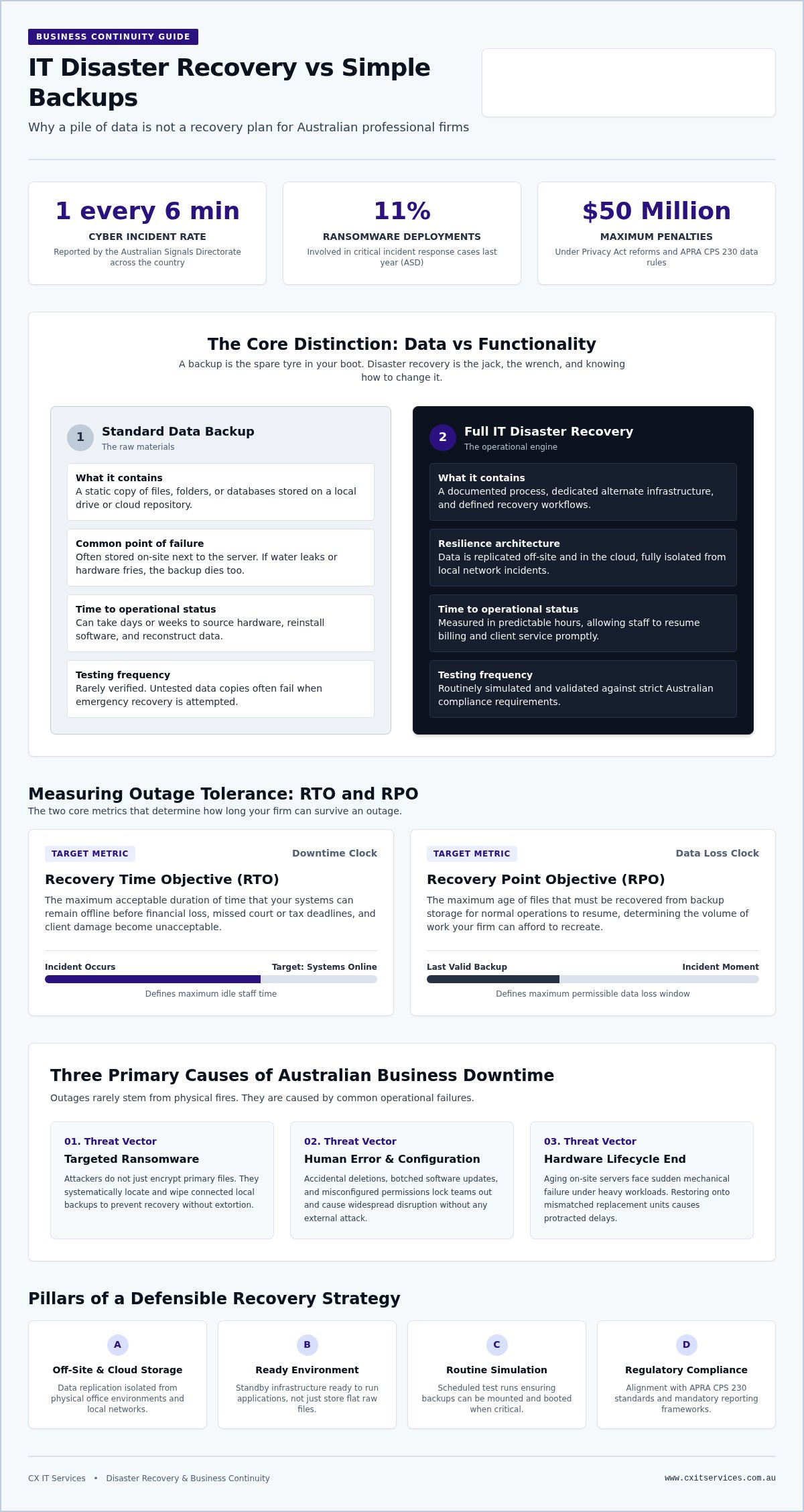
Ransomware is the biggest threat facing our professional sectors right now. The Australian Signals Directorate (ASD) reported that ransomware was involved in 11% of all critical incident response deployments last year. Attackers don't just encrypt your data. They actively target your local backups to make sure you cannot recover without paying. It is a brutal, calculated move. Human error remains a constant risk that no firewall can fully stop. Accidental deletions or misconfigurations cause more downtime than most owners care to admit. Hardware life cycles are also getting shorter. Cheap components and high workloads mean failure is a matter of when, not if, so it is important to invest in reliable office hardware from specialists like genx.ae. Old servers don't just slow down. They eventually stop, usually at the worst possible moment.
Why your business cannot afford to wait
Downtime costs more than just lost sales. It ruins your reputation with clients who expect you to be reliable. In the legal and financial sectors, trust is your only real currency. If you cannot access a file during a court deadline or a tax lodgement, that trust evaporates. Staff morale also takes a massive hit. Nobody likes sitting idle while their targets move further out of reach. Regulatory pressure is the final straw. With the Privacy Act reforms and APRA's CPS 230 now in full effect, you have a legal duty to keep data available. Serious interference with data can now lead to penalties up to $50 million. Investing in a proper IT disaster recovery plan is not just about tech. It is about survival.
Why your daily backup is not a disaster recovery plan
I've seen businesses with what they called "perfect backups" still stay offline for an entire week. It's a heartbreaking sight. They have the data, but they have no way to use it. A backup is just a copy of your files. It's the raw material. IT disaster recovery is the plan, the tools, and the people that turn those files back into a working office.
Think of it like this. The backup is the spare tyre in your boot. Disaster recovery is the jack, the wrench, and the knowledge required to actually change it. If you're missing any of those pieces, you're still stuck on the side of the road. You can't drive on a tyre that's still locked in the boot.
The limitations of traditional data backups
Traditional backups are often stored on-site. This is a massive risk. It makes them vulnerable to the exact same disaster as the original data. If a pipe bursts over the server rack, your backup drive is getting soaked too. I've walked into offices where the backup was sitting right on top of the server that just fried itself. It's useless.
Restoring from a standard backup can take days if you don't have the right hardware ready. If your server dies, you can't just pour that data onto a laptop and expect the whole office to work. You need a replacement environment. Many backups are also never tested. A backup that hasn't been tested is just a hope, not a plan. You don't want to find out your data is corrupted at the exact moment you need it most.
The pillars of a true recovery strategy
A resilient strategy relies on off-site and cloud-based storage. This ensures your data survives any local event, from a fire to a simple power surge. Following the business emergency preparedness guidelines provided by the government is a good start for any Aussie firm. It helps you identify what is actually critical to your operations.
Virtualisation technology is the real game changer. It lets you run your entire office in the cloud while your physical hardware is being fixed or replaced. Your staff can keep working from anywhere. You also need clear cyber security protocols that kick in the moment a breach is detected. If you want to see how your current setup stacks up against a real-world threat, you should book a strategy audit to find the gaps before a hacker does.
Measuring the damage with Recovery Time and Recovery Point Objectives
If you want to organise your IT disaster recovery strategy, you need to understand two acronyms. They aren't just technical jargon. They are the dials that control your business survival. Recovery Time Objective (RTO) is the "how long" question. Recovery Point Objective (RPO) is the "how much data" question. Generally, the lower these numbers are, the more expensive the solution typically becomes.
Recovery Time Objective: Beating the clock
How many hours can your staff sit around without access to email or files? This is your RTO. It is the maximum tolerable length of time that a system can be down after a failure. For a law firm, two hours might be a full-blown crisis. For a small retail shop, it might just be a nuisance. You need to be honest about this number. If your RTO is four hours but your current setup takes two days to restore, you have a massive gap.
Think about your payroll. If you have 20 staff sitting idle at A$60 an hour, that is A$1,200 every hour the system is down. In a four-hour outage, you have lost A$4,800 in wages alone. This doesn't even account for lost revenue or the damage to your reputation. Your RTO dictates exactly what kind of hardware and managed IT support you need. If you need to be back up in minutes, you need redundant systems ready to take over immediately.
Recovery Point Objective: Avoiding the data gap
If your system dies at 4 PM, and your last backup was at midnight, you have lost a whole day of work. That is your RPO. It is the age of files that must be recovered from backup storage for normal operations to resume. RPO determines how frequently you need to save your data. Professional services like accounting or medical clinics usually need an RPO of minutes, not days. Losing eight hours of billable work or patient records is a disaster in itself. It leads to re-entry errors, missed deadlines, and a massive amount of stress for your team.
You achieve a low RPO through continuous data protection or very frequent snapshots. It is about ensuring the "data gap" is as small as possible. Using a reliable IT disaster recovery plan framework ensures you aren't just ticking boxes. It helps you map out these requirements for every critical application you use. When you know your numbers, you can build a plan that actually works when the pressure is on.
Building a resilient disaster recovery framework that stands up to scrutiny
A good plan is not a 50-page document that gathers dust on a shelf. Personally, I reckon if your recovery manual is thicker than a phone book, it is useless when the server starts smoking. It needs to be a living set of instructions that your team actually understands. We build these frameworks as part of our broader IT strategy consulting work. A recovery plan that doesn't fit your specific business goals is just expensive wallpaper.
You need to be able to pull this document out during a crisis and know exactly who does what. It should be blunt and direct. If the instructions are too technical, your staff will freeze. If the instructions are too vague, they will make mistakes. The goal is to remove the guesswork when the pressure is at its highest.
The 3-2-1 rule for Australian businesses
The best IT disaster recovery plans are built on the 3-2-1 rule. It is a simple, blunt standard that has saved plenty of businesses from total collapse. First, keep three copies of your data. That is the original and two backups. If you only have one backup, you are one hardware failure away from a very bad day. One is none. Two is one. Three is safe.
Second, use two different types of media. Do not just put everything on two identical hard drives. Use a local server for speed and a cloud repository for safety. This protects you if a specific type of storage fails. Third, store one copy off-site. For Aussie firms, this copy should be in a secure Australian data centre. Keeping your data on-shore is vital for speed and compliance. If you are a medical clinic or a law firm, you need to know exactly where your data lives to satisfy Australian privacy laws.
Testing and the Essential Eight
While choosing a local facility is essential for compliance, it is also helpful to understand the technical standards of these environments; you can explore Data Centre Maintenance and Infrastructure Solutions to see how mission-critical facilities are professionally managed.
You must test your recovery process at least twice a year. I have seen too many owners assume their backups work until they actually try to use them. A test is not just checking a green tick on a dashboard. It is a full fire drill. You need to align your plan with the Essential Eight compliance strategies. This framework is the gold standard for keeping hackers out and ensuring your systems are resilient.
Your plan also needs a clear communication list. Who calls the IT provider? Who tells the clients? Who handles the mandatory ransomware reporting if data is leaked? If you don't know the answers to these questions, you don't have a plan. You have a disaster waiting to happen. Not alone. Together. If you want a plan that actually stands up to a real-world crisis, apply for a resilience review today and get your strategy sorted.
How CX IT Services organises your business continuity strategy
You have a practice to lead and clients to serve. You should not be staying up at night worrying about bitrot, failing server fans, or whether your off-site sync actually finished. Personally, I reckon your time is far too valuable to be spent playing part-time IT manager. We take the complexity out of disaster recovery by managing the entire technical stack for you.
Our fixed-fee model is designed for predictable budgeting. You get enterprise-grade protection and 26 years of industry experience without the unpredictable bills that usually follow a system crash. We position ourselves as a safe pair of hands for your data. Not alone. Together.
Strategic oversight with Virtual CIO services
We do not just install a piece of software and walk away. A true recovery strategy requires the Virtual CIO insight to plan for your future growth and evolving risk profile. Our team monitors your backups 24/7 to ensure they are healthy and ready the second they are needed. We handle the technical heavy lifting so you can focus on your strategic goals.
We specialise in the specific security and availability needs of the legal, medical, and financial sectors. We understand that for an accounting firm during EOFY or a surgical clinic mid-week, "offline" is not an option. We navigate the compliance hurdles and regulatory requirements so you can focus on your billable hours. Our process is transparent, grounded, and focused on hard operational outcomes.
Ready to secure your future?
Do not wait for a genuine crisis to find out your plan does not work. I have seen too many good Australian businesses crippled because they assumed their IT was "sorted" by a silent backup drive. Let us audit your current setup and show you exactly where the gaps are before a hacker or a hardware failure finds them first. We provide the stability and control you need to keep the lights on.
Every minute of downtime is a minute of lost revenue and eroded trust. We take a proactive approach to IT disaster recovery to ensure you are never left guessing about your recovery times. Apply now to see how we can protect your business from the unexpected. It is about genuine peace of mind and knowing that your business is truly resilient.
Protect your firm with a resilient recovery strategy
Personally, I reckon the peace of mind that comes from a tested plan is worth more than any piece of hardware. You now know that a simple backup is never enough and that your RTO and RPO numbers are the true measures of your business survival. It is about moving from a reactive mindset to a proactive, resilient framework that keeps your staff productive and your data safe. When the pressure is on, a clear plan is the only thing that matters.
As an Australian owned and operated provider with over 26 years of industry experience, we specialise in protecting the legal, financial, and medical sectors. We offer fixed-fee managed IT for teams of 10 or more. This model ensures you get enterprise-grade IT disaster recovery without the stress of unpredictable costs or technical complexity. We are the safe pair of hands you need when things go pear-shaped.
Don't leave your reputation to chance. Apply for a strategic IT audit with CX IT Services today to identify the gaps in your current strategy. Let's work together to ensure your business stays operational, no matter what challenges 2026 throws your way.
Frequently Asked Questions
What is the difference between backup and disaster recovery?
A backup is just a copy of your raw data while disaster recovery is the infrastructure and plan required to resume work. Think of a backup as a library of books and disaster recovery as the ability to actually read them when the building is on fire. Without a plan, you might have your files but no server to run them on. This distinction is vital for any firm that cannot afford days of silence.
How often should an Australian business test its disaster recovery plan?
We reckon you should test your recovery process at least twice a year to ensure it actually holds up. A plan that hasn't been tested is just a collection of assumptions. These tests should be full fire drills that verify your team knows their roles and the systems restore within your promised timeframes. Regular testing is also a core part of maintaining Essential Eight compliance for Australian businesses.
Is cloud-based disaster recovery secure for sensitive legal or medical data?
Cloud-based recovery is highly secure for sensitive data provided you use encrypted, Australian-based data centres. This ensures your records stay on-shore and satisfy the Privacy Act requirements. Modern cloud vaults use immutable storage, which means once data is written, it cannot be changed or deleted by a ransomware attacker. It is often far more secure than a physical server sitting in an unlocked office cupboard.
What are RTO and RPO and why do they matter for my budget?
Recovery Time Objective (RTO) is how long you can be offline, and Recovery Point Objective (RPO) is how much data you can afford to lose. These numbers dictate your budget because faster recovery and more frequent backups require more robust infrastructure. A legal firm needing to be back up in fifteen minutes will pay more than a business that can wait a day. Knowing these metrics helps you avoid overspending or under-protecting.
Does my business really need disaster recovery if we use Microsoft 365?
Microsoft 365 manages the availability of the platform, but you are still responsible for the backup and recovery of your own data. Microsoft does not provide comprehensive point-in-time recovery for deleted or corrupted files. If an employee accidentally wipes a SharePoint site or a hacker hits your inbox, you need an independent recovery solution. Relying solely on Microsoft's native tools is a massive risk for professional services.
What is the 3-2-1 backup rule and is it still relevant in 2026?
The 3-2-1 rule remains the gold standard for IT disaster recovery in 2026. You keep three copies of your data on two different types of media with one copy stored off-site. In the modern era, that off-site copy should be an immutable cloud repository. This simple framework ensures that even if your local server and your on-site backup drive fail simultaneously, you still have a path back to full functionality.
How much does a professional disaster recovery service cost for a small firm?
Professional services are typically structured as a fixed monthly fee on a per-user basis to provide predictable costs. This managed service approach consolidates your software, storage, and expert oversight into one bill. It avoids the massive, unpredictable invoices that hit when a system fails and you have to pay for emergency repairs. For firms with ten or more staff, this subscription model offers the best balance of protection and budget control.
Can disaster recovery protect my business from ransomware?
A proper disaster recovery plan is your final line of defence against ransomware. While security tools try to block the attack, recovery ensures you don't have to pay the ransom to get your files back. We use isolated, immutable backups that the hackers cannot touch or encrypt. This allows us to wipe the infected systems and restore your clean data quickly, keeping your business operational and your reputation intact.





 Microsoft Partner