Sick of dead laptops and surprise tech bills? Our guide to IT asset lifecycle management helps Aussie businesses stop firefighting and get their gear sorted.
Personally, I reckon most Aussie business owners have more expensive tech gathering dust in their bottom drawers than they actually have on their balance sheets.
It is usually because they lack a clear plan for IT asset lifecycle management.
This leads to a graveyard of old chargers, laptops with dodgy batteries, and hard drives that might still hold sensitive client data.
You probably know the feeling of a sudden hardware failure on a Monday morning. It stops the whole office dead.
Then comes the frantic call to find a replacement and the inevitable, unplanned hit to the bank account. It's reactive. It's stressful. And frankly, it's a bloody expensive way to run a professional firm.
Most of us agree that technology should just work without being a constant drain on your time or your sanity.
This article is your guide to managing your technology from purchase to disposal without the corporate fluff or hidden costs.
I will show you how to move from firefighting to a predictable, secure plan. We are going to get your budget under control, your data locked down, and your gear sorted once and for all.
Key Takeaways
- Understand that IT management is about the entire journey of your hardware, not just buying a new laptop when the old one finally gives up the ghost.
- Learn how to use IT asset lifecycle management to turn unpredictable tech blowouts into a steady, manageable business expense.
- Identify the "Zombie Tech" in your office that is quietly murdering your staff productivity and draining your bank account through lost time.
- Protect your client data and meet your legal obligations by following a clear process for secure e-waste disposal and data destruction.
- Discover how strategic planning helps you stay ahead of hardware failures so your team always has tools that actually work.
IT Asset Lifecycle Management: More Than Just Buying New Laptops
Personally I reckon most bosses think IT management is just a fancy way to say buying a new Mac when the old one dies. That is like saying car maintenance is just buying a new ute when the engine blows up on the highway. It is a narrow, reactive way of looking at your business tools. It is also the most expensive way to handle your technology.
Real IT asset lifecycle management is about the total journey of every piece of tech in your office. It starts the second you realise you need a new server or a fleet of laptops to keep the team moving. It covers the hardware procurement, the setup, the ongoing maintenance, and the final day you wipe the data and recycle the gear. Proper management means no nasty surprises. It means no massive bills you did not see coming because you forgot your server was five years old. No shocks. Just stability.
The difference between tracking and managing
Tracking is just a list in a spreadsheet that no one ever looks at. It is a static document that is probably out of date by the time you finish typing it. Managing is active. It is knowing exactly when a laptop is going to give up the ghost before it actually happens. It is about foresight.
This includes keeping an eye on your Software asset management alongside your physical gear. You need to know which licences are expiring and which apps are slowing down your hardware. It is about being proactive. You should be replacing gear on a set schedule, not waiting for a crisis to hit on a Friday afternoon when you have a deadline. One is a plan. The other is a disaster waiting to happen.
Why Aussie businesses get this wrong
We have a "she'll be right" attitude in Australia. It works for a backyard BBQ, but it is a disaster for cyber security and business efficiency. Waiting until things break is the most expensive way to run a company. You lose staff hours. You pay emergency fees. You risk your reputation. It is a gamble you will eventually lose.
Tech debt is real. It is the hidden cost of keeping old, slow gear running long after its use-by date. It grows faster than you think. Not slowly. Quickly. If you have more than 10 employees, this becomes a critical tipping point. You cannot just wing it anymore. You need a vCIO strategy to plan these lifecycles properly. Otherwise, you are just waiting for the next expensive hardware failure to stop your work dead. Not if. When.
The Six Stages of the IT Lifecycle: From Request to Retirement
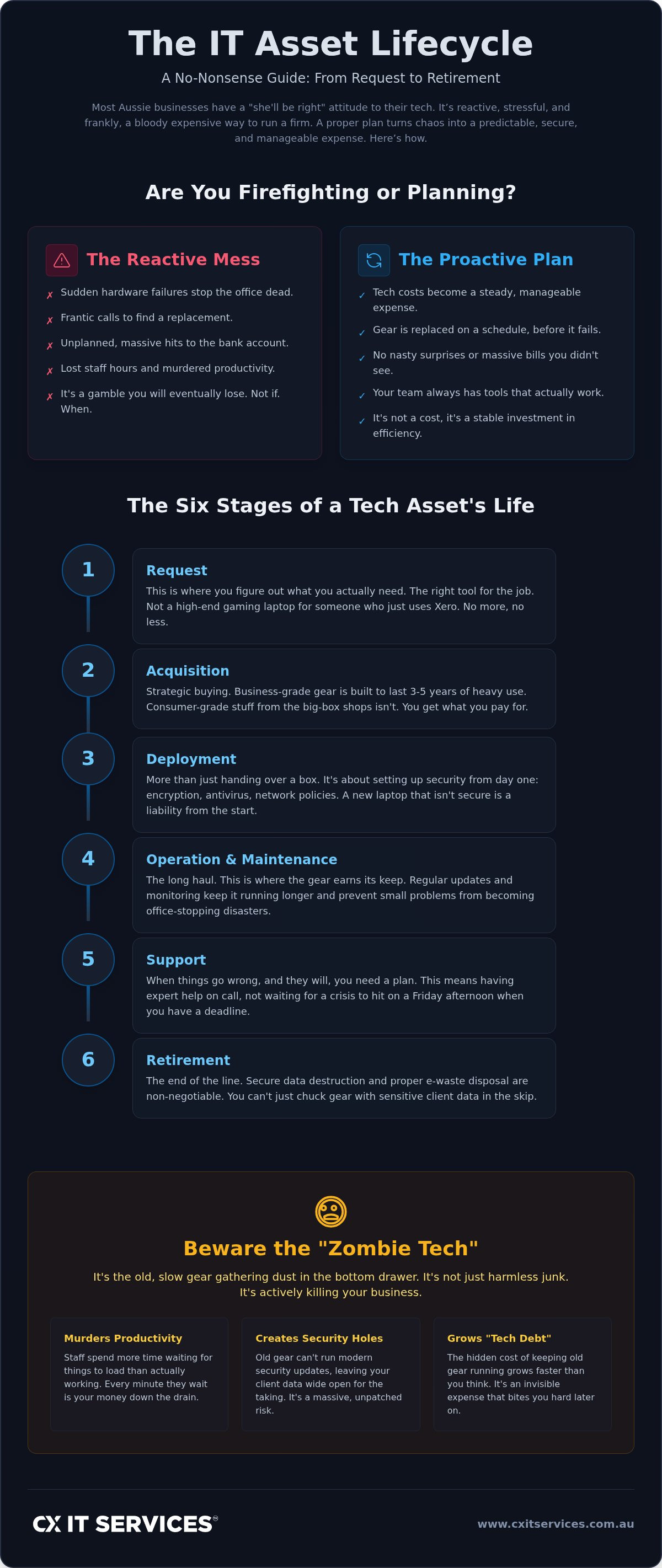
I like to keep things simple. Let's look at the actual path gear takes from the moment you realise you need it to the day it's hauled away for recycling. Effective IT asset lifecycle management follows six clear stages. It starts with the Request. This is where you figure out what you actually need to get the job done. You don't need a high-end gaming laptop for an accountant who primarily uses Excel and Xero. You need the right tool for the specific task. No more, no less.
Acquisition is next. This is where you find the right kit at the right price. Then you have Deployment, Operation, and Maintenance. This is the long middle bit where the gear actually earns its keep. Finally, you have Retirement. Each stage needs a plan. If you miss one, the whole system starts to leak money.
Procurement and Deployment
Acquisition should be strategic. It's not just about clicking "buy" on the cheapest thing at the shops. Consumer-grade laptops from a big-box retailer often lack the security features, build quality, and on-site warranties needed for a professional office. I always suggest using a partner who handles hardware procurement. They ensure you get business-grade gear that is built to last three to five years of heavy use.
Deployment is more than just handing over a box and a password. It's about setting up security from day one. This means configuring encryption, installing antivirus, and ensuring the device is ready to join your network securely. If you skip this, you're just inviting trouble later on. A laptop that isn't properly provisioned is a liability from the moment it leaves the box.
The long haul: Maintenance and Support
This is where most of the life of the asset happens. It's the years where that laptop or server is in someone's hands every day. Regular updates and monitoring keep the gear running longer. They also prevent small issues from turning into "stop-work" disasters. When you ignore maintenance, you aren't saving money. You're just deferring a larger, more expensive problem.
If you have ten or more staff, you can't manage this on a sticky note. You need a managed IT support plan to keep an eye on things. We use monitoring tools to spot a failing hard drive or a battery that is about to swell before the user even notices a problem. It keeps your team productive and your blood pressure low. If you want to see how your current gear stacks up, you can apply for a strategy session to get a clear picture of your technology's health.
The Financial Drain of Zombie Tech and Outdated Hardware
Dead set, nothing kills productivity faster than a computer that takes ten minutes just to open an email. Personally, I call this Zombie Tech. It is technically alive. The lights are on and the fan is spinning. But it is killing your business from the inside out.
Most bosses look at a $2,000 laptop and see a big expense. They don't look at the staff member earning $50 an hour who loses fifteen minutes every day to a slow machine. That is over $3,000 a year in wasted wages per person. The slow computer is actually the more expensive option. It is a drain on your cash flow that doesn't show up on a receipt. IT asset lifecycle management is the only way to stop this leak.
Old gear is also a massive target for hackers. As hardware ages, it eventually stops receiving the latest security patches. We saw this clearly with the end of support for Windows 10 in October 2025. Research shows that roughly 6 million devices in Australia alone were affected because they couldn't meet the hardware requirements for Windows 11. If you are still running that gear, you aren't just being frugal. You are being reckless with your client data.
Hidden costs you are probably ignoring
Downtime costs are the obvious ones. When a machine dies, work stops. But there are other costs that hide in the background. Old gear breaks more often, which leads to higher support costs and more frequent calls to the helpdesk. It is a cycle of constant repair rather than steady growth.
Electricity usage is another silent killer. An old on-site server can use double the power of a modern setup. In some cases, moving those old workloads to cloud services can slash your power bill and hardware maintenance costs in one go. It is about efficiency. Modern gear is faster, safer, and cheaper to run.
Predictable budgeting with a vCIO
The goal of a vCIO is to make your IT spend boring. I mean that in the best way possible. A strategic guide helps you map out your technology costs three to five years in advance. You should know exactly which laptops need replacing in 2027 and which servers are due for retirement in 2028.
This approach ends the "emergency" $10,000 spends when a critical piece of gear finally gives up the ghost. It allows you to move from unpredictable capital expenditure to a steady, predictable monthly cost. No more shocks. Just a clear path forward for your business growth.
Disposal and Data Security: Why You Can’t Just Chuck Gear in the Skip
Disposal is the final piece of the IT asset lifecycle management puzzle. It is also the one most bosses completely ignore until they see an old company laptop for sale on eBay with their client list still on it. Personally, I reckon throwing a hard drive in the general waste skip is the same as leaving your office keys in the front door with a "welcome" mat. It is a massive risk that is entirely avoidable.
Client data stays on those drives long after you have stopped using the machine. Even if the laptop won't turn on, the data is still there, sitting on the platter or the flash chips. You need a formal, documented process for wiping that data and disposing of the hardware responsibly. If you don't have a certificate of destruction, you don't have a plan. You just have a hope that nothing goes wrong.
Secure data destruction
Simply hitting "delete" or formatting a drive is not enough. Any kid with a free bit of software from the internet can recover those files in minutes. For legal and medical firms, this is a nightmare scenario. Under the Privacy Act, the penalties for a serious data breach are no joke. We are talking about fines that can reach $50 million or more. It is not worth the gamble.
You need professional data wiping that meets the NIST 800-88 standard. In some cases, physical destruction is the only way to be sure. We take those drives and run them through a shredder until they are nothing but tiny bits of metal and plastic. It is the only way to get true peace of mind that your client secrets aren't going to end up in the wrong hands.
Responsible e-waste recycling
Australia has a massive e-waste problem. We generated 588,000 tonnes of it in 2023. Because of this, the rules are getting much tighter. In Victoria, it has been illegal to put e-waste in landfill since 2019. Western Australia followed suit with a ban in July 2024. Even in states without a headline ban, you still have a legal duty of care to handle hazardous materials like lead and mercury properly.
Don’t be the business that ends up on the evening news for dumping old monitors in a paddock. It is bad for the planet and even worse for your professional reputation. Use a proper e-waste recycling service that follows the AS/NZS 5377 standard. This ensures the raw materials are recovered and the toxic stuff stays out of our soil. If you are ready to stop winging it and start managing your gear properly, book a strategy session with us to get your disposal process sorted.
Strategic Asset Management: Letting the Experts Handle the Heavy Lifting
Personally I reckon you have enough on your plate without worrying about battery health or server rack temperatures. You have a business to run. It probably isn't an IT business. Managing a fleet of 20 or 50 laptops is a full-time job if you do it right. It is not just about fixing things when they break. It is about the entire IT asset lifecycle management process. It requires constant oversight.
Partnering with an Australian owned managed IT provider takes the weight off your shoulders. We handle the procurement, the setup, the monitoring, and the eventual disposal. You get to focus on your clients while we ensure your tools actually work. We provide a safe pair of hands so you can stop playing part-time technician and get back to being a boss.
Fixing the 10-staff tipping point
I have seen it a hundred times. A business starts out doing their own IT because they have to. Then they hire a "guy who is good with computers" to help out. But once you hit ten staff, that model fails. It is no longer just a minor annoyance when a laptop dies. It is a systemic risk to your billable hours. You need systems and professional processes, not just quick fixes. Managed services give you enterprise-level management without the enterprise price tag.
It is about moving from reactive chaos to proactive stability. We use a vCIO strategy to ensure your gear is always modern and secure. This isn't just about software updates. Software doesn't fix a broken screen or drive an old server to the recycling centre for you. You need a local partner who handles the physical logistics of your hardware. We make sure the right gear is in the right hands at the right time. No excuses. Just results.
Real-world results
The results of proper management are practical and immediate. Less downtime means more billable hours for your team. If your staff aren't fighting with their computers, they are actually doing the work you pay them for. Better security means you can sleep at night. You won't have to worry about the massive data breach fines I mentioned earlier because your disposal process is locked down.
Predictable costs mean your accountant will actually like you for once. You stop having those awkward conversations about why you suddenly need $10,000 for a new server. Instead, you have a fixed monthly fee that covers the whole lifecycle. It is transparent. It is grounded. It is just smart business. Not alone. Together.
Take Control of Your Technology Journey
Personally, I reckon the peace of mind from a solid plan is worth more than any fancy software.
You now know that IT asset lifecycle management is about more than just clicking "buy" on a new laptop when a screen cracks. It is about stopping the "Zombie Tech" drain. It is about securing client data. It is about making your budget predictable.
You don't have to spend your weekends wiping hard drives. We have spent 26 years helping Aussie businesses grow by handling the heavy lifting. With on-site support across Australia, we provide a safe pair of hands. No corporate fluff. Just results.
If you are ready to stop reacting and start leading, get your technology sorted with CX IT Services. We will help you build a plan that actually works for your business. It is time to let your gear support your growth. Not slow it down.
Common Questions About Technology Planning
What is IT asset lifecycle management in simple terms?
IT asset lifecycle management is the strategic process of overseeing every piece of technology your business owns from the moment you request it to the day it is recycled. It ensures you have the right tools for the job without overspending or facing sudden hardware failures. Instead of just buying gear when things break, you follow a methodical path. This includes planning, procurement, maintenance, and secure disposal. It turns your technology into a predictable business asset.
Why is the disposal stage so important for security?
The disposal stage is critical because your hardware often contains sensitive client information and business secrets long after you stop using it. Simply deleting files does not remove the data from the physical drive. If an old laptop ends up in the wrong hands, it can lead to a massive data breach and heavy fines under the Privacy Act. You need a formal process for data wiping or physical destruction to stay compliant and secure.
How often should a business replace its IT hardware?
Most Aussie businesses should look at replacing their primary IT hardware every three to five years. Laptops often start to show their age after three years of heavy use. Servers and networking gear might push to five years. Replacing gear on this cycle ensures you stay under manufacturer warranty and can run the latest security patches. It also prevents the productivity slump that happens when staff are forced to work on slow, outdated machines.
Can I manage my IT assets with just a spreadsheet?
You can try using a spreadsheet, but it usually ends in disaster once you have more than ten staff. Spreadsheets are static and rely on someone manually updating them every time a laptop is moved or replaced. They don't tell you if a hard drive is failing or if a battery is swelling. Professional management uses live monitoring tools that provide real-time data. This allows you to be proactive rather than guessing what gear you actually own.
What are the risks of using old IT equipment?
Using old equipment creates two major risks: security vulnerabilities and massive productivity loss. Older machines often cannot run modern operating systems or the latest security updates, making them an easy target for hackers. They also slow down your team, leading to hidden costs that drain your billable hours. The cost of a staff member waiting for a slow machine is almost always higher than the cost of a new, reliable laptop. It is a false economy.
How does a managed service provider help with the IT lifecycle?
A managed service provider handles the entire process so you can focus on running your business. We take care of the procurement, the secure setup, and the ongoing monitoring of your fleet. We also provide a vCIO to help you plan your IT asset lifecycle management years in advance. This removes the stress of sudden hardware failures and ensures your gear is disposed of securely and legally. It is about having a safe pair of hands.
What is e-waste and why should my business care?
E-waste refers to any electronic equipment with a plug, battery, or cord that is no longer wanted. Your business should care because e-waste contains toxic materials like lead and mercury that cannot go into regular landfill. Many states, including Victoria and Western Australia, have strict landfill bans in place. Failing to recycle properly can lead to fines and reputational damage. Using a certified recycling service ensures you meet your legal and environmental duty of care.
Is it better to lease or buy IT hardware for my business?
It depends on whether you prefer to own your assets or keep your cash flow flexible. Buying gear is a capital expenditure that gives you total ownership but requires a larger upfront spend. Leasing or using a monthly subscription model moves the cost to an operational expenditure. This makes your IT budget more predictable and ensures you can refresh your gear more frequently. Both options work, but they require a clear strategic plan to be effective.