Stop burning cash on manual data entry. Learn how to automate front office tasks using the tools you already own and give your team hours back every week.
I have seen it a thousand times.
Smart, capable staff spending half their day on data entry that a basic bit of software could handle in seconds.
It is a waste of talent.
It is a waste of money.
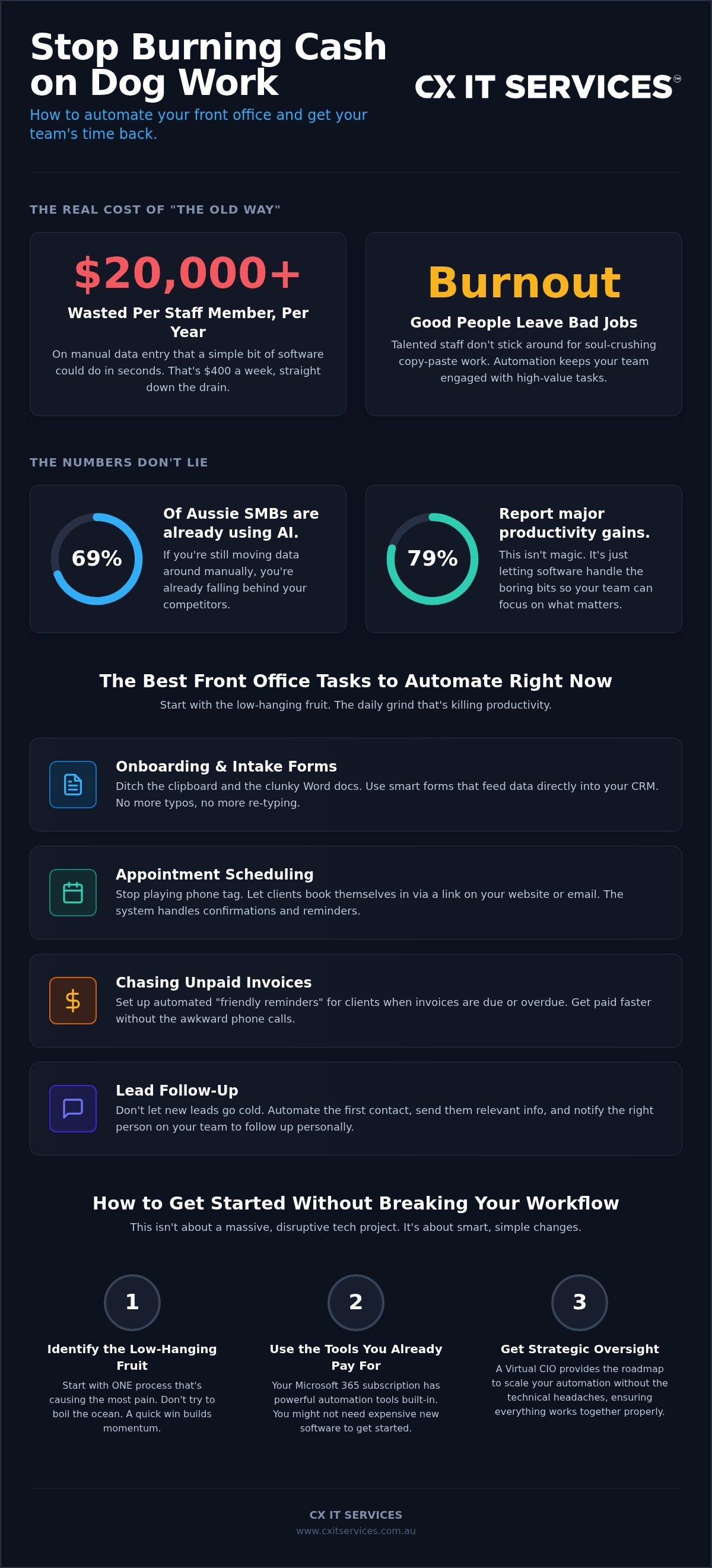
By early 2026, 69% of Australian small businesses had already adopted AI to stop this rot. If you are still manually moving data from a phone call to your CRM, you are falling behind. Personally, I reckon it is time to stop the bleeding and automate front office tasks before your team burns out.
You likely feel like information is constantly leaking out of your systems or getting lost between the cracks. You are not alone. It is a common frustration, but it is not one you have to live with.
I promise to show you the exact steps to strip away the manual "dog work" so your team can focus on high-value client interactions that actually make you money. We are going to map out what to automate first, how to organise a tech stack that actually talks to itself, and how to stay on the right side of the 2024 Privacy Amendment Act. It is about getting your time back. Simple as that.
Key Takeaways
- Stop burning cash on manual data entry that a computer could handle in seconds.
- Identify the low-hanging fruit like client onboarding and intake forms to get immediate time back.
- Use the tools you already pay for, like Microsoft 365, to automate front office tasks without buying expensive new software.
- Implement changes one process at a time to keep the office running smoothly while you upgrade.
- Learn how a Virtual CIO provides the strategic oversight needed to scale your automation without technical headaches.
Why manual front office tasks are costing your Aussie business a fortune
Personally, I reckon most Aussie firms are burning cash on tasks that a computer could do in seconds.
It is a hard truth to hear.
But every minute your receptionist spends re-typing data from a paper form into your CRM is a minute they are not helping a client.
That is not just inefficient. It is expensive.
When you choose to automate front office tasks, you are not just buying software. You are buying back your team's sanity and your firm's profitability. Every manual step is a chance for things to go wrong.
Manual errors in intake forms or billing create a massive ripple effect of drama later on. One wrong digit in a phone number or a misspelt email address can kill a lead. It leads to missed appointments, angry clients, and hours of "cleanup" work that nobody gets paid for. The mental load on your team is the real killer here. Nobody went to uni or did their training to become a professional copy-paster. It wears people down.
The hidden cost of the "status quo"
Sit down and do the maths. Take the hourly rate of your best front office staff. Now, track how many hours a week they spend on manual admin. If they are on $40 an hour and spend 10 hours a week on data entry, that is $400 a week gone. That is over $20,000 a year per staff member. And that is just the direct cost.
Think about the clients you lose because your follow-up was too slow. In 2026, people expect an immediate response. If your "status quo" is a paper-based system or a messy spreadsheet, you are losing your edge to competitors who use modern Office automation to move faster than you. I once saw a legal firm drowning in physical files. They were so busy "managing" the paper they forgot to manage the clients. They didn't just lose time. They lost their reputation.
Staff burnout and the revolving door
Good people do not want to spend eight hours a day on a spreadsheet. It is soul-crushing work. If you keep forcing talented staff to do "dog work", they will eventually walk out the door. The cost of hiring and training a new person in Australia is massive. It can take months to get someone back up to speed.
Automation keeps your team happy by letting them do interesting, high-value work. They get to solve problems and talk to humans. The machines handle the boring bits. A stable team is a profitable team. Simple as that. When you automate front office tasks, you create an environment where people actually want to stay. You replace the stress of "did I type that right?" with the confidence of a system that works. Not alone. Together.
The best front office tasks to automate right now
Personally, I reckon you should start with the low-hanging fruit. The stuff that happens every single day and makes your team want to pull their hair out. If you want to automate front office tasks effectively, you don't start with a complex AI brain. You start with the repetitive admin that is currently killing your productivity.
As of 2026, 79% of Australian small businesses using AI report significant productivity gains. They aren't doing anything magical. They are just letting software handle the boring bits. If you are still doing any of the following manually, you are leaving money on the table:
- Chasing clients for missing information on intake forms
- Playing phone tag to book a simple 15-minute consultation
- Manually sending "friendly reminders" for unpaid invoices
- Letting new leads go cold because nobody followed up within the hour
These are the tasks that eat your day. They are also the easiest to fix. When you get these right, your team can actually talk to the people in front of them instead of staring at a screen. If you're ready to stop the busywork, you can book a strategy session to see which of these will give you the biggest win first.
Onboarding and intake without the paperwork
Digital intake is the gateway to a modern front office. It is the difference between a professional first impression and a messy one. Instead of handing a client a clipboard or emailing a clunky Word doc, you send a link to a smart form. The data they type in feeds directly into your CRM or practice management software. No more scanning. No more manual data entry. No more mistakes. It is a cleaner experience for the client and a massive relief for your staff. Most of the tools you need for this are likely already sitting inside your Microsoft 365 subscription.
Scheduling that manages itself
Appointment scheduling should be a self-service thing for your clients. It is 2026. Nobody wants to wait for a call back just to book a time. By letting clients book based on your actual availability, you remove the friction. You can even set up automated reminders via SMS or email to slash your no-show rate. Personally, I have seen firms reduce missed appointments by over 20% just by turning on basic reminders. Integrating your calendar with your business phone system ensures that even when people do call, the system knows exactly who is available. It is seamless. It is professional. And it works while you sleep.
Billing and invoice reminders can also be set to run on autopilot. There is no reason for a human to spend their Friday afternoon chasing $200 debts. A simple AI & Automation workflow can handle the follow-up, only alerting you if the bill remains unpaid after three nudges. The same logic applies to nurturing leads. If someone downloads a guide or fills out a contact form, an automated sequence keeps them warm. It ensures no one falls through the cracks while your team is busy with billable work. Not alone. Together.
Choosing the right tools for a seamless front office
You do not need a million-dollar enterprise platform to get results. Personally, I reckon most firms buy too much tech. They end up with a dozen different apps that do not talk to each other. This creates a bit of a dog's breakfast of siloed data. And siloed data is the enemy of efficiency. If your CRM does not talk to your email, you are just creating more work for yourself by manually moving info back and forth.
Most of the power you need to automate front office tasks is already sitting inside your Microsoft 365 account. You just aren't using it yet. By January 2026, 69% of Australian small businesses had already adopted some form of AI or automation. They aren't all buying shiny new toys. They are just learning to use the tools they already pay for. AI and automation should be a core feature of your tech stack. Not an afterthought you try to bolt on later.
Maximising your current Microsoft 365 license
Look at Power Automate. It is the glue that connects your email, calendar, and files. You can set it up so that when a client signs a digital document, the system automatically creates a folder in SharePoint and pings your team in Teams. No manual steps. No forgetting. By 2026, Microsoft Copilot has also become a standard tool for drafting responses and summarising long meetings. You probably already own the tools you need to stop the admin bleed. You just need to switch them on and point them in the right direction. It is about making the software do the heavy lifting while your team focuses on the clients.
The role of AI in front office efficiency
AI is not just for writing poems. It is for clearing the deck. Think about the basic "how much do you charge" or "where are you located" questions that clog up your inbox. An AI chatbot can handle those 24/7 without your staff lifting a finger. We are also seeing huge wins with automated transcription for client meetings. Instead of a receptionist spending an hour typing up notes, the system provides a summary in seconds. It is about working smarter. Check out our pillar on AI automation for Aussie teams to see what is actually working right now. Just keep in mind that new rules like the 2024 Privacy Amendment Act mean you have to be transparent about using AI in your decision making. If the system is handling personal data, you have to tell people. It is about being professional and compliant. Not just fast. Not alone. Together.
How to implement office automation without breaking your workflow
Do not try to change everything on a Monday morning.
It is the fastest way to make your team hate you and your clients leave you.
Automation is a marathon. Not a sprint. If you want to automate front office tasks without the wheels falling off, you need a plan that respects your current workflow. You cannot just flip a switch and expect 26 years of habit to disappear overnight. It takes a methodical approach and a bit of common sense.
Pick one process. Fix it. Move to the next one. Trying to overhaul your entire intake, billing, and scheduling systems at once is a recipe for disaster. Start with the smallest, most annoying task. Maybe it is just the way you send out initial appointment links. Once that is running on autopilot, your team will see the benefit. They will stop seeing automation as a threat and start seeing it as a tool that actually helps them. Don't be a hero. Be a strategist.
Audit your current mess first
You cannot automate a process you do not understand. Map out exactly how a client moves through your office from the first phone call to the final invoice. Be brutally honest about what is actually working and what is just "how we have always done it." Most bottlenecks are hidden in plain sight. If your receptionist has to open four different tabs just to check a client's status, that is a shambles. It is also your first target. You can apply for an automation audit if you want a second pair of eyes to help spot these gaps before you start building.
Training and getting buy-in
Good people do not want to be replaced by a machine. They want the machine to do the bits of their job they hate. Show the team how this makes their life easier. Not just yours. If you can give them back two hours a day to focus on actual client care, they will back you 100%. Provide clear, simple, written instructions for the new way of working. Do not expect them to figure it out on the fly. As of 2026, 40% of Australian SMEs are now adopting AI without large technical teams. They succeed because they focus on the people as much as the tech. Celebrate the wins. Like the first time a client onboards without a single phone call. Not alone. Together.
Before you go live, test everything in a sandbox. This is just a safe environment where you can break things without a client seeing the error messages. Run a fake client through the whole system. If it breaks, fix it there. Only when it is bulletproof do you roll it out to the real world. It is about quiet competence. Not loud mistakes. If you take it one step at a time, you will build a system that works for you, rather than you working for the system.
Getting expert help to scale your automation strategy
Personally, I reckon automation is a bit like a high-performance engine. It is brilliant while it is humming along, but it is a massive headache when a belt snaps at 9 AM on a Tuesday. You do not want to be stuck in a support queue for a global software company while your front desk is in a shambles. You need someone to call. Scaling your efforts to automate front office tasks requires more than just a few clever scripts. It needs a strategy.
A Virtual CIO can help you plan that long-term roadmap. They look at your business goals and ensure your tech stack actually supports them. It is about avoiding the "shiny object" trap and building something that lasts. We take a "Safe Pair of Hands" approach because we know your reputation is on the line. If an automated follow-up goes to the wrong person, it is your brand that takes the hit. We make sure that doesn't happen.
Security is non-negotiable. When you start connecting your CRM to your email and your billing software, you are opening doors. You have to be certain those doors are locked. With the Privacy and Other Legislation Amendment Act 2024 coming into full effect by 10 December 2026, Australian businesses must be transparent about how they use personal information in automated systems. If your "bots" are handling client data, you need to be compliant. We don't just set up the tools. We protect the data.
Why managed IT and automation go hand in hand
Your automation is only as good as the managed IT support underneath it. Think of it as the foundation of your house. If the internet drops or a server fails, your automated workflows stop dead. We provide regular monitoring to ensure your systems are actually working. We keep your client data locked down while it moves between apps. It is about creating a stable environment where technology is a silent partner, not a constant source of stress.
The CX IT Services difference
We are Australian owned and operated. We get how local firms operate because we have been doing this for over 26 years. We know you don't have time for corporate fluff or technical jargon. That is why we focus on direct solutions and results. We offer fixed monthly fees so you do not get a nasty surprise when the bill arrives. We handle the tech so you can handle your business. Simple. It is about giving you the freedom to focus on what actually makes you money. Not alone. Together.
Take back your time and scale your firm
Personally, I reckon you have seen enough evidence to know the status quo is costing you too much.
Manual admin is a choice. It is a choice to keep burning cash on tasks a computer can handle in seconds. It is a choice to let your best staff burn out on data entry instead of helping clients.
We have shown you how to pick the low-hanging fruit like intake forms and scheduling. You know that your existing Microsoft 365 setup is likely the most powerful tool in your shed. Now, it is just about execution. It is about deciding to automate front office tasks so your team can focus on the high-value work they were actually hired to do.
We have over 26 years of experience helping Australian firms navigate this shift. We provide 24/7 Australian-based support and fixed monthly fees to keep your budget predictable and your systems secure. You don't have to figure this out alone. Not alone. Together.
It is time to stop the admin bleed and get your time back.
Book a strategy session to see how we can automate your office and let's get your front office moving at the speed of 2026.
Common questions about front office automation
Will automating my front office tasks replace my staff?
Automation will not replace your staff; it replaces the soul-crushing bits of their jobs. Personally, I reckon your team will be relieved to stop the manual data entry and focus on actual client care. By early 2026, 79% of Aussie SMBs using AI reported productivity gains. They aren't firing people. They are just getting more done with the same talented team.
How much does it cost to start automating office processes?
The cost varies depending on whether you are tweaking existing tools or building custom AI agents. While there is an initial setup involved, the real metric is the return on investment from the hours saved every week. Most professional firms find that the system pays for itself within a few months by freeing up staff for billable work. It is a strategic investment in your firm's growth.
Is front office automation secure for sensitive legal or financial data?
Security is a top priority, especially with the 2024 Privacy Amendment Act requiring transparency about automated systems. When you automate front office tasks, we use enterprise-grade encryption and ensure everything stays compliant with Australian law. It is often far more secure than having physical paper files or unencrypted spreadsheets sitting on a desk where anyone can see them.
What is the first task I should automate in my business?
Client intake is almost always the best place to start. It is your first impression and usually the point where most data errors happen. If your intake is already digital, look at your appointment scheduling or debt collection reminders. Pick the task that creates the most "drama" for your staff on a daily basis and fix that first. The momentum will carry you through the rest.
Do I need a full-time IT person to manage these automations?
You definitely do not need a full-time IT person on your payroll to manage this. That is exactly why managed IT services exist. We provide the strategic oversight and technical support for a fixed monthly fee. It gives you access to a whole team of experts for a fraction of the cost of a single internal hire. We handle the tech; you handle the clients.
Can I use Microsoft 365 to automate my office tasks?
Yes, Microsoft 365 is often the best and most cost-effective way to automate front office tasks. Tools like Power Automate can link your email, calendar, and CRM together without you needing to write a single line of code. Copilot can also handle the heavy lifting of summarising long meetings or drafting client responses. You likely already own the engine; you just need us to tune it.
How long does it take to see results from automation?
You will see results almost immediately for simple tasks like automated scheduling. For more complex end-to-end workflows, it might take a few weeks to iron out the kinks and get the team comfortable. Most Australian small business owners who adopt AI report that their workdays are noticeably shorter within the first few months of implementation. It is about getting your time back quickly.
What happens if the automated system fails?
If a system glitches, your managed IT support team is on it immediately. We monitor your automated workflows 24/7 to catch failures before they turn into a disaster for your clients. This is why we advocate for a "Safe Pair of Hands" approach. You need a partner who understands the plumbing of your business and can jump in to fix things the moment a "bot" stops behaving. Not alone. Together.