
A practical guide to the ACSC Essential 8 for accountants. Lock down client data, stop cyber attacks, and meet compliance without breaking your daily workflow.
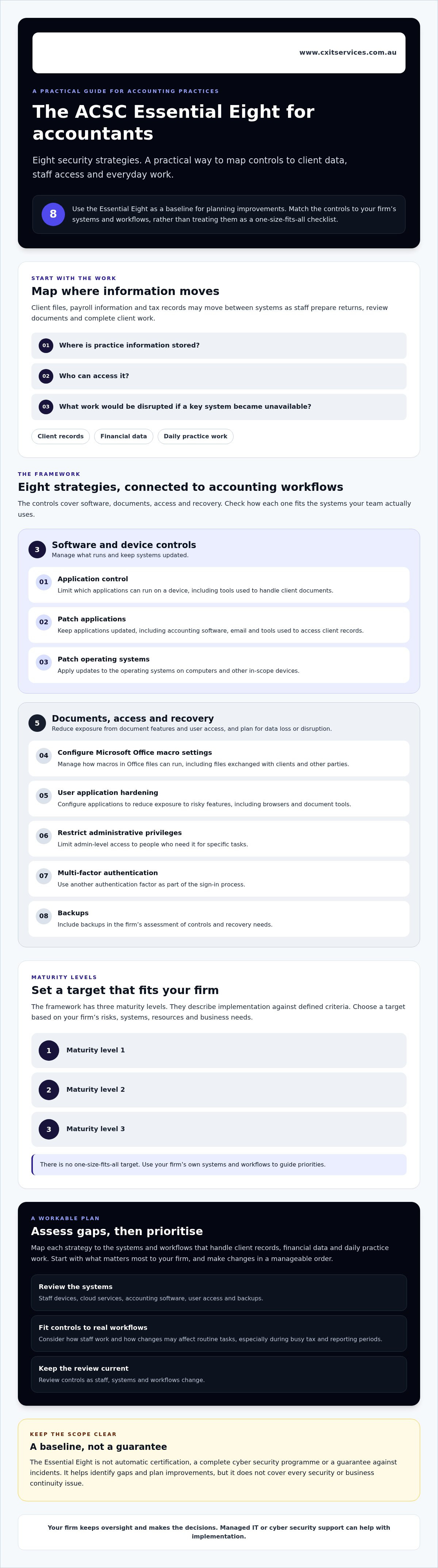
The acsc essential 8 for accountants offers eight baseline security strategies, with maturity levels to help a firm set a practical target. For an accounting practice, the key is applying them across cloud apps, staff access and devices without making routine work harder than it needs to be. Start by mapping where client data moves through everyday work.
Tighter controls can feel disruptive, particularly during busy tax and reporting periods. A practical plan maps each strategy to the systems and workflows your team actually uses, then tackles the highest priorities in a manageable order. Rather than bolting on every control at once, focus on reducing avoidable risk while keeping changes workable for staff.
This guide explains the eight strategies and maturity levels in plain English, then outlines where an accounting firm can begin, from access and patching to backups. You’ll also learn how to prioritise changes across practice and client data, and when managed IT or cybersecurity support may help with implementation while your firm retains oversight and makes the decisions.
Key Takeaways
- The acsc essential 8 for accountants provides eight security strategies and maturity levels to help firms plan practical improvements.
- Map each strategy to the systems and workflows that handle client records, financial data and daily practice work.
- Assess staff devices, cloud services, accounting software, user access and backups to identify gaps and set priorities.
- Choose a maturity target based on your firm’s risks, systems, resources and business needs, not a one-size-fits-all checklist.
- Regular reviews help keep controls effective as staff, systems and workflows change. A managed provider can support implementation while your firm retains oversight and decision-making.
What is the Essential Eight for accountants, and what does it cover?
A security review becomes more useful when a firm can name the controls it needs to check. The acsc essential 8 for accountants is a set of eight cyber security mitigation strategies developed by the Australian Cyber Security Centre (ACSC), part of the Australian Signals Directorate (ASD). It gives accounting practices a structured starting point for reducing exposure to common cyber security risks.
Quotable definition: The Essential Eight is an ACSC-developed set of mitigation strategies that helps organisations reduce exposure to common cyber security threats through prioritised security controls.
Why accounting practices handle sensitive information
Client files, payroll information and tax records can move between accounting software, email, cloud services and shared folders. Staff need access to the right information to prepare returns, review documents and complete other client work. The number of systems involved, and how information moves between them, affect how a practice should protect its data.
Start by asking where the practice’s information is stored, who can access it and what work would be disrupted if a key system became unavailable. The answers will vary between firms. The aim is to understand your own systems and workflows, rather than assume every practice faces identical risks or obligations.
What the Essential Eight does, and does not, tell you
The Essential Eight provides a set of mitigation strategies and a model for assessing how they’re implemented. Its three maturity levels describe implementation against defined criteria. They don’t mean a practice is risk-free.
The framework isn’t an automatic certification, a complete cyber security programme or a guarantee against incidents. It can help a firm identify gaps and plan improvements, but it doesn’t cover every security or business continuity issue. Use it as a baseline, then consider how its controls fit the practice’s systems, workflows and risks.
The eight Essential Eight strategies, explained for accounting workflows
The strategies are easier to apply when you connect them to the work staff do each day, rather than treating them as a standalone checklist. The ACSC groups controls that help prevent unapproved or vulnerable software, reduce the impact of compromised access, and support recovery after data loss or disruption. Its Essential Eight baseline sets out the current framework and guidance.
How application and operating-system controls affect daily work
These three strategies focus on the software running across practice systems and staff devices:
- Application control: Limit which applications can run on a device. For an accounting practice, this means managing what software staff can use on work devices, including tools used to handle client documents.
- Patch applications: Keep software updated to address known weaknesses. Include applications staff rely on for accounting work, email and access to client records.
- Patch operating systems: Apply updates to the operating systems on computers and other in-scope devices. An outdated device can put the systems and information accessed from it at greater risk.
Updates need to suit the practice’s systems and work patterns. Staff also need a clear way to report an application that stops working after an update or request software they need. The framework doesn’t mean every update can be applied without considering business impact, and no single control addresses every threat.
How access, macros, and backups fit into the framework
The remaining strategies address document features, user permissions, sign-ins and recovery:
- Configure Microsoft Office macro settings: Manage how macros in Office files can run. This matters when staff exchange spreadsheets and documents with clients or other parties.
- User application hardening: Configure applications to reduce exposure to risky features. This can help protect the browsers and document tools staff use to access practice systems.
- Restrict administrative privileges: Limit admin-level access to people who need it for specific tasks. Routine accounting work generally shouldn’t require staff to use an administrator account.
- Multi-factor authentication: Require another form of verification alongside a password for relevant sign-ins. Consider the systems staff use to access email, cloud services and accounting software.
- Regular backups: Keep backups of important information and systems so recovery is possible after loss or disruption. A backup is part of recovery planning, not proof that files can be restored successfully.
Some measures are technical controls configured on devices and systems. Others depend on staff processes, such as requesting access, handling unexpected files and reporting issues. Both matter. If your firm needs help assessing or implementing controls, you can ask about cyber security support while keeping oversight and decisions with the practice.
Essential Eight maturity levels: what should an accounting firm aim for?
Don’t choose a maturity target just because a higher number sounds safer. The Essential Eight Maturity Model helps an organisation assess its controls against defined criteria, with higher levels addressing more capable cyber threats. The ACSC’s Essential Eight maturity levels set out the official requirements. Check those criteria before saying your firm has reached a particular level.
Weigh the firm’s risks, systems, the information they hold and the safeguards already in place. A suitable plan should improve protection without ignoring how the practice needs to operate.
| Level | Broad intent | Questions for your practice |
|---|---|---|
| Level 0 | One or more Level 1 requirements are not met. | Which gaps leave important systems or information exposed? |
| Level 1 | Builds baseline protection against less capable threats. | Are core controls in place for the systems staff use to access client and practice information? |
| Level 2 | Raises protection against more capable threats. | Do higher-impact systems or data warrant stronger controls, and can the practice maintain them? |
| Level 3 | Sets stronger requirements to address highly capable threats. | Does the firm’s risk profile justify this level, and can it meet the detailed requirements consistently? |
How to interpret maturity without treating it as a pass-or-fail score
A maturity level describes implementation against the model’s criteria. It isn’t a badge proving a firm is secure. Reaching a level doesn’t remove risk, prevent every incident or automatically demonstrate compliance with other requirements that may apply to a business.
Use the current ASD criteria to assess each strategy, and be clear about the evidence behind your view. If a control is only partly in place, record that honestly rather than rounding up. The acsc essential 8 for accountants is a framework for prioritising improvements, not a universal ranking of accounting firms.
How to prioritise controls for your practice
Begin with the systems critical to client work, who can access sensitive information, and what disruption would mean for the practice. Then consider existing safeguards and dependencies. For example, changing access can affect work if the practice hasn’t confirmed who needs which permissions.
Keep a simple action register. For each gap, record the affected control, the risk or business impact, an accountable owner, any dependencies and a review date. Address the highest-priority gaps first, then revisit the plan as systems and workflows change. A risk-based sequence is more useful than promising a fixed timeline or chasing a maturity level without a clear business reason.
How accountants can assess Essential Eight gaps and plan next steps
Start with what the practice relies on to get through a normal working day. A useful first review doesn’t need to solve every gap. It should show what’s in scope, what’s working, what’s unclear and who will follow up.
A practical first review for a small or growing practice
Work through these steps with someone who understands the practice’s systems and workflows:
- Define the scope. List staff devices, cloud services, accounting software and other systems that support client work. Include the information they hold or provide access to, such as client files, tax records and payroll information.
- Map access. Record who can sign in to each system and what level of access they have. Check whether it still matches each person’s role, including access for staff who have changed responsibilities.
- Review the controls. For each Essential Eight strategy, note what the practice believes is in place and what evidence supports that view. Include how software and operating systems are updated, how administrative access is managed, and how backups are arranged.
- Mark unknowns clearly. If nobody can confirm whether a control is working, record it as unknown. Don’t assume that a setting is active or that a backup is usable just because someone remembers it being set up.
- Validate technical findings. Have appropriately qualified support check technical details against the current ASD criteria. This is especially useful where cloud services, software settings or device management are involved.
Turn findings into an owned improvement plan
Rank the gaps by potential business impact, dependencies and the evidence you have. A gap affecting a system needed for daily client work may need attention before a lower-impact issue. Check dependencies first: for example, changing access can affect work if the practice hasn’t confirmed who needs which permissions.
For every action, record the gap, the decision or change required, the person responsible and a realistic review point. Note what needs to happen first, too. This keeps the plan moving without assuming every change can be rolled out at once or without affecting staff workflows.
Give backup arrangements their own attention. Confirm what the practice expects to recover and who will verify that the arrangements meet those needs. Backup and disaster recovery planning can help frame that work. For support checking and addressing technical gaps, consider cybersecurity services. Your practice should retain oversight and decide its priorities.
If you’d like help reviewing the next steps for your practice, contact CX IT Services.
Maintaining Essential Eight controls with ongoing IT support
Security controls can drift as staff join or leave, applications change and working arrangements shift. A control that suited the practice last year may no longer fit how it works today. Regular reviews help turn the Essential Eight from a one-off project into a set of controls the firm can maintain.
What to review as the practice changes
Set a review rhythm that suits the practice, and revisit controls when a meaningful change happens. New staff, a new application or a change to remote access can all affect who can reach client information and how systems are protected.
- Access: Check that staff permissions still match their roles, and remove access that’s no longer needed.
- Devices and software: Review which devices and applications are in use, and whether updates are being managed as intended.
- Backups: Confirm that backup arrangements still cover the information and systems the practice needs to recover.
- Responsibilities: Keep roles and processes clear, including who reviews controls and who follows up identified gaps.
Keep a short record of reviews, decisions and outstanding actions. That gives the firm a useful history and helps staff pick up work when responsibilities change. Records don’t prove that every control is effective or guarantee compliance. They show what the practice checked, what it found and what it decided to do next.
When external support may help
Some practices have the time and technical knowledge to manage routine reviews internally. Others don’t. If staff aren’t sure whether a control is configured properly, or security tasks keep slipping behind client work, external support can help assess the technical details and maintain agreed controls.
Managed IT support or co-managed IT can help with implementation and ongoing technical work. They aren’t requirements of the Essential Eight. The firm still needs to set priorities, understand the risks, approve changes and check that the work supports its business needs. A provider can carry out agreed actions, but shouldn’t make those decisions on the practice’s behalf.
The acsc essential 8 for accountants works best as an active plan, not a document left in a drawer. If you’re weighing up which controls to maintain internally and where support could help, start a conversation with CX IT Services about your practice’s needs.
Turn your Essential Eight review into practical action
The acsc essential 8 for accountants gives your practice a structured way to review security controls. The useful work is matching them to your systems, data and daily workflows. Start by identifying what’s in scope, checking where controls are working or uncertain, then recording priorities, owners and review points.
Choose a maturity target that reflects your firm’s risks and capacity. Treat it as a guide to implementation, not a guarantee that risk has disappeared. Regular reviews help keep controls relevant as staff, software and working arrangements change.
If you’d like support turning the findings into a workable plan, apply to discuss your accounting firm’s IT and security needs. CX IT Services is Australian-owned and operated, with over 26 years of industry experience, 24/7 support and on-site technicians available across Australia. Your firm stays in control of its decisions, with specialist support available to help put agreed actions in place. Start with the gaps you can verify, then build from there.
Frequently Asked Questions
What is the Essential Eight for accountants?
The Essential Eight is a set of eight cyber security mitigation strategies developed by the Australian Cyber Security Centre, part of the Australian Signals Directorate. The acsc essential 8 for accountants gives a practice a structured way to review controls affecting client records, business systems and staff access. It isn’t an automatic certification or a guarantee that an organisation is secure. Check current ASD guidance for the latest strategy wording and maturity criteria.
Is the Essential Eight mandatory for accounting firms in Australia?
It isn’t automatically mandatory for every private accounting firm. The Essential Eight is mandatory for Australian non-corporate Commonwealth entities, but a firm’s own position depends on its circumstances and any obligations that apply to it. Don’t describe Essential Eight work as proof of compliance without checking the relevant requirements. Review current authoritative guidance and get appropriate professional advice about your firm’s situation.
What are the eight Essential Eight strategies?
The eight strategies are application control, patch applications, configure Microsoft Office macro settings, user application hardening, restrict administrative privileges, patch operating systems, multi-factor authentication and regular backups. In practice, they cover controls on software, devices, access and recovery. For example, a firm might review how staff sign in to cloud systems or how its accounting software is updated. Check current ASD guidance for the exact wording and implementation criteria.
How should an accounting firm choose an Essential Eight maturity level?
Start by mapping the firm’s systems, information, risks and existing controls. Then compare evidence of how each strategy is implemented with the latest ASD maturity criteria. Consider which systems are critical to client work, who can access them and what disruption would mean for the practice. Record gaps, dependencies, owners and review points. If technical evidence is unclear, get appropriately qualified support before claiming a maturity level.
Does the Essential Eight guarantee that an accounting firm will not be hacked?
No. The strategies can help reduce exposure to particular cyber security risks, but no framework guarantees that a firm will avoid an incident. A maturity level isn’t a risk-free state. Use the Essential Eight as part of broader security planning that includes suitable staff processes, ongoing review and recovery preparation. Revisit controls as systems, people and business workflows change, and avoid claiming that any single framework makes the practice completely secure.
Can an IT provider help an accounting firm implement the Essential Eight?
Yes. An IT provider may help assess systems, plan technical changes, implement controls and support them over time. The practice still needs to understand its risks, approve business decisions and oversee the work. Before engaging support, clarify the scope, responsibilities, reporting and how progress will be reviewed. Check that proposed advice reflects current ASD guidance and the practice’s actual systems, rather than relying on a generic checklist.





 Microsoft Partner