
Sort out who makes the calls before panic sets in. Use our cyber incident response plan template to protect your Australian business when things go wrong.
What happens when the first sign of a cyber incident is a staff member asking, “Who’s in charge?” A cyber incident response plan template should answer that before anyone starts switching systems off, deleting messages or making promises to customers.
The hard part isn’t writing a document. It’s deciding who can authorise containment, what evidence to preserve and how the business keeps operating while the facts are still unclear. A generic plan won’t help if it names the wrong people or ignores the systems your team actually uses.
This practical template gives you a structure to adapt to your organisation. Set roles and escalation triggers, record first-response actions, plan internal and external communications, and account for evidence, continuity and relevant Australian obligations. Treat it as a working document, not something to file away and forget. You’ll also find ways to test and update the plan so staff can follow it under pressure.
Key Takeaways
- Use a cyber incident response plan template as a starting point, then tailor it to your people, systems and business operations.
- Assign an incident lead, technical lead, executive decision-maker and communications owner so staff know who can make each call.
- Follow a consistent response sequence from identifying and assessing an incident through containment, investigation, recovery and review.
- Record decisions, actions and evidence to retain at each stage, including who is accountable and when to escalate.
- Test the plan with a tabletop exercise, then fix gaps such as unclear ownership, slow communications or missing access.
What a cyber incident response plan template needs to do
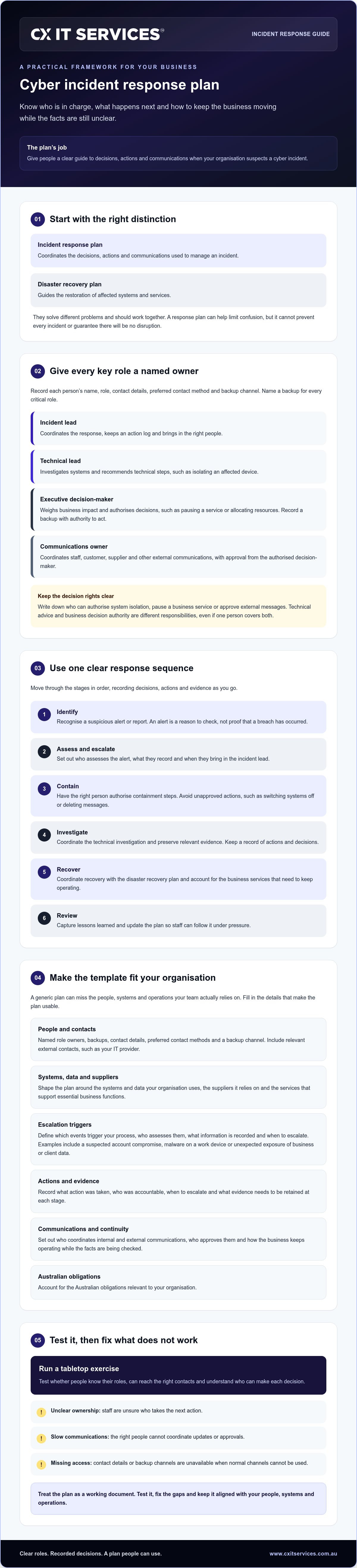
A plan earns its keep when people can use it under pressure, not just find it in a shared folder. A cyber incident response plan is a documented guide to the decisions, actions and communications your organisation will use when it suspects a cyber incident.
In plain terms, a response plan tells people how to manage the incident; a disaster recovery plan tells them how to restore affected systems and services. The two should work together, but they solve different problems. A response plan can help your team coordinate and limit confusion. It can’t prevent every incident or guarantee there’ll be no disruption. For a broader overview of the lifecycle, see computer security incident management, from preparation and identification through to recovery and lessons learned.
Business leaders, IT contacts and staff who may spot or report suspicious activity should know where the plan is and what they’re expected to do. Not everyone needs to make technical decisions. Staff need to know who to alert, while named decision-makers need to know when to act, escalate or seek advice. Shape the template around your systems, data, suppliers and the work your business can’t afford to stop.
What counts as a cyber incident for your organisation?
Start by defining the events that should trigger your process. Examples include a suspected account compromise, malware on a work device or unexpected exposure of business or client data. An alert is a reason to check, not proof that a breach has occurred. Your plan should say who assesses the alert, what information they record and when they escalate it. Set the triggers against your systems, data and operational risks. For example, consider which services support essential business functions and what signs would make you bring in the incident lead.
Why a template needs named owners, not just headings
“IT team” sounds tidy on paper. Under pressure, it can mean everyone assumes someone else is handling it. Name a decision-maker and a backup for each critical role, including who can approve containment steps, coordinate technical investigation and manage communications. Record how to reach them if normal channels are unavailable. If responsibilities are shared between staff and a provider, check whether your cyber security management services arrangements make those boundaries clear. Staff should know who takes the next action, rather than waiting for someone to notice a problem.
Set incident roles, escalation levels and decision authority
A plan can quickly fall over if it says “tell IT” but doesn’t say who makes the call. Keep the structure lean. One person can hold more than one role in a small business, as long as everyone knows which hat they’re wearing and who steps in if they’re unavailable.
Use your cyber incident response plan template to record each person’s name, role, contact details, preferred contact method and backup channel. Include relevant external contacts, such as your IT provider, and test the backup channel before you need it.
Incident lead: Coordinates the response, keeps an action log and makes sure the right people are involved.
Technical lead: Investigates systems and recommends technical steps, such as isolating an affected device.
Executive decision-maker: Weighs business impact and authorises decisions such as pausing a service or allocating resources. Name a backup with authority to act.
Communications owner: Coordinates staff, customer, supplier and other external communications, with approval from the authorised decision-maker.
The technical lead explains what’s happening in the systems. The executive decision-maker weighs that against customer impact, service disruption and business risk. Keep those responsibilities distinct, even if one person covers both in a small team. Australian Government guidance on how to prepare a cyber security incident response plan also places response planning within an organisation’s wider cyber security policy.
Who makes decisions during a suspected incident?
Write down who can authorise system isolation, pause a business service or approve external communications. Set a clear fallback if the primary executive can’t be reached. Staff should know who to contact and what they can do while waiting, rather than taking risky action or sending unapproved messages. If you use an external provider, make sure the agreed scope distinguishes who handles technical actions from who holds business decision authority.
When should an incident be escalated?
Don’t rely on a universal severity score. Set levels around likely business impact and what you still don’t know. For example, escalate promptly if you suspect client information is exposed, a critical system is unavailable or a privileged account may be compromised. Uncertainty matters too. If the team can’t establish what’s affected, bring in the incident lead and decision-maker.
- Lower impact, understood: Record the alert and assign someone to assess it.
- Wider impact or unclear facts: Contact the incident lead and technical lead through the agreed channel.
- Possible serious business or customer impact: Bring in the executive decision-maker and communications owner.
Set response expectations your team can meet, such as who must be contacted first and how quickly they should acknowledge the message. If you’d like help reviewing how technical responsibilities fit your arrangements, you can discuss your response plan.
Use a consistent response sequence from detection to recovery
A cyber incident response plan works best as a sequence staff can follow, with an owner, decision point and record at every stage. Keep the stages in order, but allow the incident lead to revisit an earlier step if new facts change the picture.
What should staff do in the first response window?
Give staff one clear, accessible way to report a suspicious event, such as a dedicated phone contact or reporting channel listed in the plan. Ask them not to delete messages, wipe devices or investigate beyond their authority. Those actions can remove useful information or make the situation harder to assess. Record when the event was noticed, what symptoms appeared, which accounts or systems may be involved, and what anyone has already done.
1. Identify. The person receiving the report logs the initial details and alerts the incident lead. The lead decides whether to begin the response process. Retain the original report and its time received.
2. Assess. The incident lead works with the technical lead to establish what may be affected and what remains unknown. Decide whether to escalate and who needs to be involved. Record known facts, uncertainties and the basis for the assessment.
3. Contain. The technical lead recommends steps to limit further impact, such as isolating an affected device. The authorised decision-maker weighs the security risk against disruption before approving action. Log what was approved, by whom, when and why.
4. Investigate. The technical lead examines relevant systems and information within their authority. The incident lead decides whether additional expertise is needed. Record findings, evidence locations and handling steps, avoiding unnecessary changes to original information.
5. Recover. Restore services only when the responsible technical and business decision-makers agree the risk is understood and recovery is appropriate. Recovery is not the same as containment. Check that the cause has been addressed before returning systems to normal. Review your backup and disaster recovery planning as part of this work, not as a substitute for investigating the incident.
6. Review. The incident lead coordinates a review once immediate response work is complete. Decide which plan, system or process changes are needed. Keep a record of the timeline, decisions, outcomes and assigned follow-up actions.
How should containment and recovery decisions be recorded?
Keep one incident log with timestamps, the person responsible, the decision made and its business reason. Note where relevant evidence is stored and who handled it. Avoid moving, editing or deleting original information unless an authorised technical lead decides it’s necessary. If personal information, insurer terms, contracts or sector rules may be involved, get appropriate legal, insurer or regulatory advice before making notification decisions. Don’t guess at obligations under pressure.
Fill in the cyber incident response plan template for your business
A plan can look complete until someone tries to use it and finds an old phone number or a system nobody remembered to include. Treat every blank as a prompt to check how your business actually works, not as a box to fill with a guess.
Use this cyber incident response plan template outline as a starting point. Add fields for any systems, suppliers or responsibilities specific to your organisation.
| Template field | Information your business must supply |
|---|---|
| Scope | Which business units, locations, systems and services the plan covers. Note anything outside its scope. |
| Plan owner | Name and role of the person responsible for keeping the plan current. |
| Approval and review | Approval date, approver and next review date. Update the plan when key systems, contacts or business arrangements change. |
| Systems and critical services | System names, business owners, purpose and the services that rely on them. Mark which functions need restoring first. |
| Data types | What information each system holds, such as staff, client or financial records. Confirm details with the relevant business owner. |
| Dependencies | Suppliers, cloud services, connectivity and other systems needed to run or restore critical services. |
| Contacts and channels | Internal decision-makers, IT contacts, key suppliers, insurer and advisers. Verify phone numbers, email addresses, preferred contact methods and a backup channel. |
| Incident records | Where to keep the incident timeline, decisions, actions, evidence locations and follow-up tasks, with access limited to appropriate people. |
What information should the template capture before an incident?
Make the system list specific enough that someone can identify each service and its owner without chasing people for clues. Map the dependencies as well. A practice management system, for example, may rely on separate identity, email or cloud services. Set recovery priorities with business owners, then check that your disaster recovery planning supports those priorities. A backup alone doesn’t say what to restore first or who approves the decision.
How should the plan handle privacy and notification decisions?
Add a decision log for information that may be affected, people potentially involved, relevant dates and what’s known or still uncertain. Ask the incident lead to verify which Privacy Act and Notifiable Data Breaches requirements apply to your organisation and the circumstances. Don’t pre-fill a conclusion that notification is or isn’t required. Get appropriate legal or privacy advice before making that call.
Ask the people listed in the plan to confirm their details and responsibilities. If you want help checking how your technical contacts and recovery arrangements fit together, ask CX IT Services to review your plan.
Test, maintain and get help with your incident response plan
A cyber incident response plan template is a starting point, not proof your process will work. A practical way to find gaps is to walk through a realistic scenario before a real incident puts everyone under pressure.
How can a business exercise its response plan?
Run a short tabletop exercise. Bring the people named in the plan together and talk through a scenario without touching live systems or interrupting services. For example, imagine staff can’t access a key cloud service and the cause is unclear. Share new information as the discussion unfolds, then ask what they’d do next.
At each stage, ask who decides, who acts, who records events and who communicates. Check whether participants can find the right contacts and understand when to escalate. The aim isn’t a perfect performance. It’s to expose uncertainty while it’s still safe to fix.
Record each gap as an improvement action, with a named owner and due date. Look for:
- Decisions nobody knew they were authorised to make.
- Delays reaching the right person or using the backup contact method.
- Missing system access, contact details or information needed to act.
- Unclear ownership between staff, management and external providers.
After the exercise, update the plan and check that the changes have been made. A list of lessons without owners and follow-up dates is just a list.
When should you review the plan or get outside support?
Set a scheduled review, then revisit the plan whenever a relevant change could make it stale. That includes staff or role changes, new suppliers, system changes and shifts in how the business operates. Confirm that contacts still work, responsibilities still make sense and the plan remains accessible to the people who need it.
Outside IT or cybersecurity support may help if no one is sure who owns technical investigation, system recovery or coordination with an external provider. Before relying on a provider during an incident, confirm what their agreed scope covers, who to contact and which actions remain your organisation’s responsibility. Managed IT support may help clarify technical responsibilities when the engagement scope fits.
Test the plan, fix what doesn’t work and keep the next review date visible. If you’d like help reviewing your organisation’s readiness and technical responsibilities, talk with CX IT Services about your plan.
Make your response plan ready before you need it
A response plan only earns its keep if people can use it under pressure. A cyber incident response plan template gives you a starting point, but its value comes from naming decision-makers, setting escalation points and recording what staff should do from the first report through to recovery.
Test the plan with a short exercise. It can show whether staff know who to contact, whether responsibilities are clear and where the document needs work. Keep it current as your people, systems and suppliers change. A plan you’ve checked beats a dusty document nobody can find.
If you want another set of eyes on your IT and cybersecurity arrangements, CX IT Services is Australian-owned and operated, with more than 26 years of industry experience. Its support and on-site technicians are available across Australia, with the right scope to be confirmed for your needs.
Apply to discuss practical IT and cybersecurity support. Start by making responsibilities clear, testing what you have and improving the plan from there.
Frequently Asked Questions
What should a cyber incident response plan template include?
A cyber incident response plan template should set out who leads the response, who makes business decisions, how staff report concerns and when to escalate. Include a response sequence, contact details, key systems and dependencies, communication steps, evidence records and recovery priorities. Tailor each field to your organisation. A template that lists the wrong contacts or misses a critical service won’t be useful when staff need it.
Can a small business use a cyber incident response plan template?
Yes. A small business can use a cyber incident response plan template and keep it practical. You don’t need a large response department, but you do need named people for critical responsibilities and backups if they’re unavailable. One person can hold several roles if decision authority is clear. Include relevant external contacts, such as your IT provider, and make sure everyone understands their part.
How often should a cyber incident response plan be tested?
Test the plan on a schedule your business can maintain, and again when important details change. Review it after changes to systems, suppliers, staff contacts or business processes. A short tabletop exercise lets people talk through a scenario without disrupting live services. Record decisions, delays and gaps, then give each improvement an owner and due date so the exercise leads to useful changes.
What happens if a business suspects a data breach?
If your business suspects a data breach, report it through the agreed channel, alert the incident lead and preserve relevant information. Don’t treat an alert as proof of a breach, and staff shouldn’t delete messages or wipe devices. The response team should establish what information and systems may be affected, what’s known and what remains uncertain. Organisations covered by the Privacy Act may need to assess a suspected serious data breach within 30 calendar days. Get advice on notification decisions.
Is a cyber incident response plan legally required in Australia?
There isn’t one answer that applies to every Australian business. Check your organisation’s circumstances, the information it handles and whether sector-specific rules apply. The Privacy Act’s Notifiable Data Breaches scheme applies to organisations covered by that Act, while the Security of Critical Infrastructure Act can impose obligations on relevant entities. Check current authoritative guidance and get legal advice. A general template alone can’t determine your compliance obligations.
What is the difference between an incident response plan and a disaster recovery plan?
An incident response plan guides decisions and actions during a suspected cyber incident, including escalation, investigation and communications. A disaster recovery plan focuses on restoring affected systems and services. Make sure the two plans work together, but don’t treat them as interchangeable. For example, the response plan helps decide whether systems should be isolated, while disaster recovery planning guides how and when services may be restored safely.
Who should be responsible for a cyber incident response plan?
A senior business decision-maker should approve the plan, and someone should own its maintenance. Assign an incident lead to coordinate actions, technical staff to assess affected systems and a communications owner to manage approved messages. In a small business, one person can cover multiple roles. Name a backup for each critical responsibility, and explain how internal staff and external IT support share the work.





 Microsoft Partner