
Tired of slow syncs and price hikes? Find secure cloud storage alternatives for your Aussie business that keep your data onshore and compliant. Don't risk it.
Personally, I reckon the most dangerous thing you can do for your firm's security right now is to keep treating your data like a pile of laundry tossed into a digital bucket.
Most Aussie businesses think the big global names are the safe bet.
They aren't.
With the new statutory tort for privacy invasion now in full swing, your "easy" setup is likely a massive liability. If you are hunting for cloud storage alternatives, you have probably already felt the sting of a massive subscription hike or the frustration of a file taking twenty minutes to sync on a local connection.
It is a common headache. You want your team to work fast. You need to know your data stays on our shores and follows the Australian Privacy Principles. Most importantly, you deserve a system that does not require a PhD to manage.
This guide explains why the standard digital bucket is failing your team. I will show you how to find a secure, local alternative that actually works. We will cover everything from data sovereignty to getting your upload speeds back where they belong.
Key Takeaways
- Global providers often hike prices without adding features. Now is the time to review cloud storage alternatives that actually fit your budget.
- Data sovereignty is a legal requirement. Storing data offshore can easily breach the Australian Privacy Principles and put your firm at risk.
- Shadow IT creates invisible security holes. This happens when staff use personal accounts because the official company system is too slow or clunky.
- Managed cloud services offer more than just storage. You get local support, automated backups, and proactive security that global giants cannot provide.
- Privacy-first options like end-to-end encryption can slash your risk. They protect your data, your reputation, and your bottom line.
Why you are likely hunting for cloud storage alternatives
Personally, I reckon the honeymoon phase with the big global tech giants is well and truly over. For years, Aussie firms were happy to dump their files into a generic digital bucket because it was cheap and it worked. But the landscape has shifted. If you have spent any time lately trying to get a human on the phone at a Silicon Valley headquarters, you know exactly why local businesses are now looking for cloud storage alternatives. You aren't just looking for a new place to put files. You are looking for a way to get your time and sanity back.
The "Big Three" providers are built for the masses, not for the specific needs of an Australian legal firm or medical practice. They offer a one-size-fits-all solution that often fits no one particularly well. Support has been replaced by chatbots. Privacy terms change whenever it suits their legal team, rarely in your favour. Cloud storage architecture is complex, yet these providers treat it like a self-service vending machine. When something goes pear-shaped, you are left shouting into a void.
The hidden cost of the big providers
Subscription creep is a slow poison for your bottom line. I see it all the time with my clients. A firm starts on a reasonably priced plan, but then the price hikes start rolling in. Usually, these increases come with a list of "new features" like AI tools or extra bells and whistles that your team never touches. You end up over-licensed and paying a premium for bloatware.
It is a classic bait and switch. They get you integrated into their ecosystem, then they squeeze. For a professional firm with ten or more staff, these monthly fees add up to a significant annual expense that provides very little actual value in return. You are essentially paying more to get the same service you had three years ago.
When "good enough" becomes a liability
Generic storage is fine for holiday snaps, but it lacks the granular security controls that finance and accounting teams require. If your system is slow to sync, it kills productivity. There is nothing more frustrating than a team member working on an outdated version of a document because the cloud didn't update fast enough on our local connections.
Reliability is the biggest factor. When a system goes down or a file goes missing, you cannot afford to be just another ticket number in a global queue. In a busy office, "good enough" is a liability that eventually costs you a client or a deadline. You need a system that is managed, monitored, and supported by people who actually know your name.
Privacy-first alternatives for the security conscious
Personally, I reckon if you are still using a generic consumer-grade cloud for your client files, you are playing a dangerous game with your reputation. With 1,205 notifiable data breaches reported in Australia in 2025, the "it won't happen to me" strategy is officially dead. For firms regulated by The Privacy Act 1988, the stakes have never been higher. You need to be looking at cloud storage alternatives that prioritise encryption over marketing fluff.
Proton Drive is often the first name on the list for a reason. Based in Switzerland, it operates under some of the most rigorous privacy protections on the planet. Everything is end-to-end encrypted. This means your data is scrambled before it even touches the internet. It is a solid choice for legal and medical teams who cannot afford even a single leak. For those who need to satisfy Canadian compliance or similar strict standards, Sync.com provides a very disciplined approach to file sharing and internal controls.
If you are sick of the subscription creep I mentioned earlier, pCloud is worth a look. They offer a lifetime storage option. You pay once and own the space forever. It is a fantastic way to lock in your costs and avoid the annual price hikes that plague the big providers. Newer players like Icedrive are also making waves. They have built a very slick interface for Windows users that makes your cloud storage feel exactly like a local hard drive. It is fast, intuitive, and lacks the bloat you find in older systems.
Zero-knowledge architecture explained
Zero-knowledge architecture is a system where only the user holds the decryption keys. This means the provider cannot see your data even if they wanted to. They have no way to peek at your files. They cannot be compelled by a foreign government to hand over your keys because they simply don't have them. For professional firms, this is a non-negotiable layer of protection. It ensures that even if the provider suffers a breach, your data remains useless to the attackers.
The trade-off between security and convenience
Hardcore encryption can sometimes make collaboration a bit clunkier. You might notice that searching within documents or previewing large files takes an extra second because the system is decrypting data on the fly. You need to decide where your "security vs speed" line sits. Most professional firms need a balance rather than an extreme. If you want to find that sweet spot without the technical headache, you can apply for a strategy session to see how we can streamline your setup.
The hidden danger of unmanaged "Shadow IT"
Personally, I reckon Shadow IT is the single biggest risk facing Aussie SMEs right now. It is not some complex cyber attack from overseas. It is your own staff using their personal accounts because your company system is a bit rubbish. When the official tools are too slow or clunky, people naturally look for their own cloud storage alternatives just to get their work done.
This creates a massive security hole that you cannot see or manage. If your data is sitting in a personal account, it is effectively out of your hands. You have no oversight. You have no control. If a staff member leaves tomorrow, they take all that sensitive client information with them in their pocket. It is a disaster waiting to happen.
Not alone. Together. That is how a team should work. But when everyone is off using their own private digital buckets, your business data is scattered across the internet. You are flying blind.
Why personal accounts are a disaster for business
Using personal accounts for work files makes a mockery of your cyber security insurance. Most policies have strict requirements about data oversight. If you cannot prove where your data is stored or who has accessed it, your claim will likely be knocked back. You have zero control over who has access to sensitive files and there is no audit trail of who downloaded or deleted what.
Human error was a major factor in 37% of data breaches reported in 2026. When that error happens inside a personal account, you have no way to fix it or even know it happened. It is a complete lack of corporate governance that puts your entire firm at risk. It is not just about convenience. It is about survival.
Bringing the team back under one roof
You cannot solve this problem with a stern memo. You need to provide a system that is actually easier to use than the personal ones your staff prefer. Centralised management is the only way to ensure data stays within the business. It allows you to lock down access and keep a clean record of every file movement. If you need a hand organising your team and getting your data back under control, managed IT support is the logical next step. We can help you build a system that people actually want to use.
A good system works for the team, not against them. When the work environment is seamless, staff have no reason to go rogue. You get the security you need. They get the speed they want. Everyone wins.
Data sovereignty and why location matters for Aussie firms
Personally, I reckon most people think the "cloud" is some magical floating ether. It isn't. It is a physical server bolted into a rack in a warehouse. Where that warehouse sits matters more than you might think. If your data lives in a US data centre, it is subject to US laws like the CLOUD Act. This allows foreign agencies to request access to your information without you ever knowing. For an Aussie law firm or medical clinic, that is a massive liability.
When you are hunting for cloud storage alternatives, you have to look past the shiny interface. You need to know exactly where the bits and bytes are stored. Data sovereignty is not just about residency. It is about ensuring your data is only ever subject to Australian law. With the maximum penalty for privacy breaches now sitting at $50 million or 30% of your adjusted turnover, you cannot afford to get this wrong. We saw a record 1,205 notifiable data breaches in the 2025 calendar year. Most of those firms probably thought they were "safe enough" too.
Not alone. Together. That is how we protect your data. Storing your files on Aussie soil is the only way to guarantee they meet our local standards.
Understanding the Australian Privacy Principles
Under the Australian Privacy Principles, you are legally responsible for what happens to data you send overseas. You are essentially vouching for the security standards of a provider on the other side of the world. If they have a bad day, it is your reputation on the line. Since the statutory tort for privacy invasion commenced on 10 June 2025, individuals can now sue your business directly for serious breaches. Local storage provides a clear legal shield. It ensures your data stays within our jurisdiction and meets the strict standards required by the OAIC.
The speed advantage of local servers
Speed is the silent killer of productivity in a busy office. Every time you save a file to a global provider, that data has to travel across the Pacific and back. This creates latency. It might only be a few milliseconds, but it adds up when your team is working on large spreadsheets or high-resolution designs. A local server in Sydney or Melbourne will always beat a server in Virginia for raw response times. You get faster file access and a team that isn't waiting for a sync icon to stop spinning. If you want to keep your data on home soil, check out our cloud services for local infrastructure options.
Staying compliant shouldn't be a guessing game for your management team. You need a setup that is built for the Australian regulatory environment from the ground up. If you are worried about where your data is actually sitting, apply for a data sovereignty audit today. We can help you bring your data home.
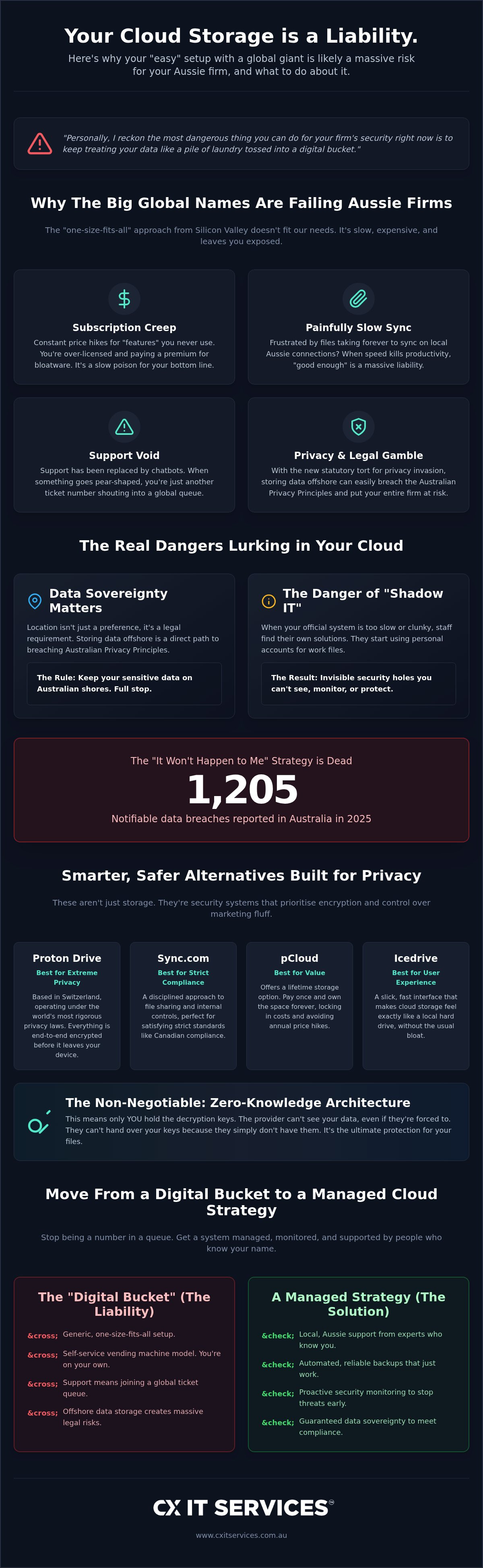
Moving from a digital bucket to a managed cloud strategy
Personally, I reckon the biggest trap you can fall into is treating your company data like a standalone app. Most people hunting for cloud storage alternatives just want a new icon to click. They want a cheaper price or a prettier interface. It is the wrong way to look at it. You need to stop thinking about storage and start thinking about infrastructure.
A managed cloud strategy is about control. Real control. It is about making sure the right people have the right access at all times. It is about knowing that your security and backups are being watched by experts while you sleep. We handle the heavy lifting. We manage the transition so it is not a headache for your team. You get back to your actual job. We make sure the data stays where it belongs.
Not alone. Together. That is how a professional firm stays secure in 2026. You deserve a system that provides stability rather than constant technical surprises.
The role of a Virtual CIO in your cloud journey
You do not need a full-time IT director on a six-figure salary to have a proper strategy. A Virtual CIO can help you pick the right stack for your specific needs. This is about long-term planning, not just buying another monthly subscription because the marketing looked good. We look at your whole business. We see how your storage connects to your security and your team's productivity. It is a roadmap for growth, not just a digital bucket.
Backup and disaster recovery is not optional
Cloud storage is not the same thing as a proper backup. This is a hill I will die on. If a staff member accidentally deletes a critical file and the system syncs, that file is gone from the cloud too. Syncing is not backing up. It is just mirroring. You need a disaster recovery plan that works when the cloud fails or a human makes a mistake. We provide an independent layer of protection. This ensures that even if your primary storage provider has a catastrophic day, your business keeps running.
We have 26 years of industry experience in keeping Aussie businesses safe. We know the pitfalls. We know the shortcuts that lead to disaster. Most importantly, we know how to build a system that works for you, not against you. Stop settling for "good enough" and start building a foundation that actually protects your firm's future.
Take control of your firm's digital future
Personally, I reckon you have seen enough to know that a generic digital bucket just doesn't cut it anymore. Data sovereignty is now a legal non-negotiable for professional firms. If your files are sitting in a US data centre, you are exposed. You also need to kill off Shadow IT before a departing staff member takes your client list with them in their pocket.
When you evaluate cloud storage alternatives, remember that you are building a foundation for your business. It is about more than just a sync icon. It is about having a system that works as hard as you do.
We have spent 26 years keeping Aussie businesses running. You get 24/7 support from people who actually know your name. You also get direct access to senior technicians who can solve problems on the spot without the corporate run-around.
Get a fixed-fee cloud strategy that actually protects your business.
You don't have to manage this technical mess alone. We are here to help you get it right and keep your team moving fast.
Frequently Asked Questions
Is Google Drive safe for Australian legal and financial firms?
Google Drive is not the best choice for firms handling sensitive legal or financial data. While it has security features, it is subject to the US CLOUD Act. This means foreign agencies can potentially access your files without your knowledge. With the statutory tort for privacy invasion active since June 2025, any breach of confidentiality could lead to direct lawsuits from clients. You need a setup that guarantees data sovereignty.
What is the best cloud storage alternative for privacy in 2026?
Proton Drive is currently the strongest option for privacy due to its Swiss jurisdiction and zero-knowledge architecture. It is one of the most reliable cloud storage alternatives because the provider cannot see your data. Sync.com is another great choice for strict compliance. Both ensure that only you hold the decryption keys. This is a massive win for confidentiality in the legal, medical, and financial sectors across Australia.
Does it matter if my business data is stored outside of Australia?
It matters immensely because the physical location determines which nation's laws govern your data. If your files sit in a Sydney data centre, they are protected by Australian law. If they are offshore, they might be subject to foreign warrants or data requests. For industries regulated by the APPs, keeping data on home soil is the only way to ensure 100% compliance and avoid massive regulatory penalties.
Can I use pCloud or Proton Drive for my whole team?
You can definitely use these for a team, but it requires a structured approach to manage access. Both providers offer business tiers with administrative controls. The trick is ensuring these tools are integrated into your wider IT strategy. Without professional management, even the most secure cloud storage alternatives can become a mess of unmanaged accounts. A Virtual CIO can help you organise this properly for ten or more staff.
What is the difference between cloud storage and cloud backup?
Cloud storage is a live synchronisation tool, while backup is a separate, historical copy of your data. If a staff member accidentally deletes a folder or a virus encrypts your files, cloud storage will sync those changes immediately. The data is gone. A proper backup system keeps independent versions of your files. This allows you to restore everything to a point in time before the disaster happened.
How do I stop my staff from using personal Dropbox accounts for work?
You stop Shadow IT by making the official company system more convenient than the personal ones staff prefer. If the work cloud is slow or difficult, staff will naturally go rogue. We recommend using centralised management to block personal logins on company hardware. This ensures all business data stays within your control. It also makes offboarding much easier when a staff member eventually moves on.
Is there a cloud storage provider that offers local Australian support?
Global providers like Google or Microsoft rarely offer local, human support when things go pear-shaped. You end up stuck in a chatbot loop. We provide local Australian support with direct access to senior technicians who know your name. With 26 years of industry experience, we understand the specific needs of Aussie firms. We manage the infrastructure so you never have to shout into a global void.
What are the Australian Privacy Principles regarding cloud storage?
The Australian Privacy Principles require you to take reasonable steps to protect personal information from misuse or loss. APP 8 specifically deals with cross-border disclosures. If you send data to an offshore cloud, you remain responsible for any breaches that occur. Given the maximum penalty for serious breaches is now $50 million, choosing a local, compliant storage solution is a critical board-level decision for any professional firm.





 Microsoft Partner