
Alerts are useless if nobody owns the fix. Here is how cloud security posture management helps Australian teams cut noise and resolve actual cloud risks.
What use is a cloud security alert if nobody knows who should fix it? I reckon that’s the part of cloud security posture management that matters most. Tools can flag risky settings across cloud environments, but a list of findings won’t reduce risk on its own. Someone needs to work out what matters, own the fix and check it’s been resolved.
It’s easy to lose track of cloud assets and settings, especially when alerts pile up. It can also be unclear where CSPM ends and monitoring or workload protection begins. That leaves teams with plenty of data and no obvious next step.
This guide explains cloud security posture management in plain English: what it checks, how it differs from related tools, and how to turn findings into practical work. You’ll see how to scope an assessment, prioritise issues, assign owners and verify fixes, alongside day-to-day IT and cyber security.
Key Takeaways
- Cloud security posture management helps identify weaknesses in cloud settings, access and safeguards.
- Prioritise findings by exposure, business impact and effort to fix, not by alert volume alone.
- Understand how CSPM relates to CNAPP, CWPP, CASB and SIEM, and where each fits.
- Start with business-critical cloud services, set clear ownership and review fixes after they’re made.
- CSPM works best alongside broader cyber security and cloud management, not as a standalone cure.
What cloud security posture management does for a business
Cloud security posture management (CSPM) finds potential weaknesses in cloud environments and helps teams manage the work to address them. That’s the plain-English version.
A cloud security posture is the state of an organisation’s cloud settings, access and safeguards at a point in time. It’s a snapshot, not a permanent guarantee. Cloud environments change as staff, systems and services are added or updated. A setting that was appropriate yesterday might be too open after a change today. That doesn’t mean every configuration issue is an active breach. It does mean the gap should be understood and assessed in context.
What CSPM looks for in cloud environments
CSPM helps build a picture of what cloud assets exist and how they’re configured. In practical terms, that might mean identifying storage, servers, databases and other services, then checking settings that could affect security. Teams can see more of their environment instead of relying on someone to remember every change.
Common areas of review include configuration settings, resources exposed to the internet and access permissions. A finding is a prompt to investigate, not proof that someone has accessed information or caused harm. Check what the resource does, who can reach it and whether the setting is intentional before deciding what to change.
Hypothetical example: A business uses cloud storage for working documents. A change leaves one storage area accessible more broadly than intended. CSPM could flag the exposure. The team would check what’s stored there, who needs access and whether the setting should be restricted. This is an illustrative example, not a reported client incident.
Why posture matters beyond the security team
A missed setting can have business consequences. Unintended access may expose information. A change to a critical service could disrupt work. If nobody knows what a system does or who owns it, investigating and responding can take longer than it needs to.
Business owners don’t need to interpret every technical alert. They do need a clear view of what matters to their operations, what’s being done and whether the fix has been checked. A finding on an old test system may call for a different response from an exposure affecting a service staff rely on every day.
The tool helps identify issues. People and processes decide what happens next: who assesses the finding, who approves a change that could affect users, and who confirms the risk has been addressed. I’d keep that work connected to the wider cyber security approach, so a configuration alert is considered alongside the business’s other security controls.
That’s the useful measure of posture management: not how many issues appear, but whether the business can understand them and make sound decisions about what to do.
How cloud security posture management finds and prioritises risk
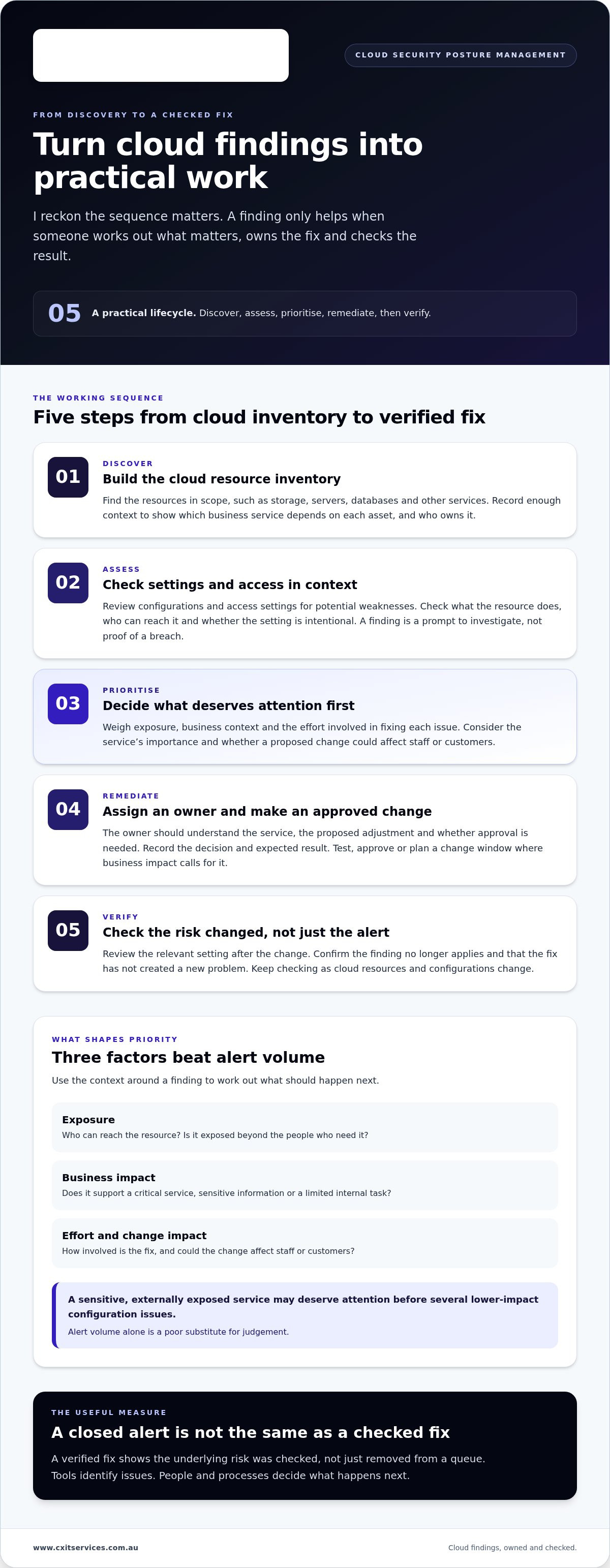
Cloud security posture management is useful when it turns scattered technical findings into a clear path from discovery to a verified fix. I reckon the sequence matters. Without it, teams can spend time clearing alerts without knowing whether the underlying risk has changed.
A practical lifecycle has five steps:
- Discover: Build an inventory of cloud resources in scope.
- Assess: Check configurations and access settings for potential weaknesses.
- Prioritise: Weigh exposure, business context and the effort involved in fixing each issue.
- Remediate: Assign an owner and make an approved change.
- Verify: Check that the change addressed the finding and didn’t create a new problem.
From cloud discovery to a prioritised finding
An inventory is the starting point. If a team doesn’t know a resource exists, it can’t sensibly assess its settings, importance or owner. The inventory also needs enough context to show which business service depends on each asset. An alert linked to a specific system and business purpose is easier to act on than one that simply says a setting needs attention.
Assessment gives the finding meaning. Is the resource exposed beyond the people who need it? Does it support a business-critical service or a limited internal task? Could the recommended change affect staff or customers? These details help distinguish an urgent risk from a lower-priority issue that still needs a plan.
IBM’s overview of Cloud Security Posture Management describes CSPM’s role in identifying and addressing cloud security risks. In practice, the order of work should reflect your business, not just the number of alerts. A finding involving a sensitive, externally exposed service may deserve attention before several lower-impact configuration issues. Alert volume is a poor substitute for judgement.
Remediation, validation and ongoing monitoring
Once a finding is prioritised, assign it to someone who can assess and manage the change. The owner should understand what the affected service does, what the proposed adjustment will change and whether approval is needed. Record the decision and expected result. That gives the team a useful trail if the change needs review or causes an unexpected effect.
Automation can help group findings, suggest fixes or carry out actions approved in advance. It shouldn’t make every change without regard for business impact. A setting change on a service staff rely on could interrupt work, so it may need testing, approval or a planned window. Keep the control proportionate to the risk.
A verified fix matters more than a closed alert because it shows the underlying risk was checked, not just removed from a queue. After a change, review the relevant setting and confirm the issue no longer applies. Then keep checking over time. Cloud resources and configurations change, so a fix today doesn’t prove the same setting will remain safe after later updates.
If your team needs help connecting cloud security findings with day-to-day IT decisions, get in touch with CX IT Services to discuss your environment.
CSPM vs CNAPP, CWPP, CASB and SIEM: what is different?
Personally, I find these terms easiest to sort out by asking what job each one does. They can sound like competing answers to the same problem, but they focus on different parts of the security picture. Products can overlap, and vendors may bundle capabilities in different ways.
Cloud security posture management (CSPM) gives teams visibility into cloud configurations and security posture. It helps identify settings or access arrangements that may need attention. It isn’t a complete cyber security programme. Recognising a CSPM capability doesn’t tell you what other protections or processes are in place.
CSPM and CNAPP: posture management within a wider platform
I think of CSPM as a specific capability and CNAPP, or a cloud-native application protection platform, as a broader platform approach that can bring several cloud security capabilities together. CSPM may sit alongside workload protection and other functions within a CNAPP. The capabilities included vary between vendors, so the label alone doesn’t tell you exactly what a product covers. Microsoft's perspective on CSPM and CNAPP describes this relationship.
CSPM, CWPP, CASB and SIEM at a glance
Here’s the comparison I use to keep the categories straight. These are broad descriptions, not rigid product boundaries.
| Category | Primary job | Typical focus | Relationship to CSPM |
|---|---|---|---|
| CSPM | Show cloud configuration and posture risks | Settings, access and exposed cloud resources | Focuses on the cloud environment’s configuration and safeguards |
| CNAPP | Bring cloud security capabilities together | May combine posture, workload and other cloud security functions | Can include CSPM as one capability |
| CWPP | Protect cloud workloads | Applications and systems running in cloud environments | Addresses workload protection, a different focus from configuration posture |
| CASB | Provide visibility and controls around cloud service use | How people access and use cloud services | Can complement CSPM by focusing on cloud service activity |
| SIEM | Collect and analyse security events | Security records gathered from systems and services | Can help teams investigate events alongside posture information |
When a product or report says it covers “cloud security”, look at the job it actually does. Is it checking cloud settings, protecting workloads, controlling cloud service use or analysing security events? Those functions can work alongside each other. None automatically replaces the others, and a broad platform label doesn’t prove every relevant risk is covered.
I’d start with the business problem, then map the capability to it. That keeps the discussion grounded and stops a pile of acronyms making the decision harder than it needs to be.
How to put cloud security posture management into practice
I reckon the best place to start is with the cloud services the business can’t afford to lose, not a grand plan to fix every finding in one hit. Cloud security posture management works better as a practical routine than a one-off clean-up. Get a clear view of what’s in scope, decide what matters first, then make sure someone owns the next move.
Set scope, priorities and accountability
Agree which cloud environments and business services the review covers. Include systems people rely on for essential work, such as handling client records, processing transactions or keeping staff connected. If the scope is woolly, teams can miss important services or burn time chasing issues outside the review.
Set priorities using business context, not a severity label on its own. Is a resource exposed? What service depends on it? Could a change interrupt staff or customers? A generic rating can help sort the queue, but it doesn’t know how your business runs. I’d start with known exposure tied to critical services, then plan lower-impact improvements without pretending they’ve disappeared.
Make responsibility clear before the work gets bogged down. IT can assess the technical change. Security can advise on the risk. The service owner can explain operational impact and timing. Give each material finding one accountable owner and an agreed review point. If that person can’t make the change, or it could affect a live service, decide who approves the next step and where to escalate it.
Build a repeatable remediation process
Keep a usable record for each finding. It doesn’t need to be fancy, but someone should be able to pick up the thread without starting from scratch. Record:
- the affected resource and business service
- why the issue has its current priority
- the decision, including any reason for delaying action
- the owner and agreed next step
- when the decision will be reviewed and how the result will be checked
This makes the difference between “urgent” and “can wait” visible. An exposure affecting a critical service may need prompt escalation. A lower-impact improvement might fit with planned maintenance, as long as the reason and review point are written down. “We’ll get to it” isn’t a process. It’s how work disappears.
Keep cloud findings connected to wider cyber security management, so they’re considered alongside other security decisions. Include an overview of the cloud services in scope, the people who manage them and the business services they support.
After the work, record who checked the result and what remains open. If you need help fitting cloud security into a practical IT process, apply to discuss your cloud environment with CX IT Services.
Where CSPM fits into Australian managed cloud security
I reckon CSPM only earns its keep when the findings connect to the way the business actually runs. A posture check can point out a concern, but it can’t decide how a change affects staff, clients or daily work. That’s why I see it as one part of cloud and cyber security, not a fix-all on its own.
For Australian businesses without a big internal security team, the tricky bit is often keeping the work moving while everyday IT still needs attention. A managed support partner can bring cloud, cyber security and operational responsibilities into the same conversation. No fancy process needed. Just clear roles and someone keeping an eye on the follow-through.
When managed support can help keep findings moving
Cloud changes can affect services staff rely on. The person reviewing a finding may need input from whoever manages routine IT changes, as well as the owner of the affected service. Sorting out those responsibilities early saves crossed wires. People know who assesses the risk, who approves a change and who checks the result.
Ongoing cloud services management can sit alongside cyber security and day-to-day IT. That helps keep cloud responsibilities in view as the business operates and changes. It doesn’t make CSPM a cure-all. The useful part is having people coordinate the work instead of leaving security findings in a queue on their own.
CX IT Services is an Australian-owned managed IT provider based in Melbourne, supporting businesses in Melbourne, Brisbane and Sydney. The company provides 24/7 support and on-site technicians across Australia. For businesses with ten or more employees, managed IT support can connect cloud security tasks with everyday IT responsibilities. The tool can flag an issue. The people involved still need to decide what action makes sense.
A practical next step for Australian businesses
Before a planning conversation, jot down what you know. A rough, honest picture is a better start than waiting until everything is neatly documented:
- which cloud environments and business services are in scope
- the concerns or findings already on your radar
- who currently manages cloud settings and security decisions
- which services are most important to keep running
- what’s been fixed, deferred or left without an owner
You don’t need every answer before starting. This list gives the conversation somewhere useful to begin and helps separate immediate concerns from work that can be planned. It also makes gaps in ownership easier to spot.
If your business has ten or more employees in Melbourne, Brisbane or Sydney and you want to talk through cloud security alongside managed IT, apply to speak with CX IT Services.
Make the next cloud security decision a clear one
You don’t need a perfect cloud environment before you can make progress. You need a workable starting point: what matters most to the business, what needs attention and who will take the next step. Personally, I’d rather see one important risk properly owned and addressed than a long list of findings nobody has time to manage.
That’s the practical value of cloud security posture management. It can help bring cloud risks into view, but lasting progress depends on fitting the work into your broader IT and security responsibilities. A plan should make sense for your people, your systems and the way your business operates.
CX IT Services is Australian-owned and operated, with over 26 years of industry experience supporting businesses with their IT and security needs. If you’re ready to work out a sensible next step for your cloud environment, apply to discuss your cloud security needs.
Start with what you know. Build from there. Your cloud security work can become clearer and more manageable, one decision at a time.
Frequently Asked Questions
What is cloud security posture management in simple terms?
Cloud security posture management (CSPM) checks whether cloud systems are set up with appropriate safeguards and helps a business address gaps. Think of it as a condition check, not a guarantee that cloud services are safe from every threat. For example, it may flag a permission that gives more people access to a finance folder than their roles require, prompting the business to review who genuinely needs access.
How does CSPM identify cloud misconfigurations?
CSPM checks cloud resource settings against rules or security policies, then flags settings that may create risk. Depending on the system being assessed, these could include access permissions or whether a resource is exposed more broadly than intended. A finding needs context before anyone changes a setting. Confirm what the resource does, whether the configuration is deliberate and what impact a correction might have.
Is CSPM the same as a cloud security platform or CNAPP?
No. CSPM is a capability focused on cloud configuration and security posture. A CNAPP is a broader platform grouping that may combine CSPM with other cloud security functions, such as workload protection. The exact mix varies between products, so the name alone doesn’t confirm what is covered. A cloud security platform is also a broad term, not one standard set of features. Check the specific capabilities against your needs.
Can CSPM work across multiple cloud environments?
It can, if the CSPM solution supports the environments in use and has the access needed to assess them. Coverage can vary by cloud service, resource type and configuration, so “multi-cloud” shouldn’t be taken to mean every asset is automatically visible. Before relying on the results, map which environments and services are included, identify any gaps, and agree how newly added resources will be brought into scope.
What is the difference between CSPM and SIEM?
CSPM focuses on the security state of cloud configurations, such as whether access settings appear too broad. A SIEM collects and analyses security events from systems and services, helping teams investigate activity over time. For example, CSPM might flag a cloud setting that needs review, while a SIEM might help investigate a sequence of sign-in events. The tools answer different questions, and one doesn’t automatically replace the other.
Does CSPM automatically fix cloud security issues?
Not necessarily. CSPM can identify a concern and may offer a recommended action, but a recommendation is different from an approved change. Some tools or workflows may support automated fixes, depending on how they’re configured. Changes affecting a live service should be assessed for business impact and handled under suitable change controls. After any fix, check that the setting changed as intended and that the service still works properly.
How should a small business start using CSPM?
Start with a manageable scope, not every cloud resource at once. For a business with ten or more employees in Melbourne, Brisbane or Sydney, that could mean listing the cloud services supporting essential work, noting known concerns and identifying who currently manages them. Then agree how findings will be reviewed, assigned and checked. This gives a small team a practical way to begin without turning CSPM into another unattended alert queue.





 Microsoft Partner