
Wondering what is cloud computing? Here is a plain-English guide for Aussie businesses. Cut the IT sales fluff, ditch the office server, and do it properly.
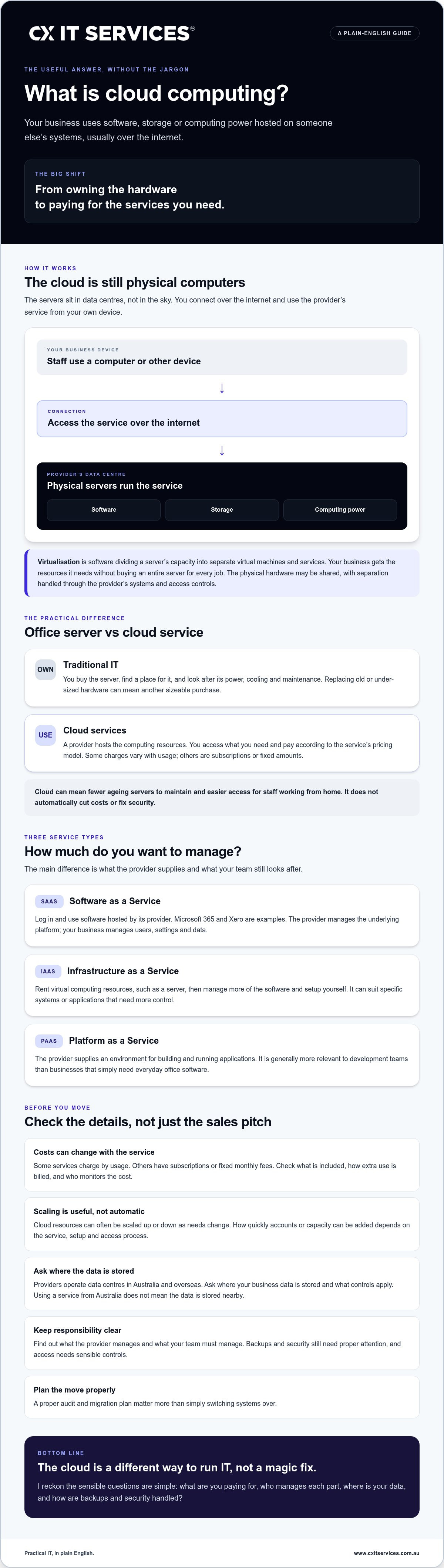
What if the server in your office cupboard stopped being your problem? If you’re asking “what is cloud computing”, the plain-English answer is this: your business uses software, storage or computing power hosted on other people’s systems, usually over the internet. You’re shifting from owning the hardware to paying for the services you need.
Fair question, though: is it just a fancy way to charge more for IT? Personally, I reckon that’s a sensible thing to ask. Cloud won’t automatically cut costs or fix security. But it can mean fewer ageing servers to maintain, easier access for staff working from home, and monthly costs you can plan around. Backups and security still need proper attention. The cloud isn’t magic, and anyone selling it that way is giving you a load of fluff.
After 26 years working in IT, I’ve seen the difference a well-planned setup can make. In this guide, I’ll explain the main types of cloud computing, what to consider before moving, and how to think about costs, security and backups. No jargon tour. Just the practical details Aussie businesses need to make a sound decision.
Key Takeaways
- I explain what is cloud computing in plain English, without burying you in technical jargon.
- See how virtualisation lets businesses use computing resources without owning the whole lot.
- Compare public, private and hybrid cloud to work out what may suit your business needs.
- Find out what to check before moving business systems and data into the cloud.
- Learn why a proper audit and migration plan matter more than simply switching systems over.
Forget the jargon: what is the cloud actually?
Personally, I reckon the simplest way to think about the cloud is using someone else’s computer. The computers are in data centres, not floating above your office. You connect to the service over the internet and use its software, storage or computing power from your own device.
Cloud computing is a service model where you access computing resources over the internet instead of owning and running all the hardware yourself. That’s the useful definition. The cloud isn’t one physical place, and your files don’t automatically live in the same building as your software. Their location depends on the provider and service you use. For a broader overview of what the cloud actually is, Wikipedia covers the main service and deployment models too.
The cupboard server vs the cloud
Traditional IT often meant buying a server, finding somewhere to put it and hoping it kept doing its job. It needed power, cooling and maintenance. If it became too old or ran out of capacity, replacing or upgrading it could mean another sizeable purchase.
With cloud services, you use computing resources hosted by a provider and pay according to the service’s pricing model. Some charges vary with usage; others are set as a subscription or fixed amount. It’s a bit like the electricity bill in the sense that you’re paying for a service rather than buying the power station. Just check what the fee includes, and how it changes as your needs grow.
Why the name is a bit of a stitch-up
There’s no cloud in the sky. The term describes services delivered over the internet, backed by physical servers in data centres. Providers operate these facilities in different locations, including Australia and overseas, so don’t assume your business data is stored nearby just because you’re using it from here.
In practical terms, you’re using capacity on a provider’s infrastructure rather than buying every server yourself. That can remove some hardware from your office, but it doesn’t mean the equipment has vanished. It’s sitting somewhere else, managed as part of the service. If data location or access matters to your business, ask the provider where it’s stored and what controls apply.
No hot server cupboard. No office cat investigating the cables. But the cloud still needs sensible choices about costs, access and data handling. It’s a different way to run IT, not a magic trick.
How cloud computing works without the technical headache
Here’s the simple version. A provider runs the physical servers, then uses software to divide their capacity into separate virtual machines and services. That process is called virtualisation. Your business gets access to the resources it needs, without buying an entire server for every job. Think of it as getting your own slice of the pie, not paying for the whole bakery.
In practice, that slice isn’t always a dedicated machine. It may share physical hardware with other customers while remaining separated through the provider’s systems and access controls. For a plain-English overview of the delivery of computing services, Microsoft Azure explains the basic idea without needing a networking degree to follow along.
The three flavours: SaaS, IaaS and PaaS
I find it easiest to understand cloud services by asking how much of the setup your business wants to manage:
- Software as a Service (SaaS): You log in and use software hosted by its provider. Microsoft 365 and Xero are familiar examples. The provider manages the underlying platform, while you manage your users, settings and data.
- Infrastructure as a Service (IaaS): You rent computing resources, such as a server, then manage more of the software and setup yourself. For workloads requiring dedicated physical hardware rather than shared multi-tenant resources, Australian hosts like Twisted Servers provide dedicated infrastructure. It can suit businesses with specific systems or applications that need more control.
- Platform as a Service (PaaS): The provider supplies an environment for building and running applications. It’s generally more relevant to development teams than to a business that simply needs everyday office software.
Different layers mean different responsibilities. Before choosing, get clear on what the provider manages and what your team still needs to look after.
Pay-as-you-go versus buying the lot
Cloud resources can often be scaled up or down as business needs change. If you bring on five new staff, you may be able to add accounts or capacity without buying another server. How quickly that happens depends on the service, setup and access process, so don’t assume new starters will be ready by Monday afternoon without checking first.
Pay-as-you-go can help avoid paying for unused capacity, but it doesn’t automatically make cloud cheaper. Some services charge by usage; others use subscriptions or fixed monthly fees. Check what’s included, how extra use is billed and who keeps an eye on it. A predictable fee can make budgeting easier, while usage-based charges need monitoring to avoid surprises.
One practical detail: cloud services rely on a stable internet connection. If files take ages to open, staff won’t care that the setup is technically elegant. Data sent between your device and a cloud service should be protected with encryption, but check what the provider secures and how your accounts are configured. If you’re weighing up cloud services for your business, I’d start by matching the service and its costs to the way your team actually works.
Public, private, and hybrid: which one is not a waste of money?
People often ask me which cloud setup is safest. The honest answer is that the label alone won’t tell you. Public, private and hybrid describe how the technology is set up, not whether your business is automatically protected. If you’re working out what is cloud computing for your business, compare the ongoing cost, the level of control you need and who’s responsible for security.
Think of public cloud as an apartment building. Different businesses share the underlying infrastructure, but each uses its own services and access controls. Private cloud is more like a detached house, with resources dedicated to one organisation. Hybrid combines the two, and can also connect cloud services with systems that remain at your office.
The case for the public cloud
Microsoft Azure and Amazon Web Services (AWS) are well-known public cloud providers. For a smaller team, public cloud can offer access to substantial infrastructure without buying and maintaining it all yourself. Providers invest in security controls, but that doesn’t secure your business by default. Account settings, user access and the way services are managed still matter.
When to go private or hybrid
A private cloud may suit a business that needs more control over its environment or has specific security requirements. It usually costs more to dedicate resources to one organisation, and private doesn’t automatically mean safer. Hybrid can keep a system on-site while other services move to the cloud, but managing both environments takes planning.
Legal and financial firms should assess their own data, contractual and regulatory requirements rather than assume a private cloud is mandatory. The right design depends on what you handle and the controls you need. I’d compare the options this way:
- Public cloud: Often lower upfront hardware costs and easier to scale. Shared infrastructure, so check access controls, configuration and provider responsibilities.
- Private cloud: More dedicated control, usually at a higher cost. The business still needs to manage security and upkeep.
- Hybrid cloud: Lets you keep selected systems on-site while using cloud services elsewhere. It can suit mixed needs, but adds complexity to manage.
Personally, I wouldn’t pay for a private setup just because it sounds more secure. Start with the information your business holds, what must stay where it is, and what your team needs to access. A properly planned cloud services setup should fit those needs, not the other way around.
Why smart Aussie businesses are making the jump
The practical win isn’t “the cloud” as a buzzword. It’s staff being able to access the right files and tools when they’re away from the office, without relying on a server under someone’s desk. Cloud access still depends on a reliable internet connection and sensible sign-in controls, but it can make working from home or between offices far less clunky.
If you’re asking what is cloud computing worth to a business, start with the day-to-day friction it removes. A team can work in shared files, add users as it grows and use services without maintaining every piece of hardware in-house. A fixed monthly fee can also make IT spending easier to plan than occasional, large hardware purchases. Check exactly what the fee covers, though. Cloud charges and support arrangements vary.
Cloud security responsibilities
Large cloud providers invest heavily in security, but that doesn’t mean your business can hand over responsibility and forget about it. The provider protects parts of the service. Your organisation still needs to manage user access, secure devices and choose the right settings. A data centre’s security rating alone can’t tell you whether your whole setup is protected, and moving files to the cloud doesn’t automatically create a backup.
Backups need to be configured for the information you care about, then checked so you know recovery will work. A spilled coffee may wreck a laptop, but it shouldn’t be the only thing standing between your firm and lost files. I’d look at cyber security support as part of the full protection picture, not as something the cloud provider handles for you.
Working together in shared documents
With cloud-based tools, several staff can work on a shared document without emailing around files named “FINAL_v2_REAL_FINAL”. Microsoft 365 is one example used by professional teams, but the useful question is whether the tools fit your workflows and are set up with appropriate access. Good setup matters as much as the software.
Cloud-based platforms can also give businesses a base for AI and automation, such as streamlining repetitive tasks where the tools and processes support it. That doesn’t mean every business needs AI. Start with a real bottleneck, then check whether automation would solve it without creating extra work.
Personally, I’d judge a cloud move by whether staff can work reliably, information is protected and the monthly spend is clear. If you’re considering Microsoft 365 management, make sure user access, security settings and backup arrangements are part of the conversation.
Getting your head out of the fog and into the cloud
A cloud migration isn’t a switch you flick and forget. Move systems without checking what they do, who relies on them and what they connect to, and you can create a mess fast. I’d start with an audit of your current setup, then move in stages, with a clear plan for testing and keeping staff informed.
If you’re still asking what is cloud computing meant to change for your business, focus on the practical outcome. The right setup should make work more reliable and costs easier to manage. The migration itself needs to account for the systems your team uses every day, not just the hardware you’d like to get rid of.
The CX IT Services roadmap
At CX IT Services, we manage cloud migrations and ongoing support for businesses with 10 or more staff. A sensible starting point is understanding your team’s needs, your goals and the technology you already depend on, including older systems that may need extra attention.
Then the move can be planned in stages. That means identifying what should move first, what needs to stay in place for now, and how each change will be tested. The aim is to reduce disruption, not promise that no one will notice a thing. Staff need clear communication and a way to get help if a tool behaves differently after the move.
We work under a fixed monthly fee, which gives eligible businesses a clearer basis for planning IT costs. Make sure you understand what’s included in any agreement and how the arrangement fits your systems and support needs.
A safe pair of hands for your migration
I’ve seen how easily cloud projects get tangled when nobody owns the detail. CX IT Services is Australian-owned and brings 26 years of industry experience. We keep the advice direct and the process grounded in how your business actually works. No grand promises. Just a planned migration and ongoing support from people who know the setup.
Before choosing a provider, ask who will manage the move, how staff will be supported during changes, what happens if a system doesn’t work as expected, and what the monthly fee covers. A good partner should be able to answer plainly.
If you want one team to look after the broader IT picture as well as the move, read about our managed IT support. That’s the sort of steady hand that can help keep the migration connected to the day-to-day needs of your business.
Make your next cloud move a planned one
Now you know what is cloud computing: using services hosted on someone else’s infrastructure, rather than running everything on your own equipment. The right setup can help your team work from different locations and make IT costs more predictable. But public, private or hybrid is not a one-size-fits-all choice. Start by checking what you have, what your staff rely on and what needs protecting. Then plan the move in stages.
Personally, I reckon a cloud migration should make work simpler, not leave your team chasing files or guessing what the bill covers. CX IT Services is Australian-owned and operated, with 26 years of experience supporting Aussie businesses. Our fixed-fee managed services are built to make monthly costs clear, without hidden surprises.
If you’re ready to get a clearer picture of what your business needs, get a no-nonsense cloud audit for your business. You don’t need to move everything at once. Start with a sound plan, and take the next step with confidence.
Frequently Asked Questions
Is cloud computing safe for sensitive legal or financial data?
It can be, provided the service and your business controls suit the information you hold. Knowing what is cloud computing doesn’t settle the security question by itself. I’d check how data is protected, who can access it, where it is stored and what the provider is responsible for. Your business still needs to manage its own security settings and access. For legal or financial records, assess your specific obligations before choosing a provider or service.
Do I still need a server in my office if I move to the cloud?
Not necessarily. If your applications and files can run through cloud services, you may be able to retire some or all of your office servers. But older software, specialist systems or equipment connected to your network may still depend on local hardware. I’d make an inventory before switching anything off. A hybrid setup can keep selected systems on-site while other services move to the cloud.
What happens to my data if the internet goes down?
Cloud services that need an internet connection may become unavailable until your connection is restored. Some applications let you work on files saved or synchronised to your device, but this depends on the service and setup. I’d check which work can continue offline and how changes sync afterwards. For business continuity, consider a backup internet connection and make sure important data has a separate, tested backup plan.
How much does it cost to move a business to the cloud?
There’s no useful price without understanding what you’re moving. Costs depend on your current systems, data, software licences, compatibility work and how much support the transition needs. I’d ask for a clear scope that separates migration work from ongoing service fees and confirms what’s included. CX IT Services provides cloud migrations and ongoing support for businesses with 10 or more staff under a fixed monthly fee.
Is the cloud cheaper than buying my own hardware?
It can be, but not automatically. Cloud services may reduce upfront spending on servers and shift some costs into recurring fees. I’d compare those fees with the full cost of owning hardware, including replacement, maintenance, power and support. Also check how usage or extra licences affect the cloud bill. The better choice depends on your systems, how much capacity you need and how predictable you want your costs to be.
Where is my data actually stored when I use the cloud?
Your data is held on servers in data centres operated by the cloud provider or its partners. The location varies by service and provider, so don’t assume it’s stored in Australia just because your business is here. I’d ask where the data and backups are kept, whether locations can change and who may access them. If location or data handling matters to your business, get the answers in writing before you commit.
Can I use my existing software in the cloud?
Sometimes. It depends on whether the software supports cloud hosting, works with your chosen cloud service and has compatible licensing. Older applications may rely on a local server or other systems that need to stay in place. I’d check with the software provider and test critical workflows before migrating. That helps uncover integration or performance issues before staff depend on the new setup.
How long does a cloud migration typically take for a team of 20?
There isn’t a reliable timeline based on headcount alone. A team of 20 with straightforward systems may have a different migration from one relying on older applications, large data stores or complex integrations. I’d start with an audit, then agree on the order of work, testing and staff communication. Ask your migration provider for a project plan based on your actual setup, including what happens if an issue delays a stage.





 Microsoft Partner