
Stop paying for cheap fixes. Learn how to judge business IT support value for money, spot hidden contract gaps, and choose the right cover for your team.
I’ve seen a low support fee look tidy on a spreadsheet, then leave critical work outside the agreement. The business still needs to sort out backups, security or longer-term technology decisions. Someone has to own that work, often a staff member who already has plenty on their plate. That’s the difference between a cheap service and genuine business IT support value for money.
Personally, I reckon the useful question isn’t simply, “What’s the monthly fee?” It’s, “What does that fee cover, what risks does it help manage, and what happens when something goes wrong?” Response times and ticket counts have their place, but they don’t show the full cost of disruption or whether the same problems keep coming back.
This guide gives you a practical way to compare support options by coverage, responsibility and business impact. You’ll learn what to measure beyond ticket volume, how unclear service boundaries affect technology spend, and how to choose a support model that fits your team. No guesswork. No comparing fees without comparing what’s covered.
Key Takeaways
- Compare in-house, co-managed and managed IT by who owns each responsibility and where specialist support comes from.
- Review recurring incidents, staff experience, security coverage and recovery readiness to see whether support is improving day-to-day operations.
- Use a simple scorecard to map your needs, clarify scope and record who is responsible for each task.
- Judge business IT support value for money by how well coverage fits your risks and operating needs, not by ticket counts alone.
- See how CX IT Services structures managed and co-managed support for Australian businesses with ten or more employees.
What business IT support value for money actually means
I’ve seen a low support fee look tidy on a spreadsheet, then leave important work outside the agreement. The business still needs to sort out backups, security or longer-term technology decisions. Someone has to own that work, often a staff member already juggling their actual job.
Business IT support value for money means getting the coverage, accountability and practical outcomes your business needs for the level of risk and disruption it faces. It isn’t automatically the lowest monthly fee. It’s support that fits the way your team works, makes responsibilities clear and helps prevent avoidable problems from repeatedly interrupting the day.
That distinction matters when comparing reactive fixes with ongoing support. Managed Service Providers (MSPs) generally deliver services through an ongoing arrangement, rather than treating each issue as a separate job. The right model depends on what your business needs covered and who is responsible for each part.
Why the cheapest support option may not represent good value
A lower fee may suit a business with limited needs, but narrow coverage can leave important work to someone else. Security, backup management or strategic planning may sit outside the support scope. That doesn’t make the option automatically poor value. It does mean you need to account for the work the agreement leaves out, including who will do it and how much internal time it takes.
Then there are repeat faults. If staff keep reporting the same login, email or system issue, each interruption takes time away from client work. A quick fix may get someone moving again without resolving the cause. Look at what happens after a ticket closes, not just how quickly it was closed.
What a business is really paying to protect
For a law firm, accounting practice, clinic or other professional business, technology supports everyday work: accessing records, communicating with clients and completing time-sensitive tasks. If a system is unavailable, staff may be unable to do useful work even when the fault seems minor. Reliable systems help protect working time and the service your clients depend on.
Data access matters, but so does recovery readiness. A backup only helps if the business can restore what it needs after a disruption. Dependable support also means people know where to report an issue and who takes responsibility for it. Include those practical details when assessing managed IT support, alongside the monthly fee.
Compare business IT support models by coverage and responsibility
I don’t reckon the label tells you enough. “Managed” and “co-managed” can sound clear until a fault lands and everyone’s unsure who owns it. Compare the work, responsibility and continuity behind each model. That’s where business IT support value for money becomes easier to judge.
When in-house IT, co-managed IT or managed support may fit
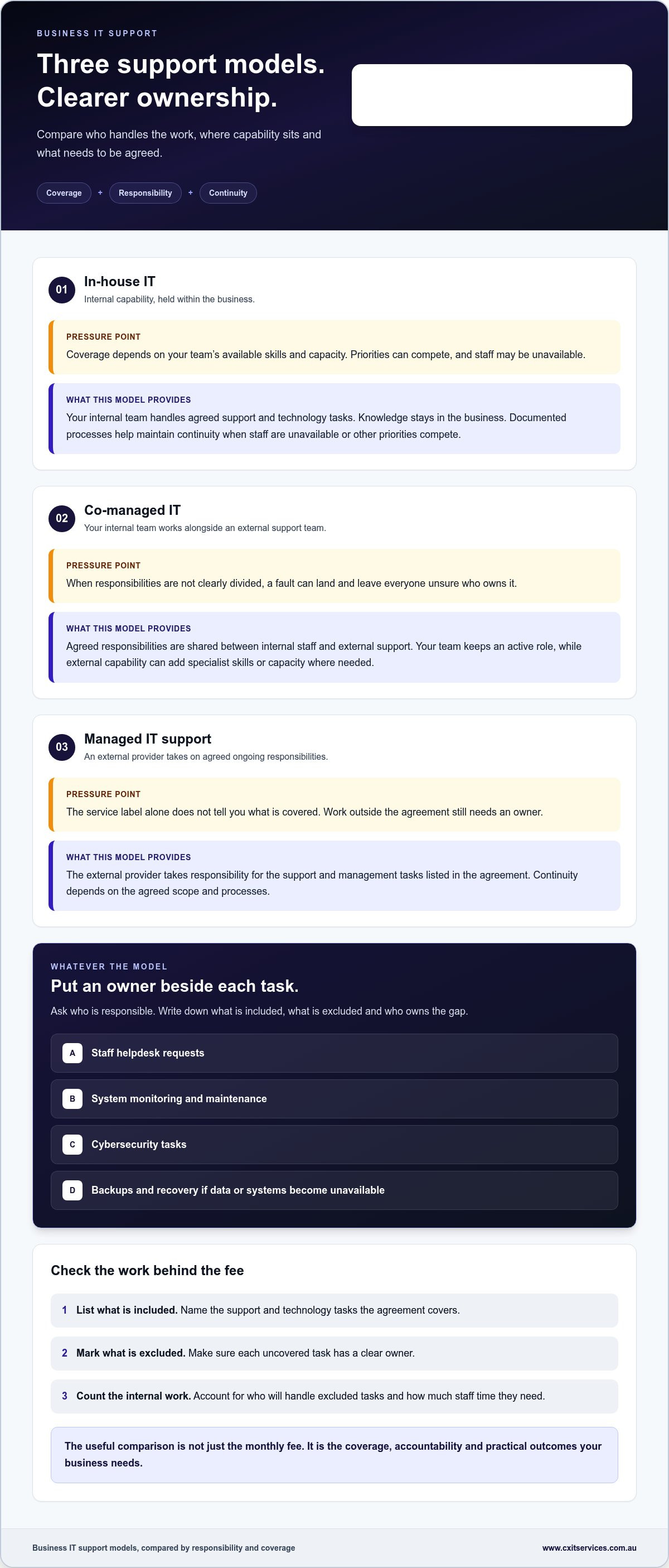
In-house IT gives you direct internal capability. Your team knows your systems and staff, but its capacity depends on the people and skills available. Co-managed support adds external capability alongside your internal team, with responsibilities divided between them. Managed IT support places ongoing IT management and support with an external provider. None is automatically the right fit. It depends on what you need and the capability you already have.
| Model | Responsibility and coverage | Continuity and internal capability |
|---|---|---|
| In-house IT | Your internal team handles agreed support and technology tasks. Specialist coverage depends on the team’s skills and capacity. | Knowledge sits within the business. Documented processes help maintain continuity when staff are unavailable or priorities compete. |
| Co-managed IT | Internal staff and an external support team share agreed responsibilities. This can add specialist capability where the internal team needs support. | Your team retains an active role, with external support supplementing its capacity and skills. |
| Managed IT support | An external provider takes responsibility for the support and management tasks set out in the agreement. | Ongoing external support can sit alongside your staff, with continuity shaped by the agreed scope and processes. |
For a business with internal IT staff, co-managed IT support can fill specific gaps without replacing the team. If you need an external team to take on broader ongoing responsibilities, managed IT support for business may be a closer fit.
Compare the work covered, not just the service label
Put the actual responsibilities side by side. Who handles staff helpdesk requests? Who monitors and maintains systems? Who manages cybersecurity tasks? Who is responsible for backups and recovery if important data or systems become unavailable? The answers can differ between support models and between agreements with the same label.
Write down what’s included, what’s excluded and who owns each task. An agreement might cover everyday helpdesk support while leaving recovery planning or a particular system outside scope. That’s not automatically a problem, provided the gap has a clear owner. It is a problem if everyone assumes someone else is handling it.
If you’re considering external support, you can share your business support needs with CX IT Services. Start with the work your team needs covered, then compare responsibilities and scope.
Measure business IT support value through outcomes, not ticket counts
I don’t read a high or low ticket count as a result on its own. A rise might mean staff are reporting problems earlier. A low count might mean fewer issues, or that people have stopped bothering to report them. To judge business IT support value for money, look at what changed for the business after support work was done.
Activity metrics show what support handled. Business outcomes show whether disruption, risk and unresolved problems are improving.
At regular reviews, use this checklist to look past the dashboard totals:
- Recurring incidents: Which issues keep returning, and is anyone investigating the cause?
- Disruption: What work was delayed or interrupted, and which systems or teams were affected?
- Staff experience: Can people get help through a clear process, and do they understand what happens after reporting an issue?
- Security coverage: Are cybersecurity tasks clearly assigned, and can decision-makers see what work is being managed?
- Recovery readiness: Are backup and recovery responsibilities documented, including who acts if staff can’t access important data or systems?
Track whether support reduces repeated disruption
Start with patterns, not isolated tickets. If staff repeatedly lose access to a shared system, for example, note how often it interrupts work, who is affected and whether the underlying issue is being addressed. A ticket marked “closed” tells you the request was handled. It doesn’t tell you whether the fault stopped coming back.
Ask your support team to explain repeat problems in plain language: what’s causing them, what has been done and what remains unresolved. You don’t need to invent a productivity target. A clear record of recurring disruption and follow-up is already more useful than a tidy ticket count with no context.
Review security, continuity and accountability
Security and recovery work can be easy to overlook because success often means nothing dramatic happened. Check who owns the agreed cybersecurity tasks, how completed or outstanding work is reported, and where responsibility passes between your business and the support team. Business cybersecurity support needs clear ownership, not a vague assumption that “IT has it covered”.
Do the same for backups and disaster recovery. Record who manages each responsibility, how recovery plans are maintained and who coordinates action if systems or data become unavailable. If a task has no clear owner, it’s a gap to resolve. That review gives you a more grounded view of support performance and the risk your business is carrying.
Use this scorecard to assess business IT support value for money
I use a simple five-step scorecard to compare support on more than the headline fee. Write down the evidence as you go. If a responsibility has no clear owner, mark it as a gap rather than assuming it’s covered.
Map needs, scope and responsibility
- 1. Map your needs. List essential systems, the support staff need to do their work, and technology problems that keep recurring. Separate immediate fixes from longer-term improvements. Include your business size, existing IT staff and the capacity they actually have.
- 2. Define the scope. Record what support covers, what it excludes and any work handled separately. Check helpdesk, cybersecurity, cloud, backup and recovery responsibilities against your operating needs. A service label is no substitute for a clear list.
- 3. Check accountability. Note who owns each task: your internal team, an external support team, or both. For shared work, write down where responsibility passes between them. Also record how staff raise issues and how they’ll know what happens next.
Internal capacity matters here. A business with capable IT staff may need outside support for specific gaps, while a team without that capability may need broader ongoing support. The point isn’t to force every organisation into the same model. It’s to make sure the work has an owner and the coverage fits.
Assess outcomes and review the fit
- 4. Assess outcomes. Review whether repeat problems are being addressed, whether staff can get the help they need, and whether security and recovery responsibilities are understood. Look for useful explanations of recurring work and unresolved risks, not just activity totals.
- 5. Review the fit. Revisit the scorecard when your team, systems or operating requirements change. A support arrangement that suited a smaller team may no longer cover the way the business works now. Mark what has changed and which responsibilities need to be revisited.
Keep this record alongside the support agreement. It makes the comparison concrete: included, excluded, owned, unresolved. For longer-term planning, IT strategy consulting for business can help connect technology decisions with business requirements.
CX IT Services structures managed and co-managed IT support around business requirements for businesses with ten or more employees. Share your business requirements with CX IT Services to discuss a support model that fits.
How CX IT Services makes business IT support accountable
I reckon accountability starts with a plain answer to one question: who’s responsible for keeping each part of your technology running? CX IT Services provides managed and co-managed IT support for businesses with ten or more employees. The aim is to make responsibilities clearer and match coverage to the way the business operates.
CX IT Services is Australian-owned and has more than 26 years of industry experience. Its support includes 24/7 assistance and on-site technicians across Australia. For a business spread across multiple offices or with staff who need hands-on help, having both support channels can be a practical part of the arrangement.
What CX IT Services brings to an ongoing support relationship
Support can draw on helpdesk, cybersecurity, cloud services, and backup and disaster recovery capabilities. The agreed scope sets out which responsibilities are covered. That scope matters. It helps staff understand where to raise issues and gives decision-makers a clearer view of what is managed and who owns each task.
Managed IT services are structured under a fixed monthly fee. That gives the business a consistent way to plan for ongoing support, while the scope defines the work covered. It doesn’t mean every technology task is automatically included. Clear boundaries help avoid surprises and make it easier to assess whether the support is delivering business IT support value for money.
Decide whether the service fits your business
This model can suit organisations that want ongoing support, clearer technology oversight and help managing several areas of IT rather than relying only on fixes as problems arise. Co-managed IT can suit a business with internal IT capability that wants to share responsibilities or supplement its team. The right fit depends on your staff, systems and operating needs.
Before deciding, be clear about the work you need covered, the responsibilities your team will retain and the outcomes you want to review. That gives both sides a practical basis for setting expectations and assessing the relationship over time.
If your business has ten or more employees and wants a managed or co-managed support arrangement, apply to discuss business IT support.
Choose support that fits the way your business works
I reckon the clearest test is whether your support arrangement covers the work your business relies on, gives each responsibility an owner and helps reduce disruption. Don’t stop at the fee or the number of tickets closed. Look at recurring problems, security coverage, recovery readiness and whether the support model fits your team’s internal capability.
That’s how you get a practical view of business IT support value for money. The right arrangement should make technology easier to manage, not leave your staff guessing who’s handling the next problem.
CX IT Services is Australian-owned and operated, with more than 26 years of industry experience. Managed IT support for businesses with ten or more employees is provided under a fixed monthly fee, with 24/7 support and on-site technicians across Australia. If your business is looking for clearer technology oversight, apply to discuss business IT support.
A sound support relationship starts with clear needs, clear responsibilities and a model that suits the business you run. Get those basics right and you’re in a much better position to move forward with confidence.
Frequently Asked Questions
How do you know if business IT support is value for money?
Business IT support is value for money when its coverage matches your needs, responsibilities are clear, and support helps reduce disruption. Look beyond the monthly fee and ticket count. Check whether recurring faults are addressed, staff know how to get help, cybersecurity tasks have an owner, and backup and recovery responsibilities are understood. If important work keeps falling outside scope, the arrangement may not be delivering the value your business needs.
Is managed IT support worth it for a small business?
Managed IT support can suit a small business that needs ongoing help but doesn’t have enough internal capacity to manage every technology responsibility. The fit depends on your team, systems and support needs, not size alone. CX IT Services supports businesses with ten or more employees through managed and co-managed IT. Compare the work covered and who owns it with the capability your business already has.
What should business IT support include?
Business IT support should cover the work your organisation needs, with clear responsibilities and boundaries. Depending on the arrangement, that may include helpdesk support, cybersecurity, cloud services, backup and disaster recovery, and ongoing technology management. Look for a clear process for staff to report issues and for the business to understand what’s recurring or unresolved. The exact scope should match your systems and operating needs.
How can I compare IT support providers without focusing only on price?
Compare the responsibilities and outcomes behind each support arrangement. Make a side-by-side record of what’s included, excluded and owned by each party. Then assess how the arrangement handles recurring issues, staff support, cybersecurity, backups and recovery. Check whether reporting helps you understand ongoing work and risks. A lower fee may suit some businesses, but it won’t tell you whether the coverage matches your needs.
Is co-managed IT a good option if my business already has an IT team?
Co-managed IT can be a good fit if your internal IT team needs extra capacity or specialist support while retaining responsibility for parts of the environment. Start by listing what your staff currently manage and where work gets delayed or needs additional expertise. Then define who owns shared tasks and how issues move between teams. This helps prevent gaps and duplicated effort. CX IT Services provides co-managed IT for businesses with ten or more employees.
What business outcomes should I measure from IT support?
Measure whether support is reducing repeated disruption and helping staff get on with their work. Review recurring incidents, unresolved problems, staff experience, security responsibilities and recovery readiness. You can also consider the effect of system interruptions on customer-facing work and business processes. Ticket totals show activity, not whether underlying issues are improving. Review trends and follow-up actions regularly, then note which risks or problems still need an owner.





 Microsoft Partner