
Sick of the compliance treadmill? I'll show you how to automate Essential 8 with tools you already own. Get real security and stop the bloody headache.
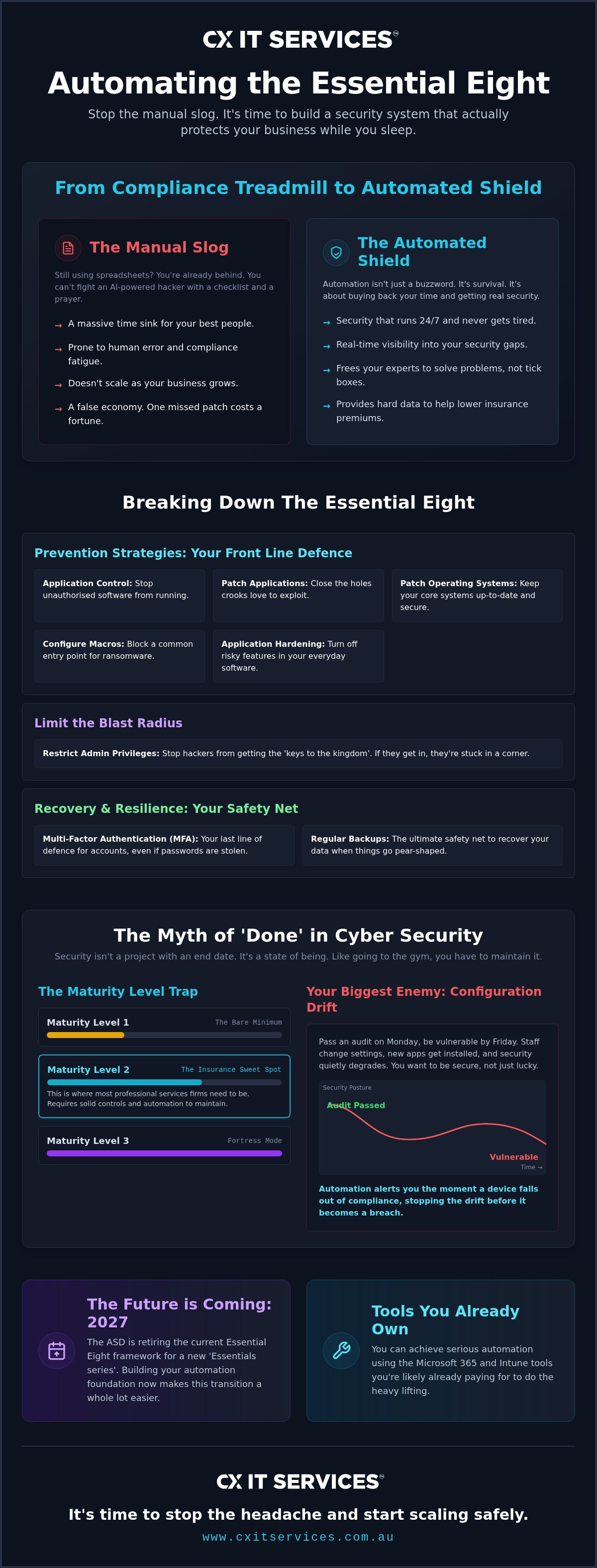
Personally, I reckon most business owners are bloody fed up with the compliance treadmill. You're likely drowning in spreadsheets and wondering why you're paying for security that still feels like a manual slog. If you don't automate essential 8 tasks soon, the constant updates from the ASD will eventually break your team. Just as you get comfortable, they've gone and announced the framework is being retired for a new Essentials series starting in 2027.
It doesn't have to be a nightmare. I'm going to show you how to turn these requirements into a streamlined system that protects your business while you sleep. You can achieve Maturity Level 2 or 3 without a massive internal team. It's about getting real security and real-time visibility, not just filling out forms for the sake of it.
We'll look at how automation helps lower those skyrocketing insurance premiums by proving your compliance with hard data. I'll also explain why building this foundation now is the only way to stay ahead of the shift to the new Essentials series. It's time to stop the headache and start scaling safely.
Key Takeaways
- How to stop treating compliance like a paper-shuffling exercise by using tools to automate essential 8 tasks.
- Why reaching Maturity Level 2 or 3 is possible without a massive internal IT department or a huge budget.
- How to use the Microsoft 365 and Intune tools you likely already own to do the heavy lifting for your security.
- The secret to moving from manual audits to continuous monitoring so you can actually see your security gaps in real time.
- Why building an automated system now makes the transition to the new ASD Essentials series a whole lot easier.
The Essential 8 is a slog. Why you need to automate it.
Personally, I reckon the ACSC Essential Eight is the best security baseline we have in Australia. It is a practical Information security framework that hits the mark on how most Aussie businesses actually get hit. But let's be honest. It is a massive headache to manage by hand. If you are still using a manual spreadsheet to track your patches or user rights, you are already behind the curve. Hackers are now using AI to find your gaps in seconds. You simply cannot fight a machine with a manual checklist and a prayer.
When you decide to automate essential 8 strategies, you aren't just buying fancy software. You are buying back your time. Automation is not just a buzzword for the big end of town. It is about survival in a world where the bad guys don't sleep. If your security isn't running 24/7, you're leaving the door wide open.
What exactly are we trying to protect?
The framework focuses on the things that actually matter to your bottom line. Application control and patching are your front line. They stop unauthorised software from executing and close the vulnerabilities that crooks love to exploit. Restricting admin privileges stops the 'keys to the kingdom' problem. Most of the time, a breach starts with one person. If that person doesn't have admin rights, the hacker is stuck in a corner with nowhere to go. Finally, MFA and backups are your last line of defence when things go pear-shaped. They are the ultimate safety net for your data and your reputation.
The high cost of doing it manually
Manual checks are a disaster waiting to happen. They are prone to human error and a nasty case of compliance fatigue. When your IT team is bored to tears ticking boxes, they start to miss the small details. Those small details are exactly what hackers look for. Your team should be focused on managed IT support that grows your business, not chasing ghosts in a spreadsheet. I've seen good IT managers quit because they were sick of the paperwork. It's a waste of talent. You want your experts solving problems, not playing data entry clerk.
One missed patch can cost you more in downtime and reputation than a decade of proper automation tools. It's a false economy to think manual is cheaper. The reality is simple. You can't scale a manual process. As your business grows, the paperwork grows with it. Eventually, something snaps. Cyber security should be a silent partner in your business, not a ball and chain that slows you down.
Maturity levels and the myth of done in cyber security.
Personally, I reckon the biggest mistake a business can make is thinking they are finished with security. I see it all the time. A firm spends six months getting their house in order, gets their certificate, and then stops. They think they've finished their cyber security. That is a dangerous lie. Cyber security is not a project with a start and end date. It is a state of being.
It is like going to the gym. You don't just hit your goal weight and then live on meat pies and beer. You have to maintain it. Most Aussie firms aim for Maturity Level 2 because it's the baseline for insurance. But Level 2 on paper is useless if your actual systems have drifted away from those settings. When you automate essential 8, you get a live score of your security posture. You aren't guessing. You aren't looking at a snapshot from three months ago. You know exactly where you stand right now. Real-time visibility is the difference between a secure business and one that is just lucky. You want to be secure. Not lucky.
Understanding the maturity level trap
The Australian Cyber Security Centre's Essential Eight outlines three main levels of maturity. Level 1 is the bare minimum. You're basically just showing up to the fight. Level 2 is where most professional services firms need to be to keep their insurers happy. It requires more rigid controls and better documentation. Level 3 is for high-value targets. If you try to maintain Level 3 manually, your IT team will burn out in a week. It requires serious automation to keep those strict controls in place without killing your productivity.
Why configuration drift is your biggest enemy
I have seen companies pass an audit on Monday and be vulnerable by Friday. This happens because of configuration drift. Staff change settings to make their jobs easier. New apps get installed that bypass your controls. Security quietly degrades while nobody is watching. Using tools to automate essential 8 compliance means you get an alert the moment a device falls out of compliance. It is about staying secure every single hour of the year. Not just when the auditors are in the building. Constant vigilance. Without the constant manual effort. If you're ready to stop the manual guesswork, you should apply for a security strategy session to see how automation fits your workflow.
Tools that actually work for automating your compliance.
Personally, I reckon you are probably already paying for half the tools you need through your existing Microsoft 365 subscription. Most Aussie firms treat their tenant like a fancy version of Outlook, but it is actually a powerhouse for security. If you want to automate essential 8 compliance, you have to look at the admin centre you already own. Microsoft Intune and Purview are the heavy lifters for Australian businesses. They take the manual slog out of the equation and replace it with policies that enforce themselves.
Microsoft Intune for device and app control
Intune is a no-brainer for managing mobile and desktop security. It allows you to automate application whitelisting without annoying your staff with constant pop-ups or helpdesk tickets. You set the policy once, and the system ensures only approved software runs on your machines. It also handles the relentless cycle of updates. You can force patches across your whole fleet within the ASD-recommended 48-hour window for extreme risks. You do this without lifting a finger. Blocking macros and hardening browsers becomes a single policy push rather than a thousand manual configurations. This is exactly what we focus on with our Microsoft 365 management services. We turn these complex settings into a silent reality for your team.
Purview and Defender for real-time monitoring
Real-time visibility is what separates the pros from the amateurs. Defender for Endpoint acts as a digital guard dog. It catches threats before they can move laterally through your network. This aligns perfectly with the technical requirements of The Essential Eight by providing continuous feedback on your security posture. Purview then steps in to handle the data side of things. It helps you track where your sensitive files are going and who is accessing them. Automated alerts mean you don't have to stare at a dashboard all day. You only get a tap on the shoulder when something actually needs your attention.
You can even layer third-party platforms like Vanta on top of this Microsoft foundation. These platforms give you a single pane of glass view that managers and auditors love. They pull live data from your environment to prove you are compliant every hour of the day. It turns a stressful annual audit into a non-event because the proof is already there. Building this stack ensures your security is a seamless part of your operations. Not a bolt-on that everyone tries to ignore. It is about working smarter, not harder.
Moving from spreadsheets to real-time security monitoring.
Personally, I reckon the hardest part of any security upgrade is just starting. Most businesses I talk to are still stuck in spreadsheet hell. They have a long list of things they think they are doing, but no way to prove it in real time. Moving from that manual mess to a live monitoring system is a journey. It is not a sprint. We tackle one pillar at a time until it is completely hands-off.
You have to stop treating compliance like a once-a-year event. If you only check your status when the auditors are coming, you are vulnerable for the other 364 days. Automation changes the game by giving you a live pulse on your business. It turns security from a nagging worry into a background process that just works.
Step 1: The gap analysis
You cannot fix what you have not measured. Step one is always a proper audit to see where you actually stand. You need to identify which of the eight strategies are your weakest links. Often, it is something simple like legacy software or forgotten admin accounts from staff who left years ago. I always recommend checking your current Microsoft 365 licensing first. You might already have the tools to automate essential 8 tasks without spending another cent on new software. Set a target maturity level that makes sense for your industry risk. If you are in the legal or financial sectors, Level 2 is usually your mandatory starting line.
Step 2: Policy deployment and enforcement
Once you know where the holes are, you move from suggested settings to enforced policies. This is where the magic happens. We start with the low-hanging fruit, usually MFA and admin rights. If you want to automate essential 8 controls, this is the phase where you stop asking people to be secure and start making the system do it for them. You should automate the onboarding and offboarding of staff to keep admin rights tight. If someone leaves, their access should vanish instantly. No manual checklists required. You also need automated backup routines that test themselves regularly. A backup is only as good as its last successful restore. You can see how we structure these protections in our cyber security services.
Step 3: Continuous compliance reporting
Setting up automated reporting is the ultimate game changer for board meetings. Instead of a vague "we are fine," you can show a dashboard with a live compliance score. Link these reports to your risk register for easy auditing. This data is pure gold when it comes time to renew your insurance. You can use these verified stats to negotiate better rates with your provider. They love seeing proven compliance. It lowers their risk and your premiums. If you are ready to ditch the spreadsheets and see your real security score, apply for a security audit today. We will help you find the gaps and build a plan that actually works.
Why CX IT is the safe pair of hands for your automation journey.
Personally, I reckon there is no substitute for time in the trenches. We have been doing this for over 26 years. We have seen the tech change from physical servers to complex cloud environments, but the core risks remain the same. CX IT Services is Australian owned and operated. We know the local rules. We know the local headaches. More importantly, we know how to automate essential 8 frameworks so they actually work for a business with 10 or more staff. We do not just sell you a tool and walk away. We act as your virtual CIO to ensure your tech actually supports your growth. Not alone. Together.
The fixed-fee advantage
Most IT companies love it when things break because they can charge you by the hour. We hate it. Our fixed monthly fee models include security monitoring because we want you to stay secure. It is a simple equation. If your systems are automated and running smoothly, we spend less time fixing them. We are incentivised to keep you secure because downtime costs us too. This gives you predictable technology spending. You can plan for the future without worrying about hidden costs for emergency patches or security updates. It is a partnership built on shared goals. We win when you win.
Expertise without the ego
Our team speaks plain English. Not just code. We focus on professional services firms that need high-end IT without the corporate fluff. Whether you are in law, finance, or medicine, your data is your most valuable asset. When we help you automate essential 8 compliance, we do it in a way that makes sense for your specific workflow. We handle the technical heavy lifting and provide 24/7 support as a safety net for your automated systems. This means you can focus on your clients while we watch the dashboard.
You shouldn't have to be a tech expert to have a secure business. You just need a safe pair of hands to manage the system for you. You can read our guide on managed IT services in Australia to see how we help growing businesses stay ahead of the curve. We believe in being a local partner you can actually talk to. No ego. Just results. It is about building a solid foundation for your business to thrive in 2026 and beyond.
Stop the manual slog and secure your future.
Personally I reckon the best time to automate your security was yesterday. The second best time is right now. Cyber security is not a project you finish. It is a continuous state of being that requires constant vigilance. By ditching the spreadsheets and using the automation tools already inside your Microsoft 365 tenant, you turn a compliance nightmare into a silent background process. This ensures you are ready for the ASD transition without the last-minute panic that usually follows a framework update.
When you automate essential 8 tasks, you buy back your time and your sanity. You get real-time visibility into your security gaps and the hard data needed to lower your insurance premiums. We have been doing this for over 26 years as an Australian owned and operated team. Our fixed-fee managed security and 24/7 national support ensure you are never left in the dark. Not alone. Together.
You don't have to navigate this transition alone. Get a free Essential 8 gap analysis from CX IT Services and see exactly where you stand. It is time to stop the headache and start scaling with confidence.
Frequently Asked Questions
What is the ACSC Essential Eight and why does my business need it?
The Essential Eight is the baseline security framework developed by the Australian Signals Directorate. It helps mitigate the vast majority of cyber threats by focusing on eight practical strategies. Even though the ASD recently announced it will transition to a new Essentials series by 2028, it remains the current standard for contracts and insurance. Implementing it protects your reputation and ensures your data stays out of the wrong hands.
Can I automate all eight strategies or are some always manual?
You can automate the vast majority of the framework, particularly patching, application control, and admin rights. While initial policy design and physical backup testing need a human touch, the goal is to automate essential 8 monitoring and enforcement. This removes human error from the daily grind. Software handles the repetitive checks, while our team provides the oversight to ensure the system is actually doing its job.
How much does it cost to automate the Essential 8 for a mid-sized firm?
Costs depend on your current setup and required maturity level. CX IT Services uses a fixed monthly fee model for managed security, which provides predictable technology spending for your business. Instead of a massive one-off project fee, we bundle the automation and monitoring into your ongoing support. This approach avoids the bill shock of hourly rates while ensuring your fleet stays compliant and secure every single day.
What Microsoft 365 license do I need for Essential 8 automation?
For full automation, you usually need Microsoft 365 Business Premium or an Enterprise E5 license. These tiers include Intune for device management and Purview for data protection. Business Premium is typically the sweet spot for firms with 10 or more staff. It provides the policy enforcement tools required to reach Maturity Level 2 without the need for expensive third-party software that complicates your IT stack.
Does automating the Essential 8 help with cyber insurance premiums?
Yes, it is a significant advantage for your business. Insurers now require hard proof of compliance rather than just a signed declaration. Automated reporting provides a live compliance score and verifiable data that reduces your risk profile. Many providers offer better rates or lower excesses to businesses that can prove they meet specific maturity levels through continuous, automated monitoring. It turns security into a financial asset.
How long does it take to reach Maturity Level 2 with automation?
Reaching Maturity Level 2 typically takes between three to six months depending on your starting point. We begin with a gap analysis to find your weakest links. From there, we deploy policies in stages to avoid disrupting your staff. Automation speeds this up significantly compared to manual configuration. It also ensures your settings don't drift back to being vulnerable once the initial implementation is finished.
What happens if an automated security policy blocks a legitimate business app?
This is exactly why our 24/7 national support team is always available. We use a safe pair of hands approach to policy design, testing configurations before they go live. If an app is blocked, we can whitelist it instantly to keep your team moving. Automation should support your growth, not hinder it. We balance tight security with the practical need for your staff to stay productive.
Do I still need a managed IT provider if I have automation software?
Software is just a tool; you still need a strategist to manage the response. Automation handles the repetitive tasks, but a managed provider like CX IT Services provides the oversight and 26 years of industry experience. We ensure the automation is configured correctly and intervene when a complex threat requires human expertise. We act as your virtual CIO to ensure your technology actually supports your long-term goals.





 Microsoft Partner