
Australian owned and operated IT support should mean more than a label. Here is how to cut through provider spin and find genuine coverage and accountability.
Personally, I reckon ownership only matters if it shows up in the support your staff get. Australian owned and operated IT support should mean more than a label. When someone is stuck, they need a clear way to get help and know who owns the fix.
Provider claims can sound much the same. The difference shows up when a system breaks, a security risk needs attention or your team needs a straight answer. I’ll focus on what’s practical: who handles support, how security and cloud services fit together, what national coverage means for helpdesk and on-site support, and how clearly the service is defined.
I’ll also explain the difference between managed and co-managed IT. Managed IT puts agreed ongoing responsibilities with an external team. Co-managed IT lets that team work alongside your existing staff, rather than replacing them by default. CX IT Services is Australian-owned and operated and supports businesses with ten or more employees. The aim is to help you judge whether a provider’s service model, coverage and accountability will work for your team, not just look good on a proposal.
Key Takeaways
- Assess Australian owned and operated IT support by looking separately at ownership, operations and the support model. Ownership alone doesn’t tell you how well your team will be supported.
- Compare what happens with everyday requests and serious incidents, including who responds and how issues are escalated.
- Use your team’s in-house IT capability to decide whether managed support, co-managed support or an internal model is the better fit.
- Before speaking with a provider, map your critical systems, current IT frustrations and who handles each responsibility.
- Look for a service model that brings helpdesk support, security and cloud needs together, with clear scope and accountability.
What Australian owned and operated IT support should mean for your business
I treat Australian ownership as one useful fact, not a verdict on service quality. It tells me who owns the provider, but not how staff get help, how issues are escalated or whether the service suits the business. I look at three things separately: ownership, how the provider operates and delivers support, and what the support model covers.
To me, Australian owned and operated IT support means the provider is Australian-owned and operates in Australia. Service quality still depends on how it looks after your people, systems and business continuity. That’s the distinction I’d keep in view. A label tells me something about the provider. It doesn’t replace clear service scope or accountability.
Ownership, operations and support are different questions
I use ownership to mean who owns the provider. Operations are about how it runs its business and delivers support. The support model sets out what your team can expect, from routine helpdesk requests to more complex technical issues.
In practice, I’d want to know what happens when a staff member can’t access a business system. They need a clear way to get help and know what happens next. If an issue needs specialist attention, responsibility shouldn’t disappear into a vague “we’ll look into it”. Judge the provider on its stated service scope and how it handles support, not on an Australian business label alone.
A Managed Service Provider (MSP) delivers ongoing IT services to a business, as described in this overview of the Managed Service Provider model. Don’t assume every provider delivers the same scope, access or accountability. For a practical explanation of managed support, see our managed IT support.
What business buyers should expect from IT support
I’d expect support to give staff a clear place to go and a useful next step if a request isn’t resolved straight away. Look for defined contact paths, a practical escalation process and an agreed understanding of which systems and tasks the service covers.
Professional services teams depend on reliable systems and handle business information as part of their daily work. Support needs to account for the knock-on effects of disruption, whether it interrupts client work, appointments or internal processes. Clear responsibility matters, especially when an issue affects more than one part of the business.
I also look at how support connects with the rest of the IT setup. Helpdesk, cybersecurity and cloud services can sit with different suppliers, but then it may be less clear who owns an issue that crosses between them. One service relationship can make coordination easier when its scope is clear. For a broader view of planning managed IT around business needs, read Managed IT Services Australia: The Strategic Guide for Growing Businesses in 2026.
How to assess an Australian IT support provider beyond its ownership
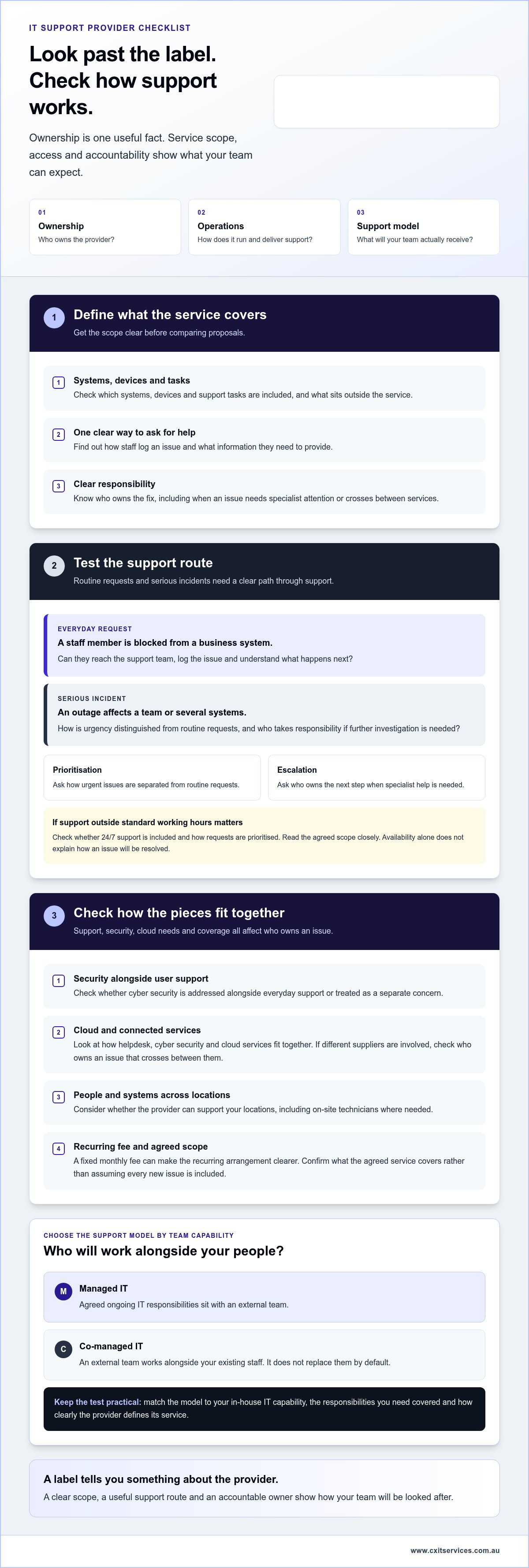
Once I know who owns and operates a provider, I look at what staff will experience day to day. Compare how routine requests are handled with what happens when a serious incident affects several people or systems. That’s where the difference between a good-sounding proposal and a workable service starts to show.
Ownership tells me who stands behind the business. Clear service scope, access and escalation show me how support is delivered. Use this checklist to keep the comparison practical:
- Service scope: Check which systems, devices and support tasks are included, and what sits outside the service.
- Access: Look for a clear way staff can log an issue and understand what information they’ll need to provide.
- Prioritisation and escalation: Find out how urgent issues are distinguished from routine requests, and who takes responsibility if an issue needs further investigation.
- Security: Check whether cybersecurity is addressed alongside everyday user support or treated as a separate concern.
- Coverage: Consider whether the service can support your people and systems across operating locations, including with on-site technicians where needed.
Check the support model, access and escalation
A blocked login for one person and an outage affecting a whole team shouldn’t be treated as the same problem. Ask how staff reach the managed IT support team, how requests are tracked and who takes ownership when specialist attention is needed. A clear route means staff don’t have to chase several people for an update.
If your business needs help outside standard working hours, consider whether 24/7 support matters. Availability alone doesn’t tell you how a request is prioritised or resolved, so read the scope closely. A fixed monthly fee can make the recurring arrangement clearer. Check what the agreed service covers rather than assuming every new issue is included.
Assess security, coverage and service clarity
Treat security as part of the support conversation, not an afterthought. Check how cybersecurity fits alongside user support, cloud services and the systems staff rely on. The Australian Cyber Security Centre’s cybersecurity guide for small businesses is a useful reference for reviewing the basics. Also look at how a provider’s cyber security services fit into its wider support arrangement.
If your people work across different locations, weigh national coverage alongside the option of on-site technicians. Remote help and in-person support address different needs. Having both within one service relationship can make coordination simpler, provided the scope and escalation process are clear. These are practical points to compare when choosing Australian owned and operated IT support.
If you’re mapping out what your team needs, you can start an application with CX IT Services and outline the support gaps you want to address.
Managed or co-managed IT support: which model fits your team?
There isn’t one right setup for every business. The useful question is how much responsibility your team wants to keep in-house and where outside support will add capacity. An Australian-owned provider doesn’t have to replace your existing IT employee. Co-managed support can work alongside them, with responsibilities agreed up front.
| Support model | Responsibility | Internal capability | External coverage and strategic input |
|---|---|---|---|
| Managed IT | An external provider manages agreed ongoing IT responsibilities. | Suited to teams without internal IT staff, or those wanting to hand over most day-to-day support. | External helpdesk and agreed technical support, with strategic input shaped by the service scope. |
| Co-managed IT | The provider and internal staff share defined responsibilities. | Works alongside an existing IT person or team, adding capacity or specialist skills where needed. | External support fills agreed gaps, while internal staff retain the responsibilities assigned to them. |
| Predominantly in-house | Internal staff manage most IT responsibilities. | Best suited to a business with the people and skills to cover its own needs. | External input may be used for specific support or strategic needs, depending on the arrangement. |
When fully managed IT support may suit a business
Fully managed support may suit a business that wants an external team to take responsibility for ongoing IT, rather than relying on one internal person to cover every request. Helpdesk, cybersecurity and cloud management are connected parts of that picture. The service scope should make clear how they fit together. For a broader look at managed IT services, see Managed IT Services Australia: The Strategic Guide for Growing Businesses in 2026. Forbes also offers a useful overview of what an MSP can do.
When co-managed IT can add capacity
Co-managed IT can suit an internal team that needs backup, more time to focus or access to skills it doesn’t have in-house. Growth, a heavy workload or a specialist gap can prompt a closer look, but none automatically means you need a new model. First, agree who handles user requests, security, cloud services and escalation. Co-managed IT complements an internal team when the provider takes on defined gaps, not when responsibilities are left blurred. Explore co-managed IT support to see how shared support can be structured.
Personally, I’d choose based on the work your team needs covered, not the label. A clear split of responsibilities makes Australian owned and operated IT support easier to assess, whether the provider manages the lot or works alongside your own people.
Questions to ask before choosing Australian owned IT support
A useful provider discussion starts with your business, not a polished pitch. Write down what’s frustrating staff now, which systems they rely on and who currently looks after each part of IT. That gives you something concrete to compare with the proposed service.
Use these questions to get clear answers about Australian owned and operated IT support:
- 1. What’s included in the service? Ask which systems, devices and routine tasks are covered, and what falls outside the agreed scope.
- 2. How do staff get help? Find out how users raise requests, what information they need to provide and how they can follow progress.
- 3. How are issues prioritised and escalated? Ask who takes ownership if a problem needs specialist attention, affects several staff or remains unresolved.
- 4. How does support work across our locations? If your team operates in multiple parts of Australia, ask how remote helpdesk support and on-site assistance fit together.
- 5. How are recurring issues reported? Ask how you’ll see patterns in support requests and what practical improvements the provider may recommend.
- 6. How do security responsibilities fit with IT support? Clarify who manages cybersecurity tasks and how they connect with helpdesk, cloud services and internal responsibilities.
- 7. What’s needed for a transition? Ask what information, system access and staff coordination are required, and how the provider would plan the changeover around your business.
Prepare for a useful provider discussion
Before the conversation, note your recurring IT problems, critical systems and the people responsible for each task. Be specific. “Staff lose access to the practice management system” is more useful than “IT is unreliable”. Include any internal IT duties you want to retain, share or hand over.
A transition plan should reflect your setup. The steps may depend on the systems involved, who manages them now and what your team needs to keep running during the change. Look for a clear discussion of responsibilities and coordination, not a one-size-fits-all promise.
Longer-term planning matters too. Ask how support decisions will account for upcoming business needs, not just today’s queue of requests. Our IT strategy and planning service can help connect technology decisions with business priorities.
Bring your questions and pain points together, then apply to discuss IT support for your business.
How CX IT Services supports Australian businesses with managed IT
CX IT Services is an Australian-owned and operated managed IT provider for businesses with ten or more employees. Support can be fully managed or co-managed, depending on what your team needs and what you want to keep in-house.
The practical value is having related IT needs handled through a clear support relationship. CX IT Services provides managed IT, cybersecurity, cloud support and co-managed IT. That brings day-to-day helpdesk needs and broader technology support together, rather than leaving staff to work out which supplier owns each issue.
A national support relationship with practical coverage
Remote support and on-site help solve different problems. Helpdesk support can assist staff with everyday technical issues, while an on-site technician can help when work needs to happen in person. CX IT Services provides 24/7 support and on-site technicians across Australia, supporting businesses with teams in different locations.
The important part is knowing how those support options fit the service arrangement. A national team can make it easier to coordinate help across multiple locations, while a clearly defined scope helps staff understand where to go and what support covers. Read more about on-site IT support.
Managed IT support is provided for a fixed monthly fee. That makes the recurring service arrangement clearer for business planning, with the agreed scope setting out what support is included. It’s a practical way to make ongoing IT support and spending more predictable, without pretending every technology need is automatically covered.
A clear next step for businesses reviewing IT support
If your business has ten or more employees and needs an external team to manage ongoing IT, managed support may fit. If you already have internal IT staff, co-managed support can add capacity or specialist capability while your team retains agreed responsibilities. Neither model is right for every business. The fit depends on your people, systems and the work you want covered.
Assess Australian owned and operated IT support on more than ownership alone. Look at the service scope, how staff access help, how support works across your locations and how the provider’s team fits with your own.
If you’re reviewing managed or co-managed IT for your business, apply to discuss your IT support needs.
Choose support that works for your business
Australian ownership is a useful starting point, not a shortcut for judging service quality. The practical test is whether your provider has clear responsibilities, a support model that fits your team and a sensible plan for routine requests and serious issues.
Australian owned and operated IT support can mean a more direct relationship, but the details still matter. Decide whether you need a provider to manage IT for you or work alongside your internal team. Then look closely at how helpdesk support, cybersecurity, cloud services and escalation fit together.
CX IT Services is an Australian-owned and operated provider supporting businesses with ten or more employees. Its managed IT support includes 24/7 support, on-site technicians across Australia and a fixed monthly fee. Co-managed IT is also available for businesses that want an external team alongside their own people.
You don’t need every answer before taking the next step. Start with the IT issues slowing your team down and the systems you rely on most.
Frequently Asked Questions
What does Australian owned and operated IT support mean?
It means the IT provider is owned in Australia and operates its support business here. It doesn’t automatically tell you how good the service is or what support your staff will receive. Assess ownership, how the provider delivers support and what its service covers as separate things. Look for clear contact paths, defined responsibilities and a practical escalation process, not just a label.
Is Australian owned IT support better for Australian businesses?
Not automatically. Australian ownership may suit a business that values a relationship with an Australian provider, but dependable support comes down to service scope, access, security and accountability. Compare what happens when an employee has a routine issue and when a critical system is disrupted. The right provider is the one whose support model fits your people, systems and operating needs, whether or not ownership is the deciding factor.
What should I look for in an Australian IT support provider?
Look for a defined service scope, clear ways for staff to request help and a useful process for prioritising and escalating issues. Check how the provider handles cybersecurity, cloud services and support across your locations. Also look at how it reports recurring problems and explains responsibilities. Before comparing providers, write down your critical systems, current pain points and which IT tasks your team manages in-house.
Can an Australian IT provider support staff across the country?
Yes, a provider with national coverage can support businesses with teams in different parts of Australia. The service may combine remote helpdesk support with on-site technicians for issues that need in-person attention. CX IT Services provides 24/7 support and on-site technicians across Australia. Look at how those support options fit together, what the service covers and how staff in different locations access help.
What is the difference between managed and co-managed IT support?
With managed IT, an external provider takes responsibility for agreed ongoing IT support. With co-managed IT, the provider works alongside your internal IT staff, with responsibilities shared between the teams. Managed support may suit a business wanting to hand over more day-to-day IT work. Co-managed support can add capacity or specialist skills without automatically replacing an existing employee. The best fit depends on your team and the work you need covered.
How much does managed IT support cost in Australia?
There isn’t one cost that applies to every business. The service scope, systems and support needs affect what an arrangement includes, so compare the proposed responsibilities rather than a headline figure alone. CX IT Services provides managed IT support under a fixed monthly fee, helping make recurring service costs clearer. Map out what your team needs covered first, then assess the fee against the agreed scope.
Can I keep my internal IT staff and use an external provider?
Yes. Co-managed IT lets an external provider support an existing internal IT employee or team. Agree who handles user requests, security, cloud support and escalation so responsibilities don’t get muddled. It may be useful if your team is stretched, growing or needs access to additional expertise, but those circumstances don’t automatically mean you need co-managed support. Start by identifying the gaps you want to address.
Ready to review your IT support? Apply to discuss your business needs with CX IT Services.





 Microsoft Partner