
Need ai automation canberra businesses actually trust? Fix bottlenecks without risking your data. Here is a practical, no-nonsense guide that cuts the fluff.
I reckon AI automation works best when it fixes a real bottleneck, not when it adds another tool to babysit. For an enterprise searching for smart ways to streamline operations, a useful starting point is a repetitive task, a clear owner and a way to check the result.
It makes sense to be cautious. AI can produce inaccurate answers, sensitive information needs careful handling, and a new workflow can create headaches if it doesn’t fit your existing systems. Don’t automate everything, or avoid it altogether. Start with a process where the benefit is clear and the risks can be managed.
This guide explains how to spot a suitable task, assess accuracy and information security, and plan a rollout that works with your business systems. You’ll also learn what controls to put in place and how IT and cybersecurity support from CX IT Services can help make implementation more manageable.
Key Takeaways
- Start with a frequent, repeatable task that causes a clear bottleneck, not a flashy tool looking for a job.
- Assess the task, its inputs, the potential value and who will oversee the outcome.
- Compare rule-based automation, AI-assisted workflows and manual processes based on fit, data handling, review, integration and ongoing ownership.
- Roll out AI automation in stages, and measure whether it solves the original problem rather than chasing a generic benchmark.
- CX IT Services provides AI and automation alongside managed IT and cybersecurity, backed by more than 26 years of industry experience.
What AI automation means for an Australian business
AI automation combines software that can interpret information with workflows that carry out routine steps. The aim isn’t to hand a whole job to a machine. It’s to decide whether a specific task can be handled more consistently, with a person keeping control where judgement matters.
Ordinary automation follows set rules. For example, if a form arrives with a particular field completed, it can be sent to a nominated inbox. AI can work with less structured information, such as the text in an email, and suggest a category or produce a summary. That suggestion needs review. AI can misread a request or leave out a detail, so don’t treat it as a reliable decision-maker by default.
How AI automation differs from ordinary automation
Think of a professional services firm receiving enquiries by email. A rule-based workflow can route messages based on a selected form option or a known sender. An AI-assisted workflow might sort messages by their apparent topic or summarise the request for staff to review. A person decides what action to take, especially if the enquiry is unclear, sensitive or consequential.
Both approaches are forms of business process automation, but they handle information differently. Rules suit predictable steps and inputs. AI may help with varied text, but it doesn’t guarantee accurate interpretation. Build in checks that match the task, and give staff a clear way to correct or override the output.
Where businesses may notice useful opportunities
Start with a recurring task, not an entire role. In legal, accounting, medical or financial work, that might mean sorting incoming requests, using dedicated workspaces such as Clarami to assist with research and document drafting, or passing information between steps in an established process. Treat these as ideas to assess, not proof that every task is suitable.
Look for work that happens often, follows a recognisable pattern and creates friction at a specific point. Then ask what information the task uses, who relies on its output and what happens if it’s wrong. Tasks involving complex judgement or sensitive decisions may need a person to remain firmly in charge.
The business problem matters more than the tool. If the process is unclear or information arrives inconsistently, adding AI may simply shift the mess to another screen. Define the job first, then decide whether rule-based automation, AI assistance or a manual step is the sensible fit.
CX IT Services provides AI and automation services as part of a broader business technology environment. Start by understanding the task before choosing how to change it.
How to identify a business process worth automating
Start with the work that keeps snagging the team, not a list of AI tools. Write down how the task happens now, including who handles each step, where it slows down and what tends to go wrong. If the problem is hard to describe clearly, it’ll be hard to tell whether automation has helped.
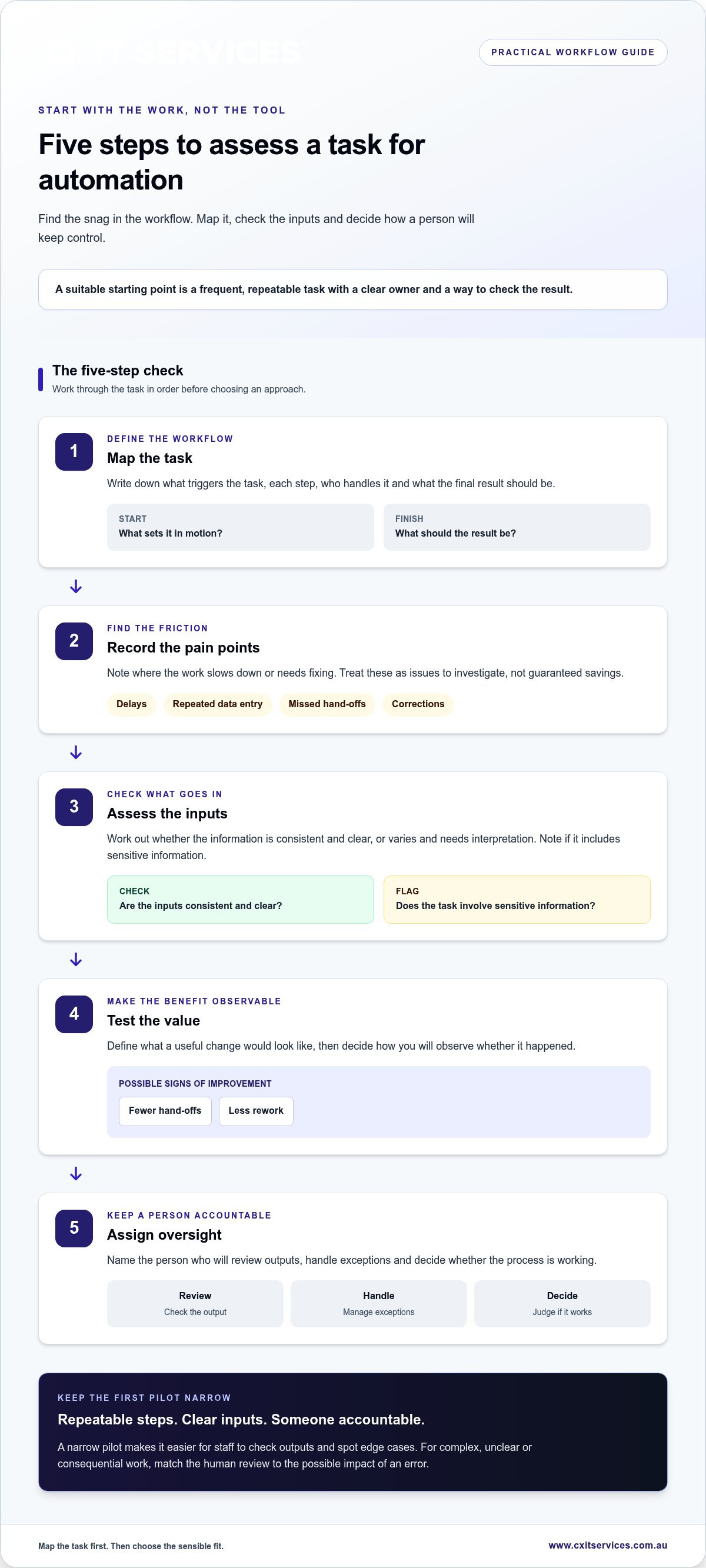
Use this five-step check:
- Map the task. Note what triggers it, each step, who handles it and what the final result should be.
- Record the pain points. Look for delays, repeated data entry, missed hand-offs or corrections. Treat these as issues to investigate, not guaranteed savings.
- Assess the inputs. Are they consistent and clear, or do they vary and need interpretation? Note whether the task involves sensitive information.
- Test the value. Define what a useful change would look like, such as fewer hand-offs or less rework. Decide how you’ll observe that result.
- Assign oversight. Name the person who will review outputs, handle exceptions and decide whether the process is working.
Which tasks suit an initial pilot?
Look first at a task with repeatable steps, clear inputs and someone accountable for the result. A team might assess how it receives and routes routine document requests. Keeping the pilot narrow makes it easier for staff to check outputs and spot edge cases before changing a whole role or business-wide process.
The latest data from the ABS can help put Australian business adoption in context. But adoption elsewhere doesn’t prove a task is right for your organisation. Your own workflow is the test.
Which tasks need more human judgement?
Be cautious with decisions that depend on nuance, incomplete information or could meaningfully affect a person. Automation might help organise incoming information, while a staff member reviews it and decides what to do. Automation can assist without taking away approval.
That doesn’t mean every complex task must stay manual. Match the level of review to the consequences of an error. Be clear about what the system may prepare, what a person must check and who can override the result.
The core rule is simple: automation should address a defined workflow problem and produce an observable result. If you’ve mapped a process but aren’t sure how to assess the technology around it, you can discuss your workflow with CX IT Services.
How to compare AI automation options, controls and oversight
Compare the workflow before comparing tools. The right approach depends on the information involved, how often exceptions arise, who relies on the result and what could happen if it’s wrong. Accuracy and security depend on the workflow, its configuration and the safeguards around it. Every approach needs clear ownership.
| Approach | Workflow fit | Data handling | Human review | Integration and ownership |
|---|---|---|---|---|
| Rule-based automation | Best suited to predictable steps and consistent inputs. | Check what information moves between each step and where it is used. | Set a process for exceptions and errors, even when routine steps run automatically. | Confirm it fits the systems already used and assign someone to maintain the rules. |
| AI-assisted workflow | May suit tasks involving varied text or information that needs sorting or summarising. | Decide what information the AI can access and how it is handled. | A person should check outputs and make the final decision where judgement matters. | Test how it fits existing systems, then assign ownership for review and ongoing changes. |
| Manual process | May be the better fit when each case is different or judgement is central. | Keep information within the established process and access arrangements. | Staff remain responsible for each step and decision. | Review hand-offs and workload, and make sure the process has a clear owner. |
What to compare before choosing
Check the inputs, users and exceptions before settling on an approach. A workflow that handles routine requests neatly may still need a clear path for incomplete information, unusual cases or errors. Consider how information will move between the tools and systems your team already uses. Don’t choose based on a promised feature alone. Decide who will maintain the workflow and update it as the process changes.
Where review and security controls belong
Make responsibilities explicit: who checks the output, handles exceptions and owns the final business decision? Limit access to the information needed for the task, understand where that information goes, and monitor the workflow for errors or unexpected changes. These steps help manage risk, but none guarantees safety on its own.
Security belongs in the planning, not as a last-minute add-on. CX IT Services’ cybersecurity services can support a considered approach to protecting business technology as automation is introduced.
How to roll out AI automation without adding unnecessary complexity
A controlled rollout gives you a chance to find problems before the workflow becomes part of everyday work. Keep the scope small, tell staff what is changing and decide who owns the process. Then use what you learn to make a clear call: refine it, expand it or stop.
What to include in a practical pilot
Choose one bounded workflow with a clear start and finish. Record how the task currently works, including who handles each step, where delays occur and what happens when information is incomplete. Name an owner before testing begins.
Define success against the original problem. If the issue is repeated hand-offs, track whether those hand-offs change. If the issue is rework, record where corrections occur. There’s no need to chase an industry benchmark that may have little to do with your process.
Before relying on the new workflow, test it with human review. Decide in advance how staff should flag an error, handle an unusual case or return to the existing process. Make sure the people involved know what the system will do, what it won’t do and who has the final say.
How to manage change after the first test
Use this staged sequence to keep the rollout manageable:
- Document the process. Capture the current steps, users, inputs and known failure points.
- Define success. Choose a measure tied directly to the problem you want to fix.
- Test safely. Run the workflow in a limited setting and review its outputs before relying on them in routine operations.
- Review results. Ask staff what worked, what caused confusion and which exceptions appeared.
- Refine before expanding. Adjust the workflow, instructions or review process, then decide whether a wider rollout makes sense.
Don’t treat the first test as a rubber stamp. Unexpected results are useful information. They may point to unclear instructions, inconsistent inputs or a process that needs a person involved at a different step. Keep a record of changes and revisit the workflow after it’s in use, so ownership doesn’t disappear once the pilot is finished.
CX IT Services provides AI automation services as part of a broader technology environment. If you’re ready to discuss an AI automation project, get in touch with CX IT Services.
How CX IT Services can support business AI automation
AI automation needs to fit the way a business already works. The workflow, the systems it relies on and the people responsible for checking it all matter. CX IT Services is an Australian-owned managed IT provider with more than 26 years of industry experience. It brings AI and automation together with managed IT and cybersecurity in a broader business technology environment.
That wider view matters. A workflow may depend on existing systems, access settings and support arrangements, not just the automation itself. CX IT Services also provides 24/7 support and on-site technicians across Australia. These services sit within the wider support environment. They don’t guarantee a particular automation will produce a particular result.
When managed technology support can help
If a proposed workflow touches several business systems or raises questions about access and security, consider those needs alongside the process. CX IT Services can discuss a defined task, how staff currently handle it and the operational requirements that shape an approach to ai automation canberra businesses may be exploring.
For issues that reach beyond an automation project, managed IT support can help address the surrounding technology environment. A workflow change shouldn’t be treated as a standalone fix if the underlying systems, support or security also need attention.
For another practical perspective, read CX IT Services’ AI automation guide for Aussie teams. It complements the work of assessing your own process.
A sensible next step
Bring one repetitive workflow to an initial discussion. Describe where it starts, the steps staff take, where delays or rework occur, and what a useful change would look like. Include any systems involved and note where a person needs to review or approve the result. A clear starting point makes it easier to scope the work and identify what needs consideration.
CX IT Services’ AI automation services connect this work to the wider business technology environment. To discuss your business needs and a potential project, apply to discuss your business needs.
Start with one workflow and a clear goal
Useful AI automation starts with a defined business problem, not a tool chosen for the sake of it. Pick one recurring task, map how it works now and decide what result you want to measure. Then compare rule-based automation, AI assistance and human-led work based on the information involved, the risks and the review each option needs.
Keep the first rollout contained. Test outputs with human oversight, give staff a clear way to flag exceptions and refine the process before expanding it. That’s a steadier way to explore ai automation canberra businesses can put to practical use, without adding needless complexity.
CX IT Services is Australian-owned and operated, with more than 26 years of industry experience. AI and automation sit alongside its managed IT and cybersecurity expertise, supported by 24/7 support and on-site technicians across Australia. Bring one workflow and its current pain points to a discussion, and use that as the starting point for scoping what may suit your business.
Apply to discuss AI automation for your business. A practical first step can make the next one clearer.
Frequently Asked Questions
What is AI automation for a business?
AI automation uses artificial intelligence within a business process to work with information, while other steps may follow set rules. The aim is to improve a defined task, not add AI for its own sake. Start by mapping how the task works now, who uses it and where delays or repeated handling occur. Then decide which outputs need human review and who remains responsible for the final decision.
Which business tasks can AI automation help with?
AI automation may assist with repeatable, information-heavy tasks, such as sorting incoming requests or preparing summaries for staff to review. Whether a task suits it depends on the process, the quality of the inputs and the consequences of an error. Map the workflow before choosing an approach. Keep a person responsible for exceptions and decisions that require business judgement, particularly where information is incomplete or the outcome matters to someone.
Is AI automation safe for business information?
Safety depends on the information involved, the systems used and how access, handling and review are managed. Don’t assume every AI tool treats data in the same way. Identify what information enters the workflow, who can access it and how outputs are checked. Before using sensitive business information, understand how the proposed setup handles it and seek suitable technical advice. No single control guarantees that every risk is removed.
Can a small or medium business use AI automation?
Yes. A small or medium business can start with a narrow, repeatable workflow rather than a large transformation project. Document the task, choose a result worth measuring and assign someone to review the outputs. Keep the test limited so the people using the process can assess how it works and flag problems. Expand only if the test shows the workflow is suitable for routine use.
How do I choose an AI automation project?
Start with a recurring business problem, not a product or trend. Look for a process with clear inputs, repeatable steps and an owner who can assess the result. Record delays, rework and exceptions before making changes. Then consider data handling, system fit and human review. A sensible ai automation canberra project begins with one well-defined workflow, which is easier to test and assess than a broad rollout.
Will AI automation replace staff?
AI automation can change how particular tasks are handled, but that doesn’t mean a business should assume it can replace a role. Assess the work itself, including the judgement, exceptions and accountability involved. Explain proposed changes clearly to affected staff and keep human oversight where decisions need it. A more useful question is which parts of a workflow could be improved while people remain responsible for important decisions and outcomes.
How can a business get started with AI automation?
Choose one workflow that causes regular friction and write down how it currently works. Set a clear outcome, identify the information involved and assign someone to review the results. Test the change on a limited basis, record what works and address problems before expanding it. If the project affects core systems or security, involve suitable technical support early so those operational needs are considered as part of the plan.





 Microsoft Partner