
Use this practical ACSC Essential Eight compliance checklist to spot real security gaps, gather proof, and protect your Aussie business without the fluff.
A completed checklist can still leave serious gaps. I reckon the useful question isn’t whether every box is ticked, but whether each control works and you can show the evidence. This ACSC Essential Eight compliance checklist gives your IT team practical checks for each of the eight strategies.
The maturity language can feel abstract, and security work has to fit around staff and core systems. You don’t have to tackle everything at once. The ACSC is transitioning towards its new Essentials series, but the Essential Eight strategies remain a useful foundation. Work you’ve already done isn’t wasted.
Use this checklist to decide what to assess, what evidence to gather and how the maturity model fits in. A checklist alone doesn’t establish compliance or certification. It gives you a clearer view of gaps, helps assign owners and supports a realistic plan for improving and maintaining controls without disrupting the business more than necessary.
Key Takeaways
- Use the ACSC Essential Eight compliance checklist to assess controls, while keeping the maturity model criteria in view.
- Check each strategy against observable evidence, not assumptions about how systems are configured.
- Define the systems in scope, test controls and record gaps before deciding what needs attention.
- Prioritise actions by exposure, business impact, dependencies and available capacity, then assign an owner and due date.
- Build reviews into system and staff changes, patch routines, access reviews and backup recovery tests so evidence stays current.
What the ACSC Essential Eight checklist can, and cannot, tell you
Personally, I reckon an ACSC Essential Eight compliance checklist is most useful when it shows what’s actually covered, not what someone assumes is covered. It gives you a structured way to review the eight mitigation strategies in the Australian Signals Directorate (ASD) model, organise evidence and identify questions to resolve. It can’t certify your business or prove a control works.
Definition: An internal Essential Eight readiness checklist records how your organisation’s systems and processes compare with the ASD model. Treat it as a practical assessment aid, not certification or a substitute for obligations that apply to your business.
Before scoring anything, write down the scope. Include the systems that support day-to-day work, the people who use them, business locations, cloud services and relevant third parties. A business with offices in Melbourne, Brisbane and Sydney might rely on shared cloud services as well as local devices and networks. Include remote staff and hosted email too. Leave something out and your result may look tidier than the real environment.
Record exclusions as well. Note what sits outside the assessment and why. That gives everyone a clear boundary and stops a result for one part of the business being mistaken for a result across the lot.
Who should use an Essential Eight compliance checklist?
Business owners, operations leaders and IT teams can use a checklist to turn cyber risk into work with an owner and a next step. For Australian small and medium businesses, it’s a useful starting point when security responsibilities are shared and no one is focused solely on cyber security.
Regulated or government-connected organisations may have additional requirements in contracts, procurement terms or sector-specific rules. Don’t assume the Essential Eight covers them all. Identify which requirements apply to your organisation, then keep that review separate from your internal readiness assessment.
What does an Essential Eight assessment actually measure?
A maturity assessment looks at whether controls meet the criteria in the current ASD Essential Eight Maturity Model. It isn’t a count of policies or ticks. A policy can describe what should happen, but the assessment needs to establish what’s configured, whether it operates in practice and what evidence supports that conclusion.
Use the current ASD model as the authority for maturity criteria. Tie evidence to the system and control it relates to. Mark anything you couldn’t verify as unresolved rather than assuming it passes. That gives your team a more honest baseline for the detailed checks and improvement plan that follow.
The eight Essential Eight strategies: practical checks for each control
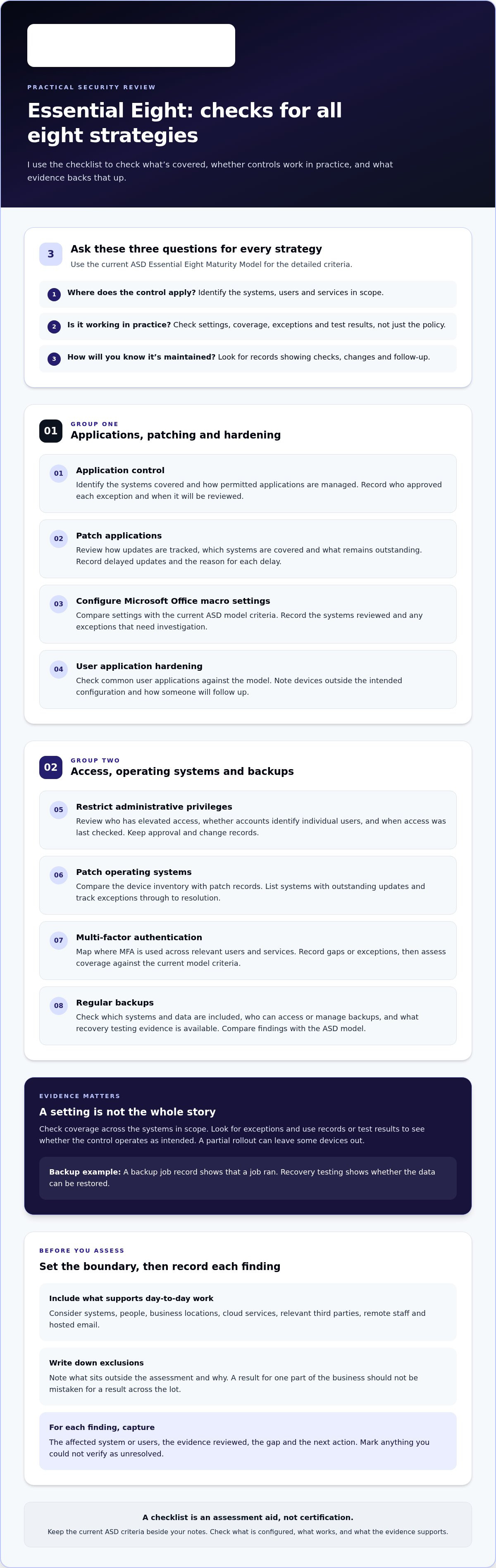
I find it helps to review the strategy names one by one, then ask three plain questions: where does the control apply, is it working in practice, and how will the business know it’s still being maintained? Use the current ASD Essential Eight Maturity Model for the detailed criteria. The prompts below guide your review, they aren’t extra technical requirements.
Treat the strategies as a coordinated control set, not eight separate boxes to tick. A gap in one area can affect how well other protections hold up.
Application control, patching and hardening checks
- Application control: Identify which systems are covered and how permitted applications are managed. Record who approved each exception and when it will be reviewed.
- Patch applications: Review how application updates are tracked, which systems are covered and what remains outstanding. Keep a record of delayed updates and the reason for each delay.
- Configure Microsoft Office macro settings: Compare settings with the current ASD model criteria. Record the systems reviewed and any exceptions that need investigation.
- User application hardening: Check how common user applications are configured against the model. Note devices outside the intended configuration and how someone will follow up.
Access, authentication, operating systems and backups
- Restrict administrative privileges: Review who has elevated access, whether accounts are identifiable to individual users and when access was last checked. Keep a record of approvals and changes.
- Patch operating systems: Compare the device inventory with patch records. List systems with outstanding updates and note how exceptions are tracked through to resolution.
- Multi-factor authentication: Map where MFA is used across relevant users and services. Record gaps or exceptions, then assess coverage against the current model criteria.
- Regular backups: Check which systems and data are included, who can access or manage backups, and what recovery testing evidence is available. Compare your findings with the ASD model.
A setting in a policy or management console doesn’t tell the whole story. Check coverage across the systems in scope, look for exceptions and use records or test results to see whether the control operates as intended. A partial rollout may protect some devices while leaving others out. A backup job record, for example, shows that a job ran. Recovery testing shows whether the data can be restored.
For each finding, record the system or users affected, the evidence reviewed, the gap and the next action. Keep the current ASD criteria beside your notes to anchor the assessment to the model. CX IT Services provides cyber security support to help businesses work through technical security tasks.
How to assess maturity and collect evidence that stands up
A useful assessment follows a clear trail: scope, evidence, testing, findings, action. Use the current ASD Essential Eight Maturity Model criteria to assess each strategy. Don’t choose a maturity target just because it sounds right. Your target should reflect your business risk, applicable requirements and operating environment.
- Define the scope. Record the systems, users, cloud services, locations and third parties included. Note exclusions so nobody mistakes a partial review for a business-wide assessment.
- Gather evidence. Collect relevant policies, configuration records, coverage reports, exception approvals and review records. Note the date, system or user population covered, and the person responsible for each item.
- Test the controls. Check what is actually configured and operating, not just what a policy says should happen. Compare records with systems, investigate gaps and test outcomes where practical.
- Record gaps and exceptions. Describe what you found, what evidence supports it and which systems or users are affected. Mark partial coverage as partial, not complete.
- Assign actions. Give each gap an owner, a next step and a review date. That turns assessment findings into work the business can track.
What evidence should the assessment record?
Useful evidence has context. A screenshot may show a setting, but on its own it might not identify who captured it, when it was current or which devices it covers. Pair it with an owner, date, scope and, where relevant, a test result. Keep evidence tied to the control and systems assessed so another person can follow the reasoning.
For backups, a successful job record shows that a backup ran. Recovery test records provide evidence that data can be restored. Keep both where available, along with any exceptions or follow-up actions.
How do maturity levels shape the assessment?
The ASD model describes maturity levels from Level Zero to Level Three, with criteria that build on the controls at lower levels. Read the current model’s definitions and requirements directly before assigning a level. A business shouldn’t assume it needs the same target as another organisation. Risk, contractual or other applicable requirements, and the business context all matter.
If evidence only supports part of a control, record the limitation and exception rather than awarding a clean pass. I find that blunt record more useful than a reassuring score built on assumptions. For broader context on organising cyber security work, see Cyber Security Management Services: A Strategic Guide for Australian Businesses in 2026.
Clear evidence also makes ownership easier to manage. Virtual CIO and IT strategy support can help businesses sequence security work and assign responsibility. If you’re ready to discuss practical next steps, get started with CX IT Services.
How to turn Essential Eight checklist gaps into a workable plan
A gap list only helps if it leads to decisions. Use the ACSC Essential Eight compliance checklist findings to build a plan showing what needs attention, who owns it and what happens next. Don’t treat every gap as equally urgent. Weigh the exposure, business impact, dependencies between controls and the capacity available to do the work safely.
Which Essential Eight gaps should be addressed first?
Start with gaps that leave important systems or information materially exposed, especially where the issue affects a broad part of the business. Then consider dependencies. An action may rely on accurate device records, an agreed change window or another control being in place first.
There’s no universal priority order. A change that’s straightforward for one business could disrupt another’s core systems. Separate immediate risk-reduction work from larger projects that need testing, change planning or executive approval. That way, staff aren’t caught off guard and essential operations aren’t put at unnecessary risk.
How should a business assign owners and track remediation?
Give each action a named owner, not just a department. A technical lead might implement a change, while a business owner approves its timing or accepts the impact. Set a due date and review point. If work is delayed, record why and decide whether the risk needs interim management.
For an exception, document the affected system, the reason, any compensating measures and who approved it. Keep it visible until it’s resolved or reviewed again. “We’ll get to it” isn’t a plan. It’s a gap with no owner.
Use a simple tracker that people can update as work progresses:
| Finding | Affected systems | Evidence | Owner | Action | Due date | Review status |
|---|---|---|---|---|---|---|
| Control gap or exception | Systems or users in scope | Record reviewed and date | Named person | Next step or risk treatment | Agreed date | Open, in progress or reviewed |
Keep the tracker specific enough to support decisions. “Improve MFA” is too broad to track. “Confirm which in-scope services lack MFA, assign the configuration work and review coverage after the change” gives the owner something concrete to complete.
Some findings need technical work. Others need a decision about sequencing, business impact or acceptable risk. Virtual CIO and IT strategy support can help provide ownership and executive oversight for that planning. For backup or recovery gaps, make recovery actions part of the wider business continuity plan, not a separate tick-box task.
If you’re ready to turn your findings into an owned, practical plan, talk with CX IT Services about next steps.
Keep Essential Eight controls working after the checklist is complete
Security work can fall behind during ordinary business changes. A new system, a staff departure or an access change can shift who or what a control covers. Build review points into those changes, as well as scheduled security and IT planning. That makes checks part of the work, rather than relying on someone to remember later.
What should a recurring Essential Eight review cover?
Review control coverage, configuration changes, exceptions and unfinished remediation actions. Check that records still match the systems and users the business actually relies on. After an incident, consider whether it changes your view of a control or exposes a process that needs attention.
Record decisions, responsibilities and escalation paths somewhere the relevant people can use. That gives staff a clear next step when a control changes or an exception needs approval, even if the person who handled the last review has moved on.
When can managed cybersecurity support help?
Some businesses manage security operations internally. Others share the work between their own staff and an external team. Managed or co-managed IT can help coordinate operational tasks and follow-up, while business leaders retain oversight of priorities and decisions.
Managed IT support can keep routine IT work moving alongside security responsibilities. Cyber security support can also help coordinate assessment and remediation without promising compliance, certification or a particular maturity level.
Keep the process workable. Assign responsibility, make review points clear and adjust them as the business changes. If you’d like to discuss what support fits your priorities, talk with our team about your Essential Eight priorities.
Make the next security step a practical one
Personally, I reckon the best next step is the one your team can own and keep moving. Use the ACSC Essential Eight compliance checklist as a working reference, then turn one priority into a clear action with a responsible person and a review point. Progress beats a perfect-looking spreadsheet that nobody touches.
CX IT Services is Australian-owned and operated, with more than 26 years of industry experience. Our support includes on-site technicians and 24/7 support across Australia, alongside managed IT and cyber security support. We work with businesses in Melbourne, Brisbane and Sydney, and can help you consider how these services fit your security priorities. A checklist still isn’t proof of compliance or a guaranteed maturity outcome.
Ready to work out a sensible next step for your business? Talk with our team about your Essential Eight priorities. Start with what matters most, then build from there.
Frequently Asked Questions
Is the Essential Eight mandatory for every Australian business?
No. Don’t assume the Essential Eight is a universal legal requirement for every Australian business. Whether it applies can depend on your sector, contracts, government relationships and other obligations. A business can still use the ACSC framework to strengthen its cyber security even if no specific requirement applies. Check current official guidance and your organisation’s own obligations before describing your business as compliant.
Does completing an ACSC Essential Eight checklist mean our business is compliant?
No. Completing an ACSC Essential Eight checklist records findings at a point in time, but doesn’t prove every control is effective or that your business meets an external requirement. For example, a written policy may describe a process that isn’t consistently followed. Be clear about whether you’re reporting internal readiness, the outcome of a formal assessment, or compliance with a particular contract or obligation.
What is the difference between Essential Eight compliance and maturity?
Maturity describes how an organisation’s implementation compares with the criteria in the current ASD Essential Eight Maturity Model. Compliance usually means meeting a specific requirement, such as a contract or an assessment condition. The terms aren’t interchangeable. If a report says your business is compliant, identify the exact obligation or assessment behind that statement, and use the current ASD model when describing its maturity.
Can a small business use the Essential Eight checklist?
Yes. A small business can use a checklist to map its technology, identify areas needing attention and decide who should follow up. For example, a medical practice could start by listing the systems staff use for everyday work, then check which security tasks have a clear owner. The scope and target should suit the business’s risks, technology and obligations, not another organisation’s setup.
How often should a business review its Essential Eight controls?
There’s no single review interval that suits every business. Use scheduled reviews as well as checks prompted by meaningful changes, such as a new system, staff departures or an incident. A small change to a user account may call for a focused check, while a major technology change could affect several controls. Set the review approach to match your risks, governance requirements and current ASD guidance.
What evidence should we keep for an Essential Eight assessment?
Keep evidence that shows what was reviewed, who or what it covered, when it was collected and who is responsible for the control. Useful records may include configuration exports, device coverage reports, patch records, approved exceptions and backup recovery test results. Keep sensitive evidence access-controlled, and note which model criteria it supports. An undated screenshot with no clear system or owner attached can be hard to rely on later.





 Microsoft Partner