Tired of M365 feeling like a maze? Our guide to Microsoft 365 management for Aussie businesses shows you how to stop licence bleed and fix security risks.
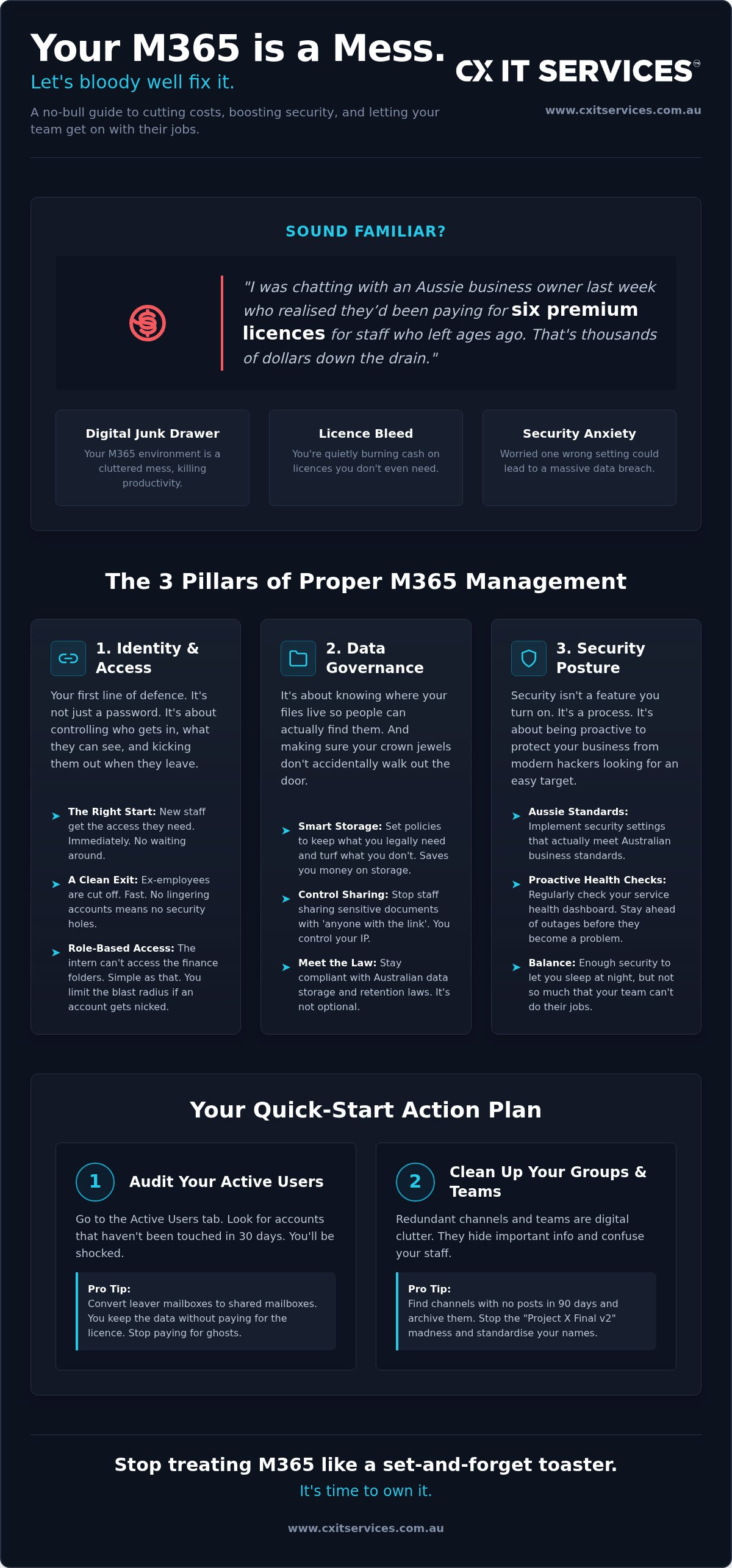
I was chatting with an Aussie business owner last week who realised they’d been paying for six premium licences for staff who left in 2024. That is thousands of dollars down the drain simply because Microsoft 365 management felt like a maze they didn't have time to navigate. If your M365 environment feels like a cluttered digital junk drawer, you are not alone. Most Aussie business owners I talk to are fed up with the constant interface changes and the creeping anxiety that a single misconfigured setting could lead to a massive data breach.
Proper management isn't about being a tech wizard. It is about having a clear, repeatable process to keep your environment lean and secure. You deserve a setup that works for you, not the other way around. I've seen too many good businesses get tripped up by access issues or "licence bleed" that quietly eats into their margins. It is frustrating, expensive, and entirely avoidable.
In this guide, I’ll show you how to master your environment to boost security, cut wasted costs, and keep your team productive without the technical headache. We are going to walk through the practical steps to get your M365 organised, predictable, and secured to Australian standards. By the end, you will have a clear roadmap to a cleaner, safer, and cheaper digital workspace.
Key Takeaways
- Stop treating your software like a set-and-forget toaster. Active governance is the only way to keep your data organised and your team productive.
- Learn how to navigate the Admin Centre maze. You will discover the high-impact levers that reduce helpdesk tickets and fix access issues fast.
- Protect your business from modern hackers by implementing security settings that meet Australian standards. Security is a necessity, not an optional feature.
- Master your Microsoft 365 management to eliminate licence bleed and ensure you are only paying for the tools your staff actually use.
- Evaluate the true cost of DIY management. Decide if your time is better spent in the Admin Centre or focusing on your actual job.
Understanding the Core Pillars of Microsoft 365 Management
Personally I reckon Microsoft 365 is the most powerful tool in your shed. But most people treat it like a set-and-forget toaster. You plug it in, expect it to brown the bread, and never think about it again until it starts smoking. That is a mistake. A big one.
Microsoft 365 management is not a one-time setup. It is the ongoing process of governing your users, your data, and your security settings to keep the business running smoothly. Without active oversight, your environment quickly becomes a digital junk drawer. It gets messy. It gets slow. Most importantly, it starts costing you a fortune in wasted licences and security risks.
To do this right, we look at three main pillars: identity management, data governance, and your overall security posture. If one of these is wobbly, the whole thing eventually tips over. You end up with staff who cannot access their files or, worse, hackers who can.
Identity and Access Management
Controlling who enters your digital office is your first line of defence. It is not just about having a password. Effective management handles the entire lifecycle of a user from the moment they are hired to the day they move on.
When someone starts, they need the right access immediately. When they leave, they need to be cut off just as fast. I have seen businesses leave ex-employees with active accounts for months. That is a massive security hole. You also need role-based access control. The intern should not have the keys to your finance folders. Your marketing person does not need to see the payroll data. By restricting access based on specific roles, you limit the damage if an account ever gets compromised.
Data Governance and Compliance
Data governance is about organising where your files live so people can actually find them. It sounds basic, but a lack of structure kills productivity. In Australia, we have strict legal requirements for data storage and retention. You cannot just delete everything and hope for the best.
Proper Microsoft 365 management involves setting retention policies that keep what you need for the law and purge what you do not to save on storage costs. You also need to manage external sharing. If your staff are sharing sensitive documents with "anyone with the link," you have lost control of your intellectual property. We set the guardrails so your team can collaborate without accidentally leaking the crown jewels. It is about balance. You want enough security to sleep at night, but not so much that your staff cannot do their jobs.
Step-by-Step: How to Organise Your Admin Centre for Performance
The Microsoft 365 Admin Centre is a maze. It is designed by engineers for engineers. If you go in there without a map, you will waste hours clicking through sub-menus that don't actually matter for your daily operations. You need to know where the high-impact levers are to make your Microsoft 365 management effective. A well-organised centre reduces helpdesk tickets. It keeps your team happy. Most importantly, it gives you back your time. Focus your attention on the Active Users and Groups sections. These are your primary control points. I also recommend checking the Service Health dashboard once a week. It lets you stay ahead of global outages before your staff start calling you to say the internet is broken. It is about being proactive rather than reactive.
Step 1: Audit Your Active Users
Go to the Active Users tab and look for accounts that haven't logged in for 30 days. Personally I find businesses often pay for staff who left months ago. It is literally throwing money away. Don't just delete these accounts immediately. You might need the data. Convert former employee mailboxes to shared mailboxes. This preserves the emails without requiring a paid licence. It is a simple win for your monthly budget. Effective Microsoft 365 management means you are always in the driver's seat of your software spend.
Step 2: Clean Up Your Groups and Teams
Redundant Teams channels are just digital clutter. They confuse your staff and hide important information. Identify the channels that haven't seen a post in 90 days and archive them. You also need to standardise your naming conventions. If your file structure has "Project X", "Project X Final", and "Project X Final v2", your team is wasting time searching for the right version. Clear, descriptive names are your best friend. Review your group memberships quarterly. Permissions drift over time. Ensure the intern who left six months ago isn't still a member of the "Management Only" group.
Step 3: Customise Your Dashboard
Your dashboard should tell you exactly what you need to know in five seconds. Don't settle for the default view. Pin the high-value reports like "Usage" and "Security" to your home screen. Set up custom alerts for unusual activity or multiple password reset requests. This is your early warning system. For a deep dive into high-level security, CISA's Secure Configuration Baselines offer a fantastic technical standard to aim for. If you would rather focus on your billable hours, you might want to chat with us about a managed setup that keeps everything humming in the background. If this feels like a bit much, you can always look into professional Microsoft 365 services to handle the heavy lifting.
How to Manage Security Settings to Protect Your Aussie Business
Security is not a feature. It is a bloody necessity in 2026. Managed security means staying ahead of the hackers who are targeting Australian SMEs every single day. These groups aren't just going after the big end of town anymore. They want the low-hanging fruit. That means your law firm, your medical clinic, or your accounting practice is a target. If you aren't actively watching the gate, someone will eventually kick it in.
We follow the ACSC Essential Eight framework because it is the gold standard for Aussie teams. Microsoft 365 has the tools to make your business incredibly secure. The problem is that many of these tools are turned off by default. Microsoft wants to make things "easier" for users so they don't complain about login friction. But "easy" is often just another word for "vulnerable." Proper Microsoft 365 management means finding the sweet spot where your team can work without being wide open to an attack.
The Non-Negotiable: Multi-Factor Authentication (MFA)
If you do not have MFA turned on for every single user, you are asking for trouble. It is that simple. I recommend moving away from SMS codes as they can be intercepted by sophisticated actors. Use the Microsoft Authenticator app instead. It is faster and much more secure for your staff. Multi-factor authentication is the most effective way to stop 99 per cent of account takeovers.
Implementing Essential Eight Strategies
Start by restricting administrative privileges. Only the people who absolutely need them should have them. If your office manager is using a global admin account to check their daily email, you are one bad click away from a total disaster. You also need to focus on patching applications within the ecosystem. This closes known vulnerabilities before hackers can exploit them. Effective Microsoft 365 management ensures these updates happen automatically without disrupting your workflow.
Security is a moving target. What worked last year might not be enough to stop a breach today. If you want a deeper dive into local protection, check out our guide on Cyber Security Management Services. It is tailored specifically for the Australian market. Consistency is the only way to stay safe. You cannot just set these rules once and walk away. You need a safe pair of hands watching the dashboard while you focus on growing your business.
Managing Licences and Users to Optimise Your IT Budget
Microsoft loves it when you over-licence. It is great for their bottom line, but it is a silent killer for your bank account. Effective Microsoft 365 management is about matching the right licence level to the right staff member. You do not need to give a top-tier Business Premium licence to someone who only checks their email and looks at a calendar once a week. Personally I reckon most Aussie businesses are overpaying because they treat software like a one-size-fits-all uniform. It is a waste of money that could be better spent on growing your firm.
Auditing your spend every quarter is the only way to stop subscription creep. Software costs have a habit of growing when you aren't looking. A new staff member starts and you buy a licence. They leave, and that licence sits there, unassigned, still ticking over on your bill. It is like leaving the lights on in an empty office. You are paying for nothing. Consistency is the key to keeping your overheads predictable.
The Ghost Licence Audit
Start by checking for unassigned licences in your billing tab. These are the ghosts in your machine. You are being billed for them, but nobody is using them. You should also look for over-licenced users. These are people assigned to high-tier plans who never touch the advanced security or desktop apps. By downgrading these users to a more appropriate level, you can save significant amounts of A$ over a year. Consolidating your billing through a managed provider gives you a clearer view of the total cost. It stops the confusion of multiple invoices and hidden fees.
Mixing and Matching Licences
You have the power to mix and match. Your power users might need Business Premium for the advanced security and device management. Your general staff might be fine with Business Standard. For those who only need web access, Business Basic is a fraction of the cost. It is about being strategic. You can also save money by using Shared Mailboxes for addresses like info@ or sales@. These do not require a paid licence as long as they are accessed by a licenced user. It is a simple trick that many businesses miss.
Planning this out requires a long-term view of your technology. Using Virtual CIO services can help you build a software roadmap that actually makes sense for your budget. You want a setup that scales with you without the nasty surprises at the end of the month. If you are tired of guessing which licences you actually need, apply for a review of your M365 environment today. We can help you trim the fat and get your IT budget back under control.
How to Choose Between DIY and Professional M365 Management
You have a stark choice to make. You can spend your weekends squinting at the Admin Centre or you can focus on the job you actually enjoy. DIY Microsoft 365 management is fine when everything is humming along. But it fails the moment a crisis hits. Usually, that is when a breach occurs or a critical system goes down. For Aussie teams with 10 or more staff, the cost of a managed service is almost always lower than the time lost to DIY mistakes. You are paying for expertise, not just a set of hands to click buttons.
Doing it yourself often feels like a way to save money. In reality, it is often just a way to delay an inevitable expense. When you manage things internally without a dedicated expert, you are relying on luck. Luck is not a strategy. You need a setup that is resilient, predictable, and professional. It is about moving from a reactive "fix it when it breaks" mindset to a proactive one that stops problems before they start.
The Hidden Costs of DIY Management
Most business owners underestimate the true cost of doing it themselves. First, consider the time cost. If your office manager is wasting five hours a week troubleshooting login issues or password resets, that is 260 hours a year. At a professional wage, that is a massive drain on your resources. Then there is the risk cost. Missing one security patch can leave you open to an attack that costs thousands in recovery fees. Finally, there is the frustration cost. Dealing with Microsoft's direct support is a special kind of hell that nobody should have to endure. It is a slow, bureaucratic process that rarely solves the problem quickly. It is better to have a partner who knows the shortcuts and has a direct line to the right people.
The Managed Advantage with CX IT Services
We provide a safe pair of hands for your technology. We handle the onboarding and offboarding of staff so permissions are always correct and your data stays secure. We monitor your security posture around the clock to stop threats before they land. Our fixed monthly fee structure means you have total predictability. There are no nasty surprises when the bill arrives at the end of the month. Personally I reckon the peace of mind is the biggest win. Knowing that your Microsoft 365 management is handled by experts allows you to grow your business without looking over your shoulder. For a broader look at how this fits into your business strategy, read our guide on Managed IT Services Australia. It is about stability and control. Not alone. Together.
Take Control of Your Digital Workspace
Managing a modern business is hard enough without fighting your own software. We have covered how to audit your licences to stop the bleed of A$ and how to lock down your security using the Essential Eight. Personally I reckon the biggest takeaway is that Microsoft 365 management is a strategic task, not just a technical one. You need your tools to work for you, not the other way around.
You can keep trying to navigate the Admin Centre maze yourself, or you can hand the keys to a safe pair of hands. With 26 years of Aussie IT experience and 24/7 support availability, we make sure your environment stays clean, secure, and predictable. Our fixed monthly fee structure means you never have to worry about hidden extras or surprise invoices. It is about stability and control.
It is time to stop wasting your weekends on IT tickets and start focusing on your actual job. Apply for professional Microsoft 365 management today and get the peace of mind you deserve. You have built a great business. Let us help you protect it and keep it running smoothly.
Frequently Asked Questions
Is it hard to manage Microsoft 365 for a small business?
It is difficult if you don't have a technical background because the interface changes constantly. Microsoft often moves settings and renamed features without any warning. This makes it hard to find the high-impact levers needed to keep things running. For most small teams, it becomes a time sink that pulls you away from billable work and actual growth.
How much does Microsoft 365 management cost per month?
Costs vary depending on the level of support and security your firm requires. Most professional providers in Australia offer a fixed monthly fee structure based on your user count. This ensures you have predictable software costs without hidden extras. It is always better to get a tailored quote based on your specific staff count and security requirements.
Can I manage Microsoft 365 on my phone?
You can use the Microsoft 365 Admin mobile app for basic tasks like resetting passwords or blocking a lost device. However, I don't recommend it for deep configuration work. The mobile interface is limited. It is far too easy to miss a critical security toggle while you are on the move. Stick to a desktop for the heavy lifting.
What is the most important security setting in Microsoft 365?
Multi-Factor Authentication (MFA) is the single most important setting you can enable right now. It is the most effective way to stop 99 per cent of account takeovers. Beyond that, ensuring your Microsoft 365 management follows the ACSC Essential Eight strategies provides a robust framework for protecting your business data from local cyber threats.
How do I stop paying for Microsoft 365 licences I don’t use?
You need to perform a manual audit in your billing tab to find unassigned licences. Identify any active licences that aren't currently attached to a user and cancel them immediately. For staff who have left, convert their mailboxes to shared mailboxes. This allows you to keep the data for legal reasons without paying for a monthly subscription.
Should I outsource my Microsoft 365 management or keep it in-house?
Personally I reckon you should outsource if you have 10 or more staff. The time you or your office manager loses to IT troubleshooting usually costs more than a managed service fee. Professional Microsoft 365 management gives you a safe pair of hands and ensures your environment is handled by experts who see these issues every day.
What happens if my Microsoft 365 admin leaves the company?
If your only admin leaves without handing over the keys, you are in for a world of pain. You risk being locked out of your own environment entirely. This is why having a managed IT partner is vital. We maintain the Global Admin credentials securely so your business never grinds to a halt when internal staff move on.
Does Microsoft 365 management include data backup?
Standard management covers configuration and security, but it does not always include third-party backup. Microsoft protects the infrastructure, but they don't guarantee your data against accidental deletion or ransomware. I always recommend a separate backup and disaster recovery service to ensure your files are truly safe. You need a way to restore data if the worst happens.